Backlog.md
Active and stableRuns locally ✓No paid APITurn project tasks, agent plans, and acceptance criteria into reviewable Markdown files and a local Kanban board that can be tracked with Git.
npm i -g backlog.mdIdeal use for this tool
Best for an individual developer or small team using coding agents and wanting to review the specification and plan before code. It keeps tasks, acceptance criteria, and decisions inside the project and exposes them through CLI, a local browser, or MCP. It is not a replacement for a centralized enterprise SaaS board with organization-wide permissions and reporting.
Details and illustrated features
When several coding agents work on a project, the hard question is often no longer “did it write code?” but “what task was it doing, what counts as done, and why was this decision made?” Backlog.md stores that context as Markdown files inside the project and exposes it through a CLI, a local Kanban board, or MCP. The task, plan, and review record stay beside the code instead of disappearing inside one agent conversation.
🧭 What is Backlog.md?
Backlog.md is an open-source, Markdown-native task manager for any folder or Git repository. Each task is a readable file that can hold a description, acceptance criteria, implementation plan, notes, dependencies, Definition of Done, and final summary. You can use it from the command line, open a local browser board, or connect Codex, Claude Code, Cursor, and other documented hosts through CLI instructions or MCP.
It does not require a central server or account. Git is optional, and --no-git supports local or non-code projects. With Git, the backlog files become part of project history, so their changes can be reviewed and shared like code.
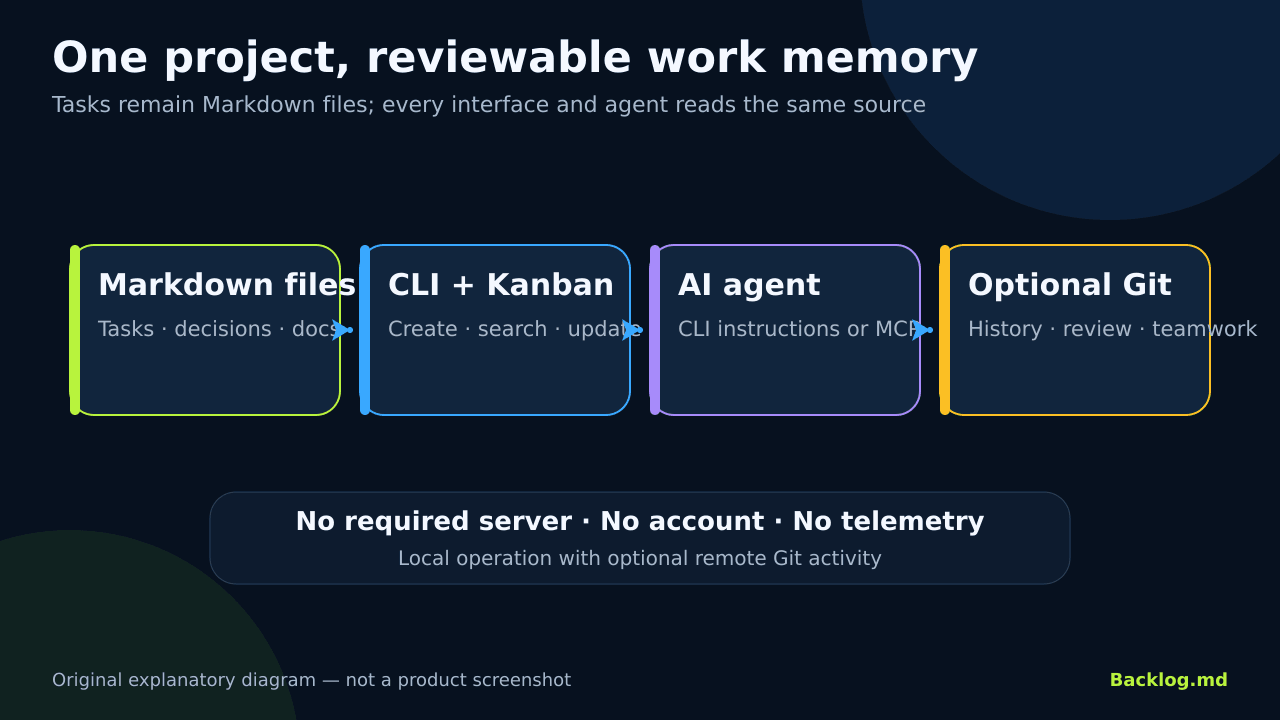
Original explanatory diagram of the Backlog.md workflow, not a product screenshot.
🎯 How does it help you?
Backlog.md suits an individual developer or small team using coding agents and wanting to review scope before code. Instead of saying “add search” and waiting for a large diff, ask the agent to split the idea into small tasks, define acceptance criteria, and write a plan into one task before implementation. After you approve the plan, it implements one task and shows tests and the Git diff.
The added value is not automatic coding. It is a workflow with three explicit review gates:
- Review the task description and acceptance criteria.
- Review the implementation plan and expected files.
- Review the code, tests, and outcome before closing the task.
This is useful when sessions or agents change because the current task does not depend on chat memory alone. It still cannot guarantee that a specification or implementation is correct; human review and real tests remain necessary.
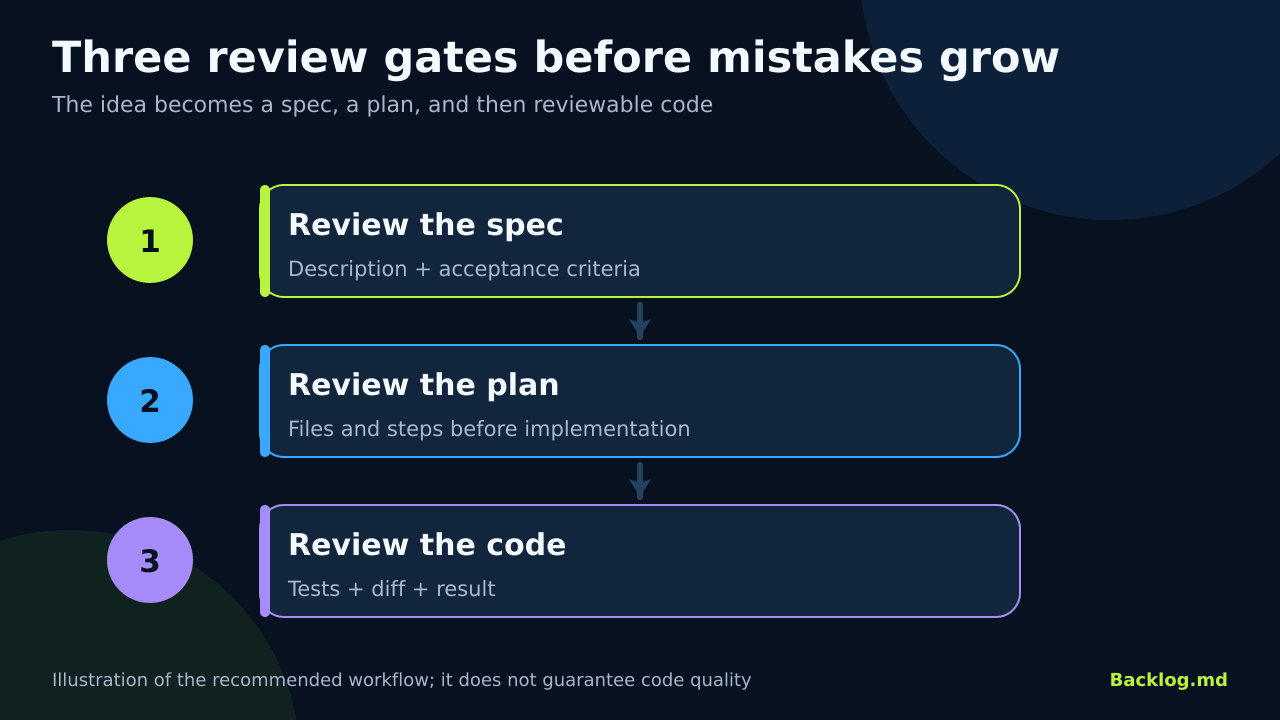
Original illustration of the documented workflow, not a quality measurement.
🌟 Key features
1. Reviewable Markdown tasks
Backlog.md writes task files into a project-local folder such as backlog/ or .backlog/. A task can record its reason, description, assignees, priority, status, acceptance criteria, Definition of Done, plan, notes, references, dependencies, and final summary. The project recommends using CLI, MCP, or Web commands instead of hand-editing the files so field types and metadata remain consistent.
- Where: the project backlog folder or
backlog task <id>. - How: create a task, then add a description and acceptance criteria before implementation.
- Illustrative example:
backlog task create "Add unified search" --ac "Search tasks, docs, and decisions". - Value: the next human or agent can understand the task without recovering an old chat.
- Limit: Markdown does not make vague criteria testable; you still have to write clear conditions.
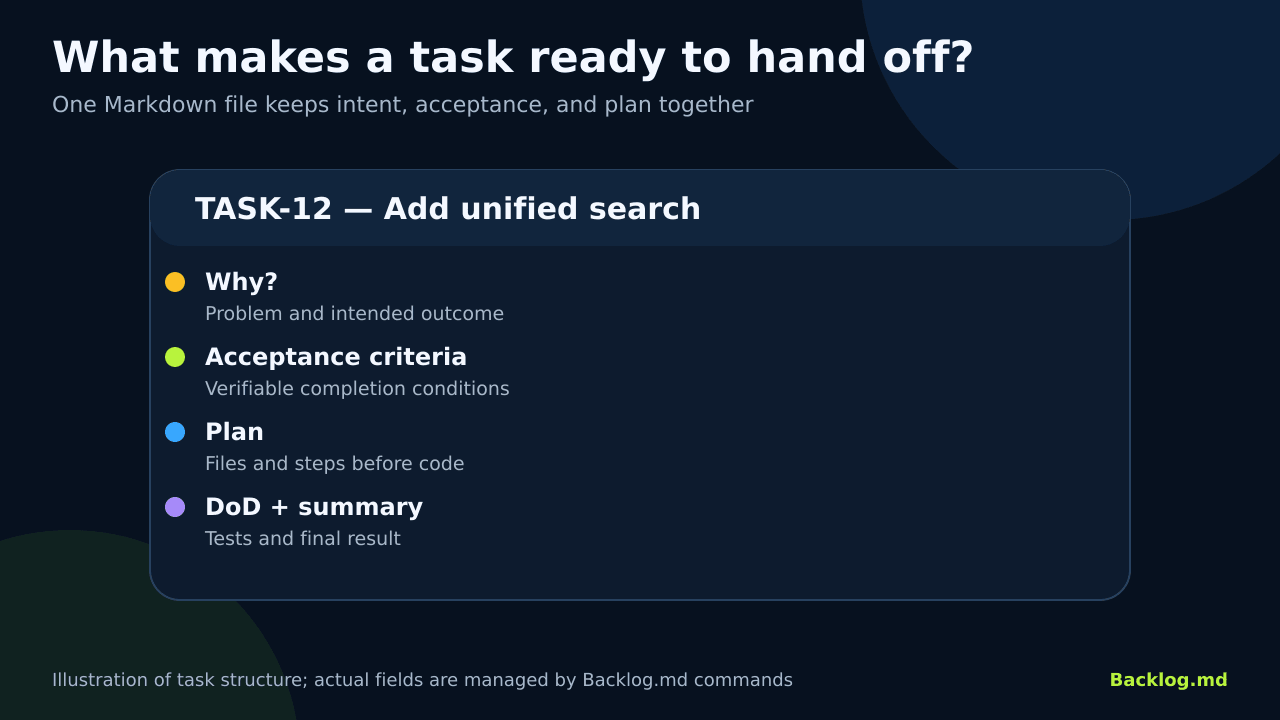
Illustration of task structure, not a literal copy of every field in the product.
2. Agent review gates before implementation
After backlog init, the setup can add a short instruction to AGENTS.md or another supported instruction file. The agent then reads backlog instructions overview. The recommended loop is: break the idea into tasks, review the specification, write a plan for one task, approve the plan, implement and verify, then close the task.
CLI instructions are the recommended default. Optional MCP setup is documented for Codex, Claude Code, Gemini CLI, Kiro, and Cursor. MCP does not remove host permissions; it gives the agent structured tools to read and change project tasks.
- Value: correct a misunderstanding while it is still a task sentence, not a large code change.
- Limit: “one task, one context, one PR” is workflow guidance, not an enforced system rule.
3. Terminal and local browser Kanban
backlog board opens an interactive terminal board. backlog browser serves a local Web interface on 127.0.0.1:6420 by default, with drag and drop, task creation and editing, acceptance-criteria checklists, and updates shared with the Markdown files. The server binds to loopback, so it does not automatically provide a shared LAN board.
You can also export the board to Markdown with backlog board export or place the export in a README. This provides a readable status snapshot without operating a central service.
4. One data source for humans, agents, and scripts
The same project data is available through CLI, TUI, Web, and MCP. Read commands support --plain and --json; release v1.53.0 also documents paging long lists. A script can consume JSON while a human reviews the same tasks visually.
Backlog.md also manages documents, decisions, milestones, dependencies, and search. Task details show direct and transitive dependencies and report cycles or ambiguous references rather than resolving them by guesswork.
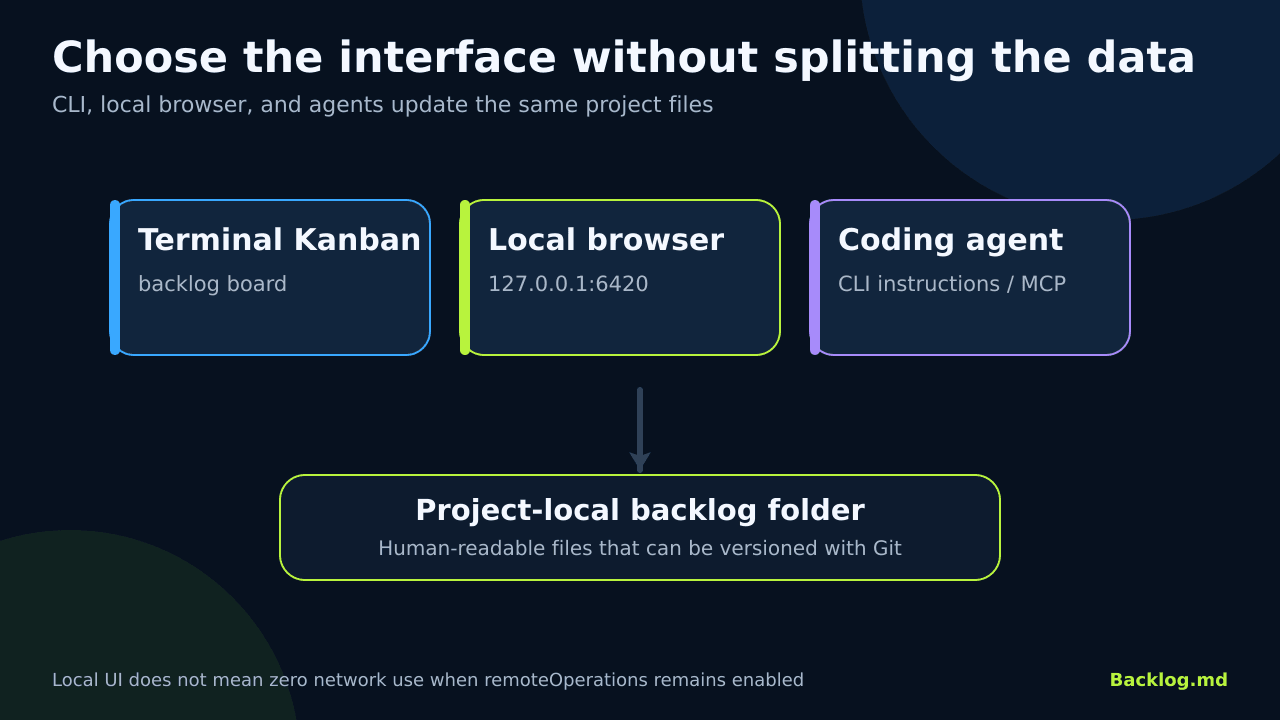
Original illustration; each interface works on the same project files.
🪜 Step-by-step example
Illustrative example; not run on your project: you want to add unified search to an application.
- Install the tool and run
backlog init "My Project"in the project. - Choose CLI instructions for the agent, or MCP only when direct MCP tools are useful.
- Ask: “Split unified search into small Backlog.md tasks with descriptions and acceptance criteria. Do not code yet.”
- Open
backlog boardorbacklog browser. Replace vague conditions such as “works well” with verifiable outcomes. - Select one task and ask the agent to write an implementation plan into it and wait for approval.
- Review the proposed files and test method. Approve or revise the plan.
- Allow implementation, then inspect tests,
git diff, and the final summary. - Mark verified work Done. Use
backlog task completeto remove it from the active board while preserving its record and dependency links, orarchivefor canceled or duplicate work.
For a very small project, skip the agent and use Backlog.md as a normal task manager from the terminal or browser.
⚖️ Compared with manual work
| Chats and scattered files | With Backlog.md |
|---|---|
| Requirements and plans may stay inside one agent chat | They live in a task file beside the project |
| Review happens after the code is finished | Review the specification, then plan, then code |
| Every agent needs the context explained again | It reads the current task, criteria, and plan |
| A separate board or document is needed | CLI, local Kanban, and Markdown share one source |
| Sharing depends on copy and paste | Files can be reviewed and versioned through Git |
This compares workflows; it is not a measured time-saving claim or quality guarantee.
⚙️ Important configuration
backlog init covers project name, backlog folder, configuration location, and agent integration. Run backlog config for advanced settings.
remoteOperations: enabled by default and allows remote Git activity needed for cross-branch task views. Set it tofalsefor offline, local-branch-only work.autoCommit: disabled by default. Task commands change files without creating automatic commits.checkActiveBranches: checks task state across active branches and may cost more on a large repository.bypassGitHooks: disabled by default. When enabled with automatic commits, it uses--no-verify.onStatusChange: can run a shell command when a task changes status. It is disabled by default and should be treated as local code execution.
🚀 Installation and first run
Official npm command:
npm i -g backlog.md
Then, in a project:
backlog init "My Project"
backlog task create "Add unified search"
backlog board
Bun, Homebrew, and Nix methods are also documented. The README documents macOS, Linux, and Windows support, with architecture-specific notes for Apple Silicon and Intel. For a one-off npm run, use the full package name npx backlog.md; plain npx backlog without a local install can resolve to an unrelated package.
I did not install or run the example. Check the result with backlog --version and compare it with the latest documented release.
🔗 Integrations and compatibility
- Coding agents: Claude Code, Codex, Gemini CLI, Kiro, and Cursor are documented through CLI instructions or MCP.
- Git: optional, useful for history, collaboration, and task-file review.
- Systems: macOS, Linux, and Windows according to the README.
- Export and automation: Markdown board export and stable JSON for read commands, including a watch mode.
- VS Code: a community extension exists; it is not part of the core project.
💰 Cost and local operation
The code uses the MIT License. Backlog.md itself does not require a subscription or paid API and can run without an AI agent. Model or hosted Git costs are separate.
Task and configuration files stay in the project folder. The README states there is no account and no telemetry, and the Web UI runs locally. “Local” does not always mean “offline”: installation downloads packages, and remoteOperations is enabled by default and may fetch from Git remotes. Disable it when you need local-branch-only operation.
⚠️ Limitations and when not to use it
- It is not a shared SaaS board with presence and team permission controls; collaboration commonly relies on Git merges.
- The local Web UI is not exposed to other devices by default. That helps privacy but does not provide a ready-made shared board.
- Concurrent branch edits can still produce file conflicts. Cross-branch features reduce ambiguity but do not remove Git conflicts.
- Active-branch checks can add cost on a large repository; disable or narrow them when necessary.
- Jira or Linear may fit better when you need organization-wide permissions, cross-team reporting, or complex approval workflows.
- Do not let task fields become more work than the task. Keep only enough context, acceptance criteria, and plan to review the change.
🔐 Security and permissions
backlog init can add instructions to files such as AGENTS.md; the README says unrelated existing content is preserved. Review the file diff before committing. The MCP connector gives the agent structured read and write access to project backlog data, within the host process and filesystem permissions.
Review any setting that executes local commands, especially onStatusChange. Do not enable bypassGitHooks when hooks are part of your safeguards. The browser binds to 127.0.0.1, but backlog files may still contain sensitive project information. Do not push them to a public repository without review, and never place API keys or secrets in task text.
📚 Sources and verification date
Verified on 1 October 2026 against the original repository, README, CLI reference, advanced configuration, releases, and license.
The latest visible release was v1.53.0, dated 24 September 2026. GitHub showed approximately 6.9k stars and 437 forks at review time. These changing popularity counts are not quality or security ratings. I did not install the tool, run the example, or test the MCP connector on a real project.