Beszel
Active and stableRuns locally ✓No paid APIBeszel is a self-hosted dashboard that monitors servers and Docker containers, keeps history, and sends alerts from a lightweight hub you control.
docker compose up -dIdeal use for this tool
Best for an individual developer or small team running a VPS, home server, or a few Docker hosts and needing a simple dashboard, history, and alerts. Its value is combining host and container metrics in a self-hosted hub. It is not a full logs-and-traces observability platform.
Details and illustrated features
When one person or a small team runs two or three servers, the problem is usually fragmentation. top gives you one moment, docker stats shows containers only right now, and nobody receives an alert until a user notices that a service is slow. Beszel brings that picture into a self-hosted dashboard: a web hub, a lightweight agent on each system, historical data, and configurable alerts. Its practical value is not “monitor everything.” It gives you a readable baseline before you need a larger observability stack.
🧭 What is Beszel and how does it work?
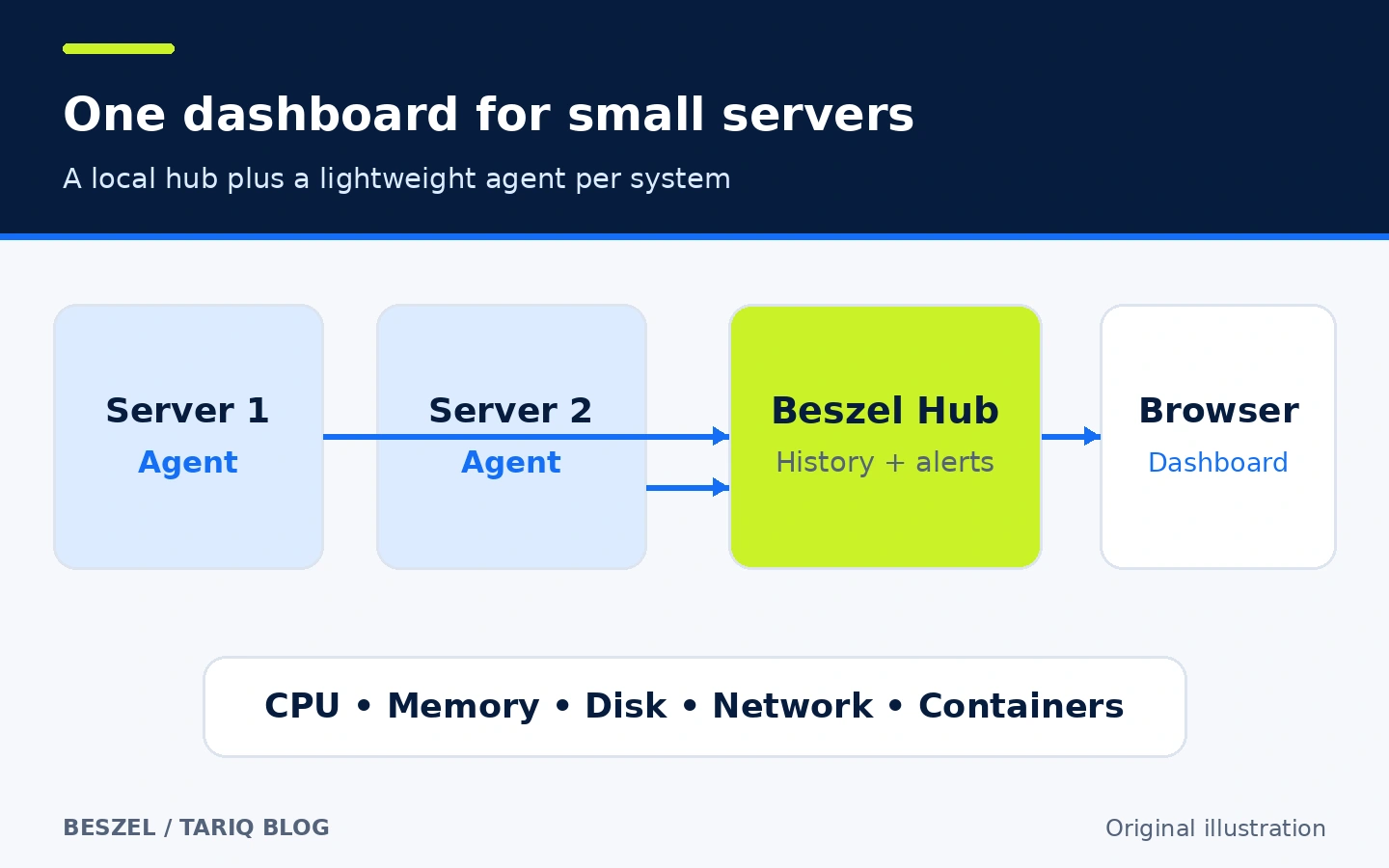
Beszel is an open-source server monitoring platform created by Henry Goddard and contributors. A deployment has two parts:
- Beszel Hub stores settings and metrics and serves the web dashboard.
- Beszel Agent runs on each monitored system and collects the metrics available to it.
The agent records CPU, memory, disk, network, load, and container data. It can also expose temperatures, fans, GPU, battery, S.M.A.R.T., ZFS, and systemd information when the operating system supports them and the agent has the required access. Hub and agent communicate over SSH or WebSocket, depending on your network design. You then review current state and history in a browser and add alert rules for conditions that deserve attention.
🎯 When is it useful, and what does it add?
Beszel suits an individual developer or small team running a VPS, home server, or several Docker hosts. It helps answer practical questions: Did memory use rise after a deploy? Which container is moving traffic? Has disk use been climbing? Is the system reachable at all?
The added value is one small product for collection, history, and alerting, with data stored in a hub you operate. That can be simpler than assembling Prometheus, Grafana, and an alert manager when you do not need advanced queries or distributed tracing. It is not a complete observability replacement: it does not automatically provide centralized application logs, traces, or a sophisticated SLO program.
🌟 Features and how to use them
1. Review host and container behavior over time
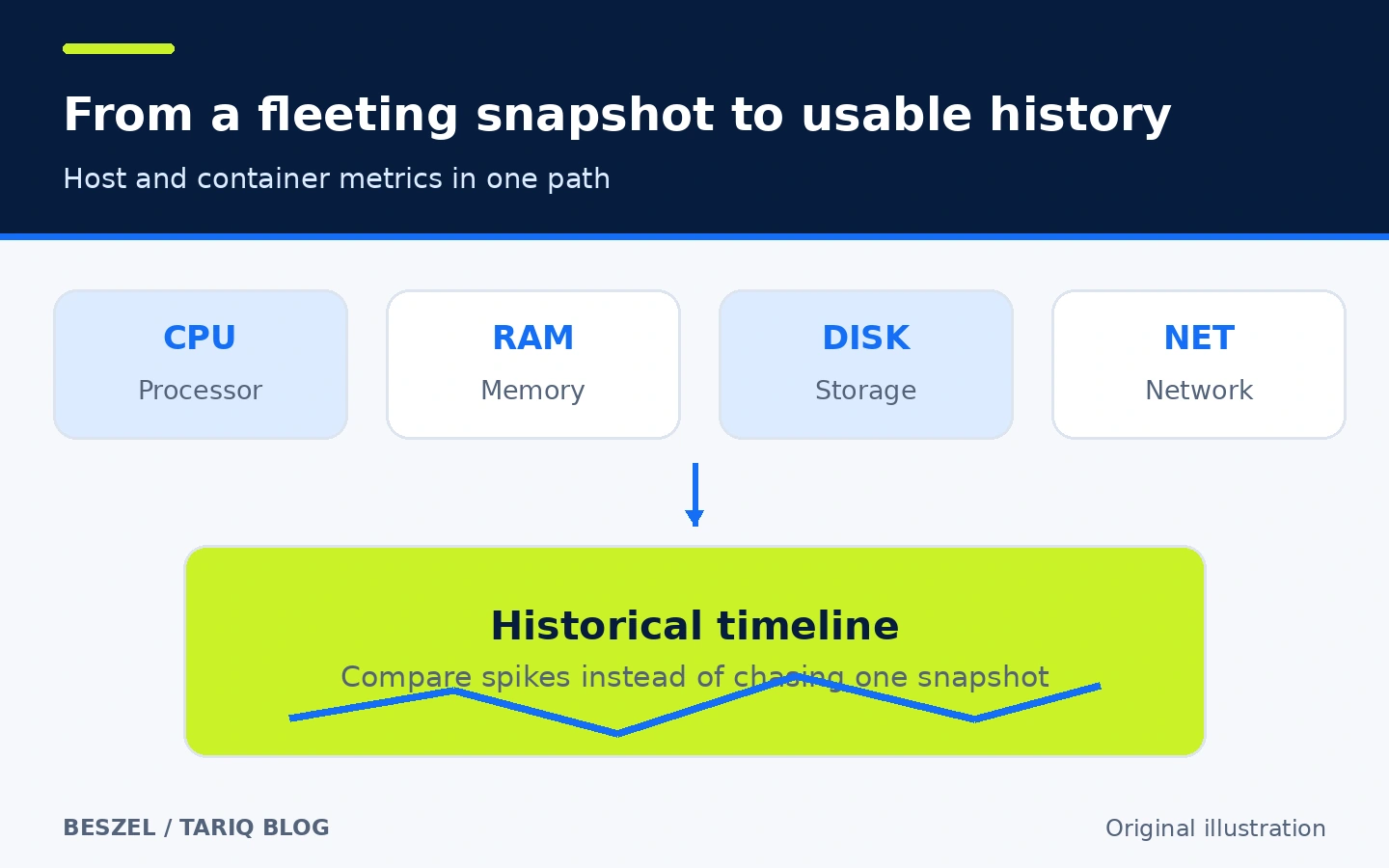
Instead of opening SSH after an incident and seeing only the present, Beszel records the metrics collected by the agent. Open a system page and compare CPU, memory, disk, and network before and after a deployment. On a Docker host, inspect the container whose usage increased rather than stopping at the host total.
How this helps: a nightly memory climb becomes a visible pattern rather than a fleeting snapshot. A filling disk can be reviewed alongside I/O and container activity. Limit: the available metrics depend on the OS and agent installation. Rootless containers may not expose temperatures, fans, battery, GPU, ZFS, S.M.A.R.T., or systemd services without additional configuration.
2. Turn an important condition into an alert
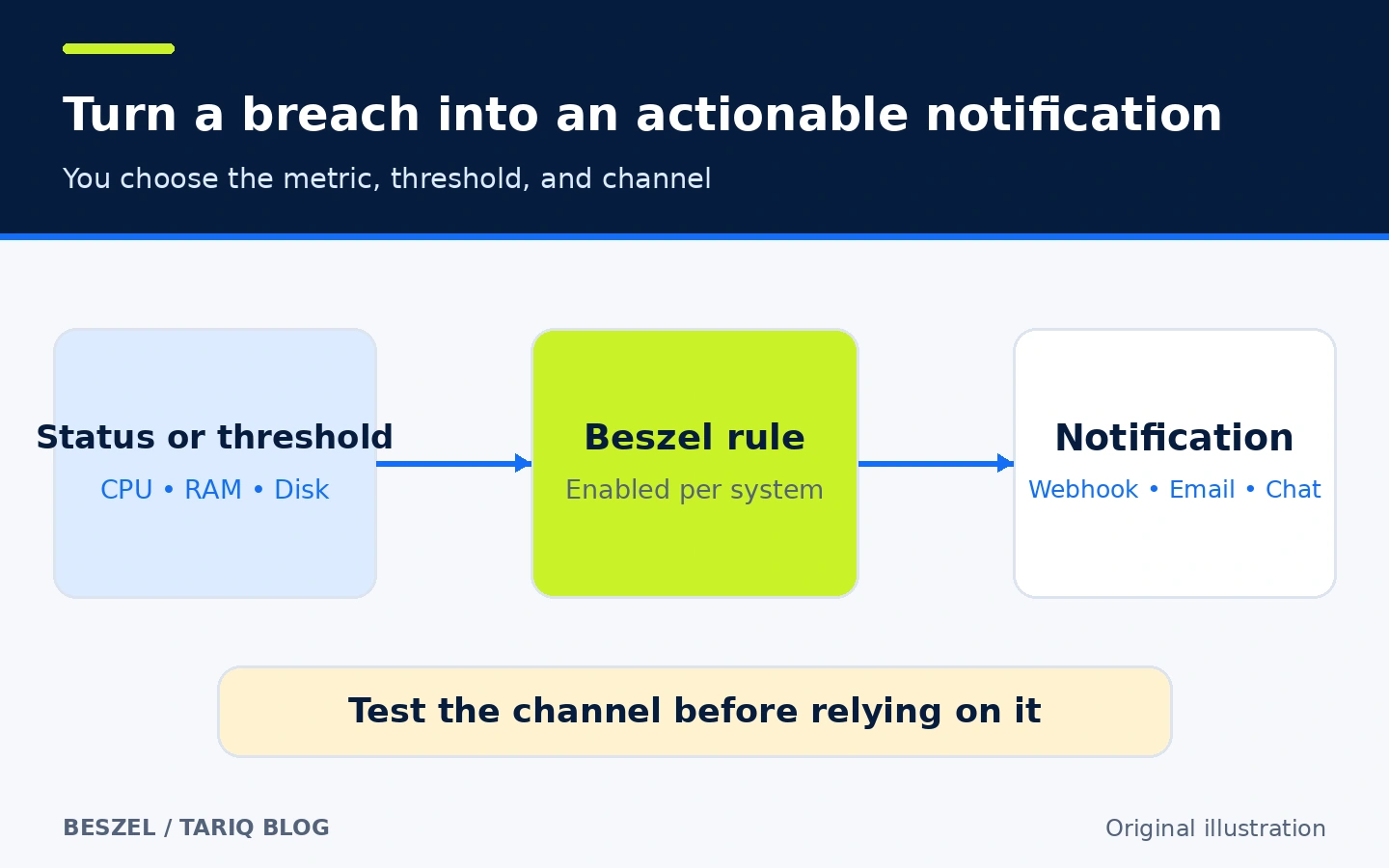
Enable alerts for a system from the systems table, then configure rules for supported metrics. Beszel supports many notification destinations through Shoutrrr URL schemas, including email, chat services, and webhooks depending on your setup. It can also notify on a S.M.A.R.T. failure after a disk has reported data, and on packet loss above the configured Network Monitor threshold.
Start with a few alerts that require action: a down system, low disk capacity, or sustained resource pressure. Send a test notification, then create a safe test condition or temporarily lower a threshold to verify the whole route. Limit: a configured rule does not guarantee delivery. The message provider, DNS, or network can fail, so the notification path needs testing and independent oversight. Credentials embedded in notification URLs are stored in the hub; restrict access to its settings and backups.
3. Add network and storage-health checks when needed
The tool is not limited to CPU and RAM. An agent can probe Network Monitor targets and report latency and packet loss. Version 0.21.0 also adds TLS certificate-expiry checks for HTTPS targets. Beszel can display disk S.M.A.R.T. data when the agent can access the relevant devices. These additions are useful on a small server, but they need suitable OS support and permissions. Do not add devices or capabilities just to fill the dashboard.
4. Use accounts and roles instead of sharing one password
The hub uses PocketBase. Its superuser is separate from normal user accounts, and the documentation defines admin, user, and read-only roles. A read-only user can view shared systems and create personal alerts but cannot manage systems. Keep superuser credentials for administration, and share systems only with the accounts that need them. OAuth2 or OIDC can be added, but is not required for a basic setup.
🪜 Practical example: monitor one Docker VPS
This is an illustrative setup; it was not run on a real server while preparing this entry.
- Create an empty directory on a machine that stays available and add this
docker-compose.ymlfor the hub:
services:
  beszel:
    image: henrygd/beszel
    container_name: beszel
    restart: unless-stopped
    environment:
      - APP_URL=http://localhost:8090
    ports:
      - 8090:8090
    volumes:
      - ./beszel_data:/beszel_data
- Start it:
docker compose up -d
- Open
http://localhost:8090and create the first administrator. If the hub will be reachable from the internet, put a reverse proxy and HTTPS in front of it and setAPP_URLto the real address. Do not expose the raw port and assume it is protected. - Choose Add system in the hub. The dialog supplies the key and, for WebSocket, the
TOKENandHUB_URL. Follow the agent command generated for your system instead of copying values from a generic example. - If the agent runs in Docker to inspect containers, the installation page documents mounting
/var/run/docker.sockand using host networking. Review whether you need both. The socket is sensitive even with:robecause it exposes container metadata, and host networking broadens network visibility. - Once the system connects, collect a few hours or days of history before choosing thresholds. Enable one alert, test its destination, then add more gradually.
- Configure a backup of
beszel_datafrom the Backups page to disk or S3, or stop the hub and copy the directory. Test restoration before relying on the backup.
The expected result is a connected system with the metrics permitted by the agent platform and permissions. Do not assume every sensor will appear; a missing advanced metric can mean that the OS or container lacks the necessary access.
⚖️ Beszel compared with manual work
| Job | Scattered manual commands | With Beszel |
|---|---|---|
| Check current state | Log in to every server and run top or docker stats | Open the systems dashboard |
| Learn what happened overnight | No history unless you already stored it | Review the available historical data |
| Relate a problem to a container | Compare commands and logs by hand | Review host and container metrics together |
| Detect an important breach | Build and maintain a cron script and sender | Configure an alert and supported destination |
| Give someone view access | Build custom access or share sensitive credentials | Use an account with an appropriate role |
This compares workflows, not measured time savings or resource consumption. If you already operate reliable Prometheus/Grafana monitoring and alerts, Beszel may add another dashboard instead of reducing complexity.
🚀 Installation and compatibility
The simplest start is Docker or Podman for the hub, followed by an agent container, binary, or OS service. Agent documentation offers binary, Homebrew, Winget/Scoop, Home Assistant, Docker, and Podman paths. The stable GitHub release checked here is v0.21.0, published on 2 October 2026. Its assets include agents for Linux, macOS, FreeBSD, OpenBSD, and Windows; hub binaries are published for Linux, macOS, FreeBSD, and Windows. Architectures vary by platform, so check the release assets before installing.
The Docker hub command used in the example is:
docker compose up -d
That command does not install an agent. Copy the agent command from Add system because it contains the connection method and values for your system. Installation and upgrades were not executed here.
🔐 Privacy, permissions, and connection security
In a self-hosted setup, metrics and settings are stored in the hub you run. This is an inference from the documented hub-agent architecture and storage path, not a promise that every integration stays local. OAuth, S3, notification services, and update checks contact external services when enabled. Review every webhook destination and do not send secrets to a URL you do not trust.
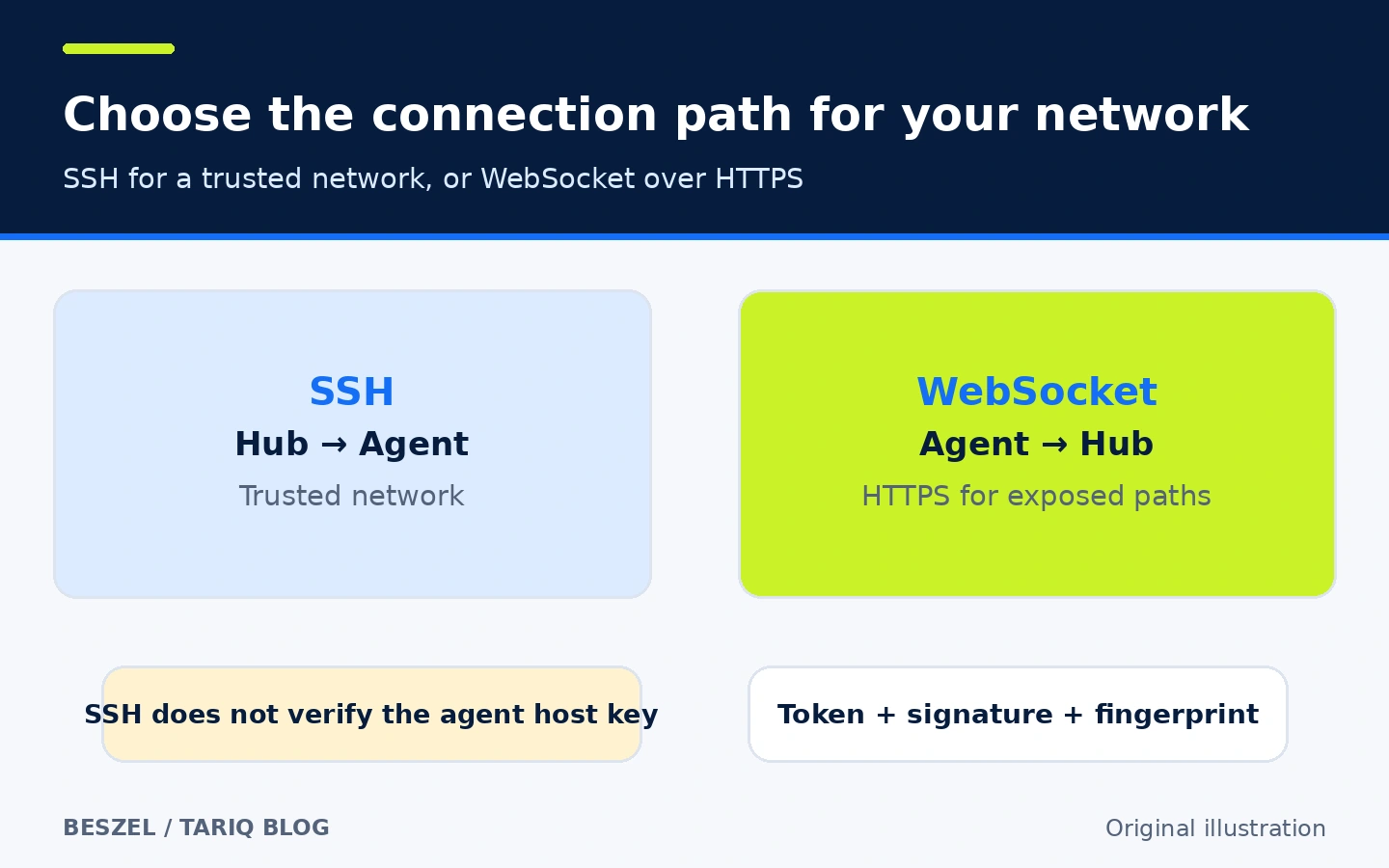
Beszel supports two hub-agent paths:
- SSH: the hub initiates the connection to the agent on port 45876 by default. The agent accepts an ED25519 key and provides no PTY or input for remote commands. However, the documentation warns that the hub does not verify the agent host key. This mode assumes a trusted network; an interceptor could impersonate an agent and submit false metrics.
- WebSocket: the agent initiates a connection to the hub. The hub verifies a token and signs it with its private key; the agent verifies the public key and locks the machine fingerprint. For a public or untrusted path, the documentation recommends WebSocket with valid HTTPS.
The agent needs read access to system metrics. A Docker socket mount, S.M.A.R.T. device mappings or capabilities, and systemd log access all expand what it can observe. Grant only what you need. Pin a known image or release instead of latest when your policy requires controlled updates, and protect the hub with HTTPS, backups, and separate account credentials.
💳 Cost and limits
Beszel's code is MIT-licensed and its core does not require a paid API. You still pay for the host, storage, domain, S3, or notification services if your providers charge for them. This entry does not quote a hosted-service price because it evaluates the self-hosted project.
Important limits:
- It is not a complete logs-and-traces platform and does not replace in-application monitoring.
- Advanced metrics depend on the OS, hardware, and agent installation.
- A rootless agent container may hide host metrics; the documentation suggests a binary/service when broader visibility is needed.
- Alert reliability depends on both the hub-agent link and the notification destination.
- Resource overhead, default data retention, and downgrade behavior were not measured here. Review current documentation and backups before upgrading an important environment.
📚 Sources and verification date
- Original repository and v0.21.0 release
- What is Beszel? and Hub installation
- Agent installation and connection security
- Notifications and network monitoring
- User accounts and OAuth/OIDC
Checked on 21 October 2026. GitHub reported 26,376 stars and 1,103 forks at inspection time, and the latest repository push was 20 October 2026. These changing popularity and activity counts are not quality or security ratings. Installation, penetration testing, and performance benchmarking were not performed.