dsh-better-sidebar
Active and stableRuns locally ✓No paid APIA DeepSeek Harness side workbench for browsing and editing files, reviewing changes, tracking tasks, and running session-aware side chats.
dsh plugin --profile web add dsh-better-sidebar@latestIdeal use for this tool
Best for a developer using DeepSeek Harness who wants session files, changes, and parallel jobs visible beside the conversation. It adds session-specific context and separates Side Chat questions from the main flow. It is not a standalone full IDE and requires a compatible DSH release.
Details and illustrated features
When you work in DeepSeek Harness, you may keep jumping between chat, a terminal, a file editor, and Git just to understand what the agent did. dsh-better-sidebar turns the side of the DSH interface into a session-aware workbench. You can browse and edit files, review Git changes and session file activity, watch agents and background jobs, and open a side question without mixing it into the main conversation. Its value is not replacing a full IDE; it is keeping session-related tools and evidence visible before you accept a change.
🧭 What is dsh-better-sidebar and how does it work?
It is a Web UI plugin for DeepSeek Harness, published as the dsh-better-sidebar npm package. Since version 0.19.0, its tabs register in DSH's native right-sidebar services. It also retains its own splittable bottom workbench. Layout, tabs, and panel state are kept per session, with interface state persisted locally in the browser. A host half provides routes for files, previews, Git, uploads, and WebSockets; a React client renders the workbench.
The current release avoids duplicating new DSH features. Image, PDF, spreadsheet, Office, terminal, and browser surfaces come from DSH when available. The plugin keeps the parts that still add distinct value: its file tree, editable CodeMirror surface, Markdown and HTML preview, Changes view, Side Chat, Tasks view, and the service other plugins use to register additional tabs and file viewers.
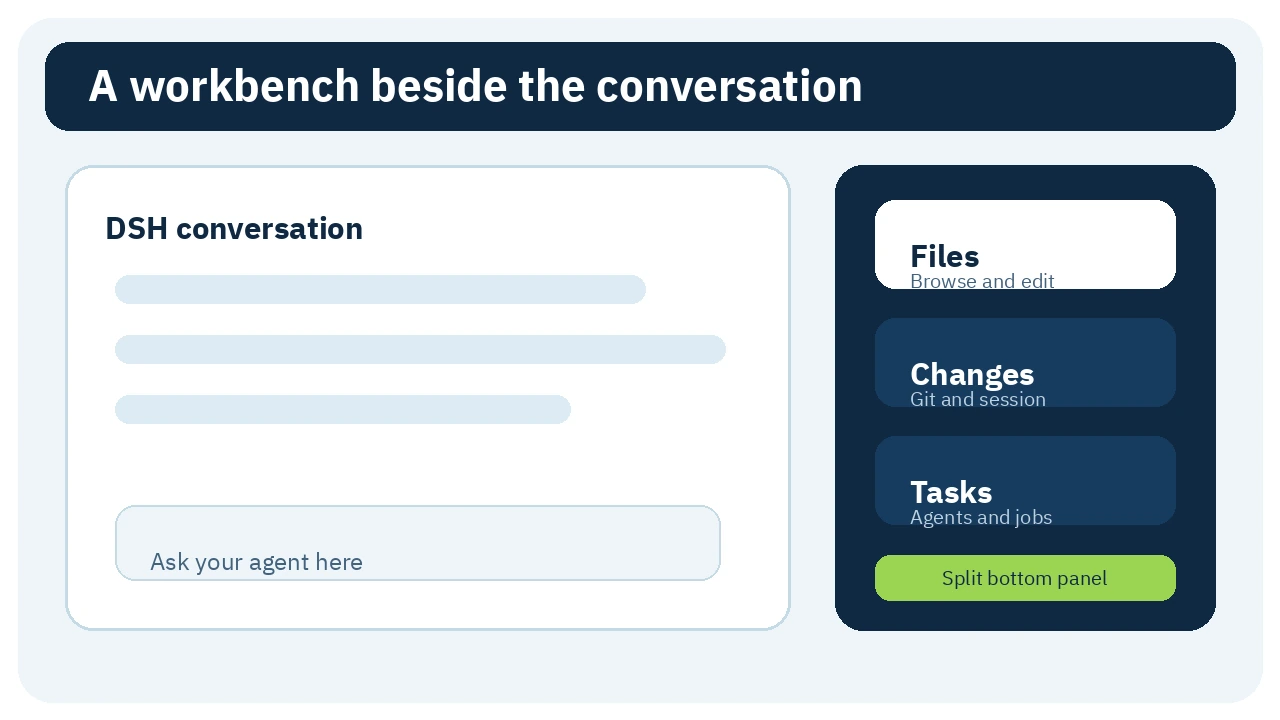
🎯 How does it help you?
Suppose an agent edits authorization files. Without this plugin, you may ask for filenames, open another editor, run git diff, and return to chat to ask why a condition changed. With Better Sidebar, you can open the file from chat, inspect or edit it, move to Changes to compare Git state with this session's activity, and open a Side Chat for a narrow question such as “Why did this condition change?” without diverting the main task.
The added value is visible session context: which files belong to the work, what changed, which background task is still running, and which question can be separated. It reduces tool switching, but it does not prove that code is correct or replace tests, pull-request review, or a backup before consequential Git actions.
🌟 Key features and how to use them
1. Session file tree and editable code surface
File Workbench lazily expands directories and watches the expanded ones for changes. You can search filenames, open a file in a tab or split pane, copy its path, or use @file to reference it in the composer. Text and code open in CodeMirror with syntax highlighting and saving. Markdown preview supports tables, task lists, math, and Mermaid with an additional sanitization pass.
- Where: the Files tab or a file opened from chat.
- Use: select the workspace, expand a directory, choose a file, edit it, and save with
Ctrl/Cmd + S. - Value: inspect the file next to the agent conversation instead of moving context into a separate editor.
- Caution: saving changes the project file. The tree watches expanded directories only; it does not continuously rescan the whole workspace.
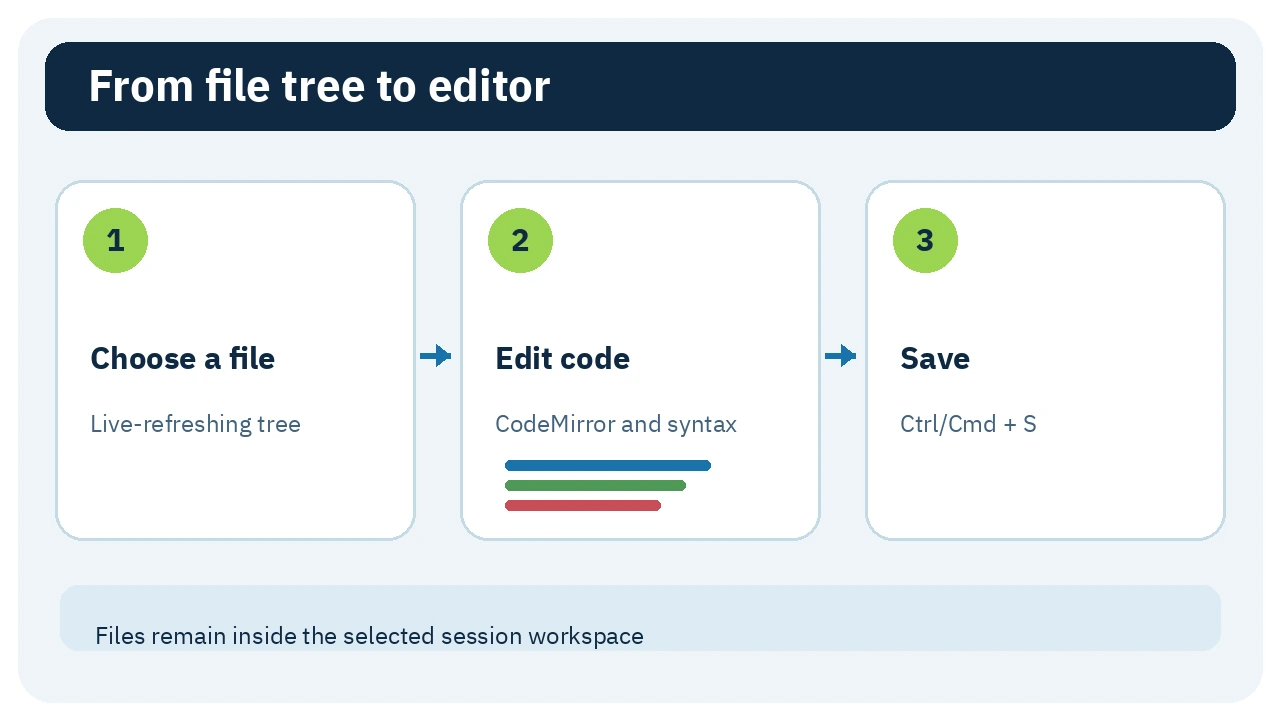
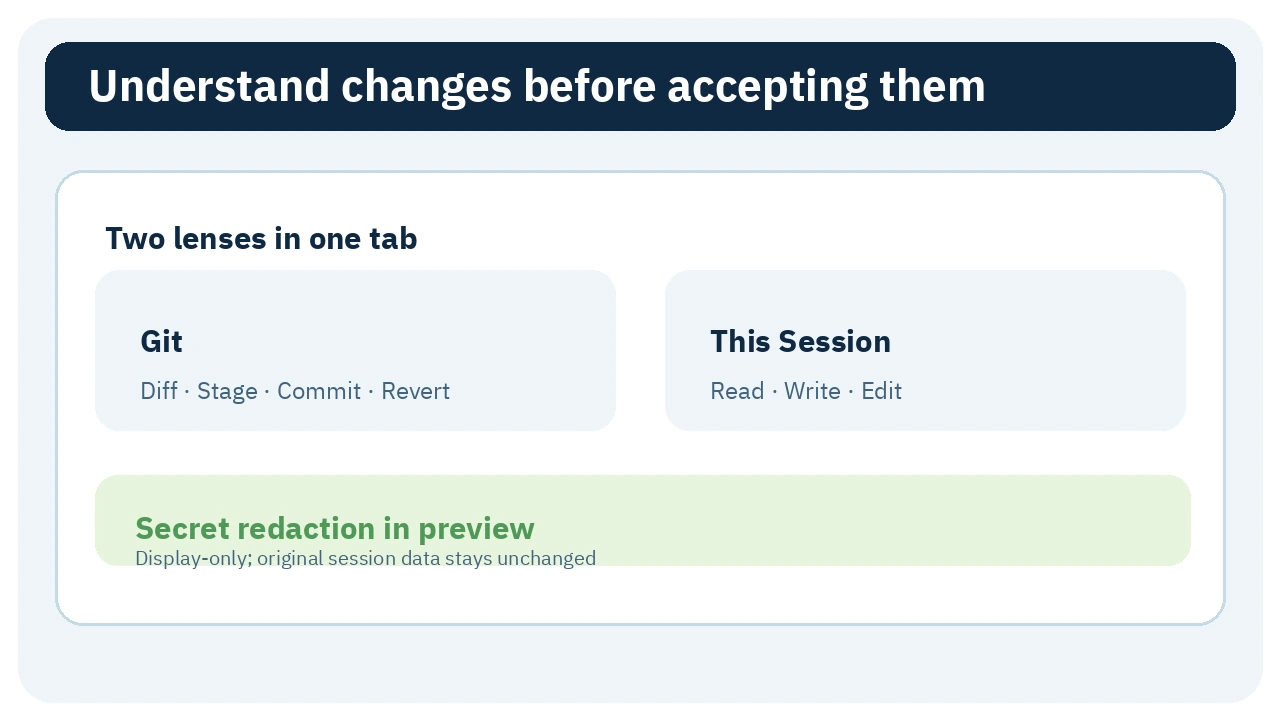
2. Review Git state and session activity
Changes contains two lenses. Git shows diffs and history and can stage, unstage, commit, and revert with worktree or child-repository selection. This Session folds session events into the files the model read, wrote, or edited, with grouping and operation filters. Selecting a change opens a unified diff preview that can expand into its own tab.
The preview redacts credential-shaped paths and values that resemble API keys, Bearer tokens, or PEM keys by default. This is display-only: the original file and session log remain unchanged, and pattern matching may miss an unusual secret.
- Where: Changes, then Git or This Session.
- Use: begin with This Session to inspect the agent's scope, then review Git diff before staging or committing.
- Value: separate “what this session touched” from every outstanding repository difference.
- Caution: the plugin has no push, pull, or fetch. Stage, commit, and revert are real operations and require review.
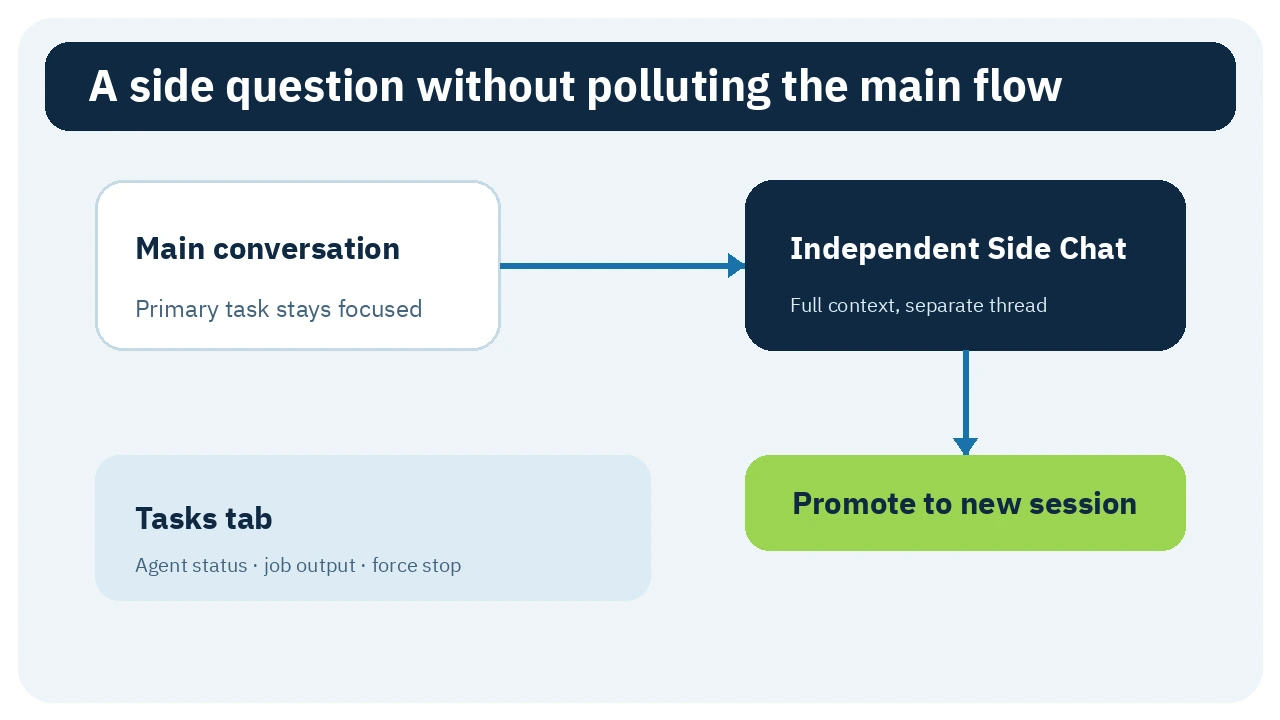
3. Side Chat and background tasks
Side Chat is a beta feature that creates a side thread inheriting the parent's full context, including the in-progress turn frozen as interrupted. It then runs independently and does not write its messages into the main conversation. Follow-ups can survive a DSH restart, and the thread can be promoted to a top-level session. It is useful for a focused clarification or investigation that should not alter the main task.
Tasks displays subagent topology and background jobs, including run state, live output, exit codes, and force-kill. A visible completed task is evidence of execution, not proof that its result is correct.
- Where: the Side Chat and Tasks tabs.
- Use: open Side Chat for a bounded question, or Tasks to see which agent or process is still running.
- Value: keep the primary conversation focused while exposing parallel work.
- Caution: Side Chat inherits broad context. Force-killing a job can leave partial output or unfinished files.
4. Extensible sidebar foundation
Better Sidebar exposes ctx.betterSidebar, which lets other plugins register tabs and file viewers. Its built-in tabs and viewers use the same service exposed to third parties. Settings include a recommended catalog for file review, Jupyter notebooks, video preview, Git remotes, and other extensions. Every companion remains a separate package whose source and permissions need independent review.
The benefit is one shared surface instead of many floating interfaces. The limit is a larger trust and compatibility surface as you install more packages; do not install every catalog item automatically.
🪜 Step-by-step example
Illustrative and not run on a real project: ask a DSH agent to fix an API authorization check. Open Tasks to see whether it launched a subagent or test job. Open This Session to identify files it read and changed. Inspect the policy file in the editor. Start a Side Chat and ask whether the supervisor role is affected, then return to the main flow. Review Git diff, run the project's normal tests, and only then decide whether to stage and commit. If a sensitive configuration file appears, do not rely on preview redaction alone.
⚖️ What changes compared with manual work?
| Manual workflow | With dsh-better-sidebar |
|---|---|
| Open another editor and search for a file | Open it from the session context in the sidebar |
Run git diff and infer agent scope | Compare Git with This Session activity |
| Put every side question in the main conversation | Use an independent Side Chat and promote it when useful |
| Track agents and jobs through scattered messages | View state, output, and exit codes in Tasks |
| Build a separate UI for every extension | Register a tab or viewer in the shared service |
This compares access patterns, not measured time savings. For one tiny change, your normal terminal and editor may be simpler.
⚙️ Important settings
Feature controls live under Side Cards. Each tab or viewer can be disabled independently, with secondary settings opened from its feature card. Model-driven sidebar_open is opt-in; enabling it lets the model open files, folders, or HTTP(S) pages in the sidebar. Leave it off if you do not need the model to control what appears.
workspaceFence keeps file and preview routes inside the session working directory. Turning it off expands the path scope and should be deliberate. HTML preview is sandboxed by default. htmlViewerNoSandbox and htmlViewerDefaultUnsafe disable that protection or make unsafe mode the default; leave both off for untrusted content. Mount settings also expose limits for reads, media, uploads, and lists, which should be sized to the machine and project.
🚀 Installation and first run
The verified release is 0.21.1. It requires Node.js 20 or newer and DSH 0.1.7-rc.1 or newer on the 0.1.7 line. The README also lists pnpm 10+ for source installation or development. For the supported line:
dsh plugin --profile web add dsh-better-sidebar@latest
Then hard-refresh the browser with Cmd/Ctrl + Shift + R. Replace web if your profile uses another name. DSH 0.1.6 or older needs a compatible older plugin such as 0.19.1 according to the README table; do not install the newest release on an old host blindly. I did not run the command.
🔗 Compatibility, platforms, language, and activity
The plugin targets DeepSeek Harness Web. The repository lists Windows, Linux, and macOS; it says macOS is validated daily while Windows and Linux are covered by unit tests. The sidebar browser depends on the DSH desktop profile and is not available in the Web profile. Modern PDF, image, Office, and terminal surfaces also depend on the DSH host version.
Built-in interface dictionaries follow Chinese and English, with an optional peer providing additional language overlays. The Arabic diagrams in this entry are external explanations, not evidence of official Arabic localization. The newest visible commit at inspection time was d641d2e, dated 23 September 2026 at 16:03 UTC, merging release 0.21.1. Recent activity is not a stability guarantee.
💰 Cost and local operation
The code is MIT licensed and the package has no paid API requirement of its own. File, Git, and preview operations run on the DSH host against the registered workspace. Model-provider or subscription costs remain separate, and prompts or file context may leave the device depending on how DSH is configured.
On 26 September 2026, GitHub displayed 3,754 stars and 370 forks. These changing popularity counters are neither security nor quality ratings. I omitted download counts because the npm page could not be independently inspected from this environment.
🔐 Privacy, permissions, and security
The plugin can read, write, and upload files in the session workspace, run Git CLI operations, read session events, and inspect agents and background jobs. Side Chat copies conversation context into a new thread, while This Session renders the file-operation log. Some interface state and redaction preference are stored in localStorage.
Host routes use a Host-header trust fence and workspace path limits, and writes are atomic. Default HTML preview uses an opaque-origin iframe, CSP sandbox, and disabled browser permissions. Unsafe HTML settings weaken those controls. Diff redaction is useful but pattern-based and may miss a secret. The README does not document a separate telemetry contract sent by the plugin; missing documentation is not proof of zero network activity, especially when opening URLs or installing companion plugins.
⚠️ Limitations and when not to use it
- Git has no push, pull, or fetch.
- HTML preview renders the saved file, not an unsaved draft.
- The file tree watches expanded folders only rather than recursively scanning the whole workspace.
- The browser tab requires the DSH desktop profile, and the bottom workbench is unavailable below 768px; tabs move into the full-width sidebar.
- Multiple companion plugins increase permission and compatibility risk. Do not enable two Better Sidebar installation channels because double-mounting can break the plugin tree.
- It does not replace pull-request review, tests, or backups. It may be unnecessary if you prefer a full IDE and use DSH only for chat.
📚 Sources and verification date
Checked 26 September 2026 against the dsh-market listing, original repository, English README, package.json, MIT license, and latest release commit. I did not install the package or test editing and Git actions on a real project.