dsh-git-graph
ExperimentalRuns locally ✓No paid APIA DeepSeek Harness plugin for visual Git history, branch selection, and isolated worktree sessions that reduce cross-session interference.
dsh plugin --profile web add @linxin666/dsh-client-ui-git-graph@latestIdeal use for this tool
Best for a developer running several DSH sessions against one repository who wants visible branch context, history, and worktree creation in the UI. It adds session isolation and readable branch-switch guards. It may be excessive for one small change on one branch or for environments that prohibit outbound telemetry.
Details and illustrated features
You work on one repository from several sessions, then discover that a session is on the wrong branch or that switching branches will affect other work. dsh-git-graph adds a branch selector, a visual commit graph, and Git worktree management to the DeepSeek Harness web interface. Its value is making Git context visible before a session starts and reducing terminal branch handling, without turning Git into unchecked automation.
🧭 What is dsh-git-graph and how does it work?
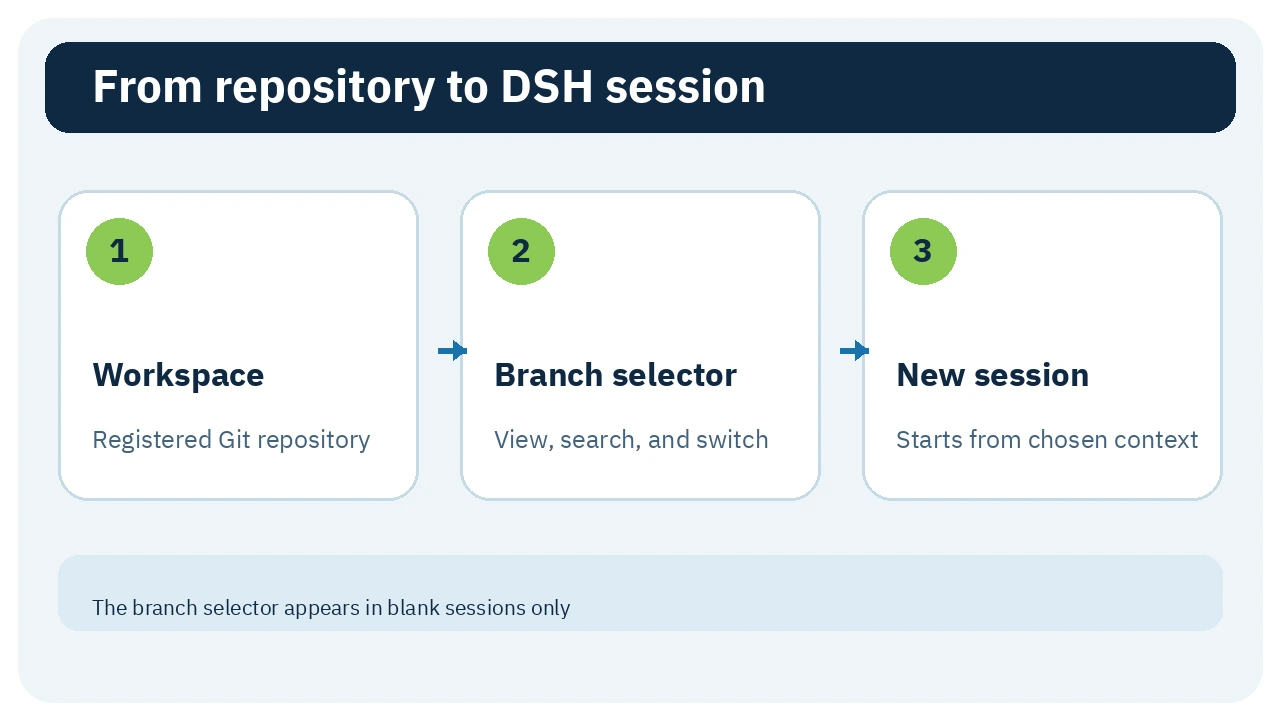
It is a Web GUI plugin in the dsh-web monorepo, published as @linxin666/dsh-client-ui-git-graph. A host half runs Git operations against registered workspaces, while a React client renders inside DSH. In a blank session, a branch chip appears next to the official workspace selector. It lets you search local branches, switch or create one, open Git Graph, or launch an isolated worktree session.
🎯 How does it help you?
If you are building a payment feature while reviewing reports, each task can use its own worktree and branch instead of sharing one checkout. Before starting a session, you can see the current branch and repository state, and inspect merge history visually. The practical value is answering “where will this session work?” before the agent edits files, with guards around risky branch switches. It does not replace Git knowledge or diff review before merging.
🌟 Key features and how to use them
1. Select or create a branch before starting
The branch selector appears only in a blank session whose workspace is a registered Git repository. Open it to search local branches; a checkmark marks the current one. The bottom action can create a local branch from the current HEAD and switch to it. The control disappears once a session is active because the plugin does not move an existing session to a different directory.
- Use: select the official workspace first, choose the branch, then start the session.
- Value: know which file context the agent will receive.
- Important: switching acts on the workspace checkout and therefore affects other sessions using that same workspace. Use worktrees for parallel work.
2. Read repository history in Git Graph
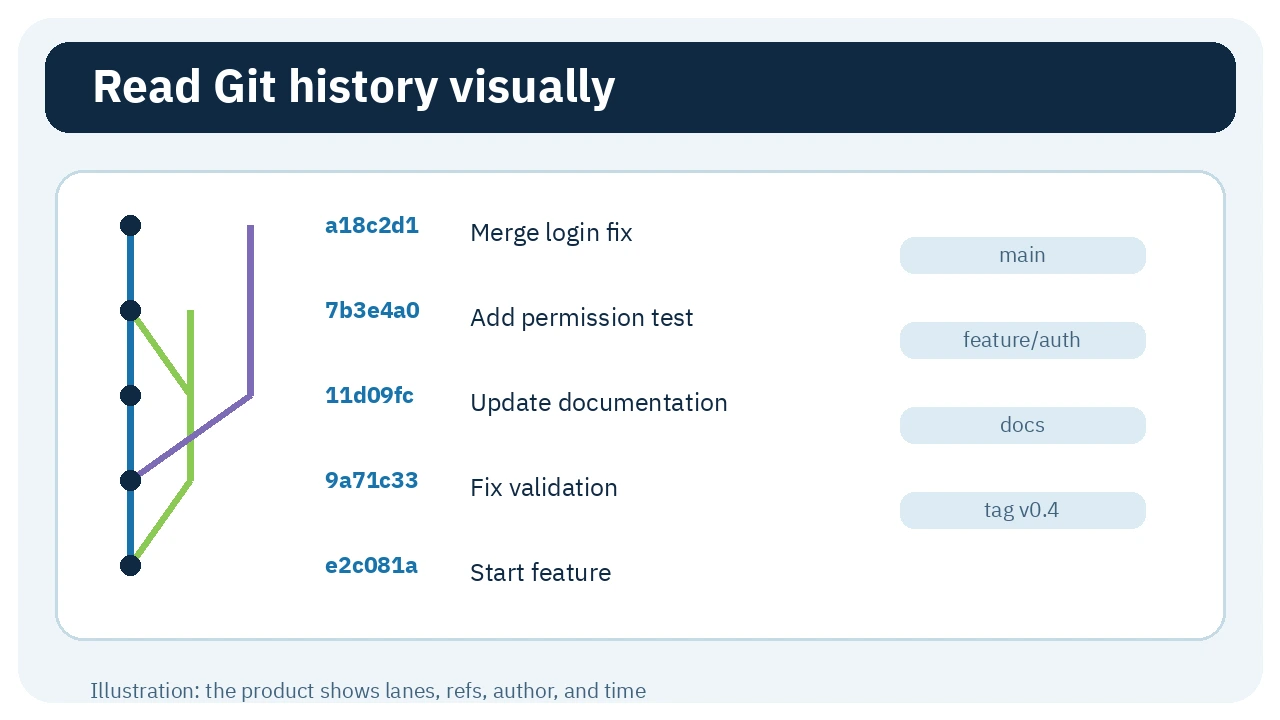
Choose Git Graph from the branch menu. The panel is read-only. It initially loads 200 commits and adds 100 per Load more action. The host collects a topologically ordered log across branches, tags, and remotes. The panel shows branch and merge lanes, the first seven commit characters, subject, ref labels, author, and relative time.
- Use: inspect it before a merge or when locating where two branches diverged.
- Value: see branch relationships inside DSH instead of reading a long
git logor changing tools. - Important: it does not run merge, rebase, or cherry-pick.
3. Guards before branch switching
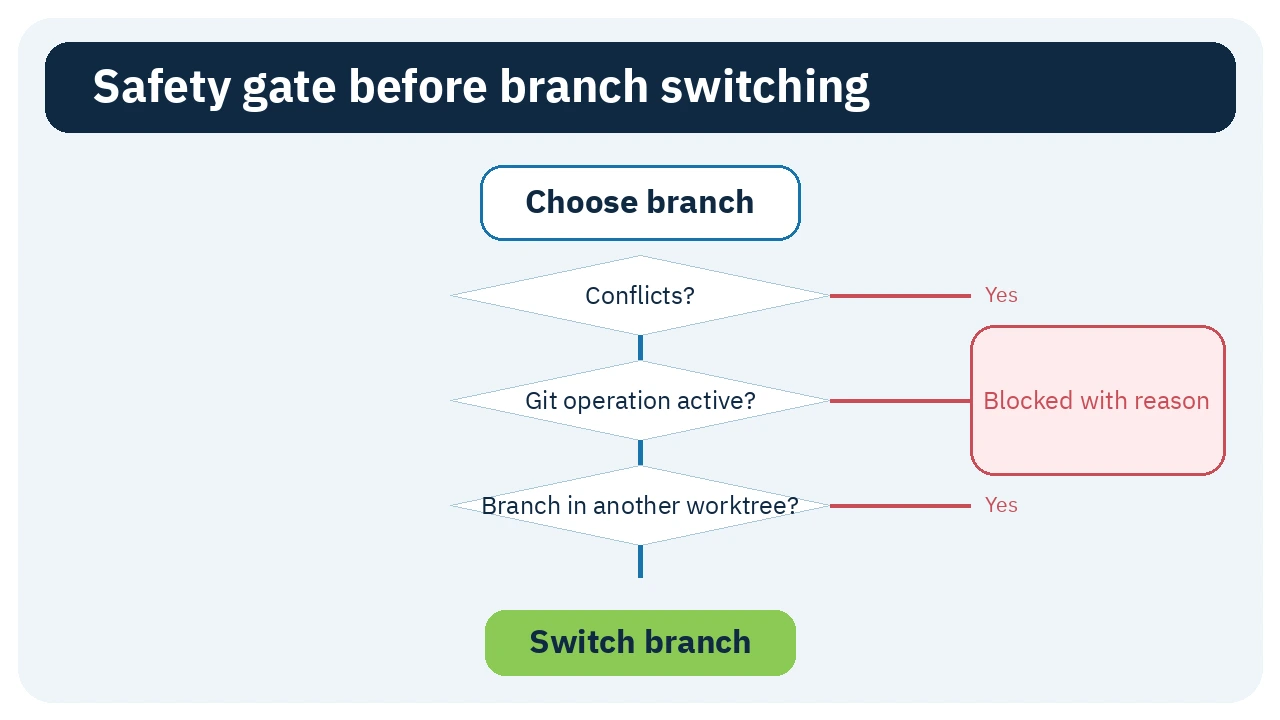
Before running git switch --no-guess, the plugin checks conditions that may make switching unsafe or impossible. It refuses when unresolved conflicts exist, a merge/rebase/cherry-pick/revert/bisect is active, or the target branch is checked out by another worktree. It also reports tracked or untracked files that would be overwritten and validates branch names and existence.
- Use: if an action is refused, resolve the stated Git condition and inspect the listed files.
- Value: get a readable, categorized reason instead of silently changing context or repeatedly issuing a failing command.
- Important: the guards do not commit or stash changes for you.
4. Isolate sessions with Git worktrees
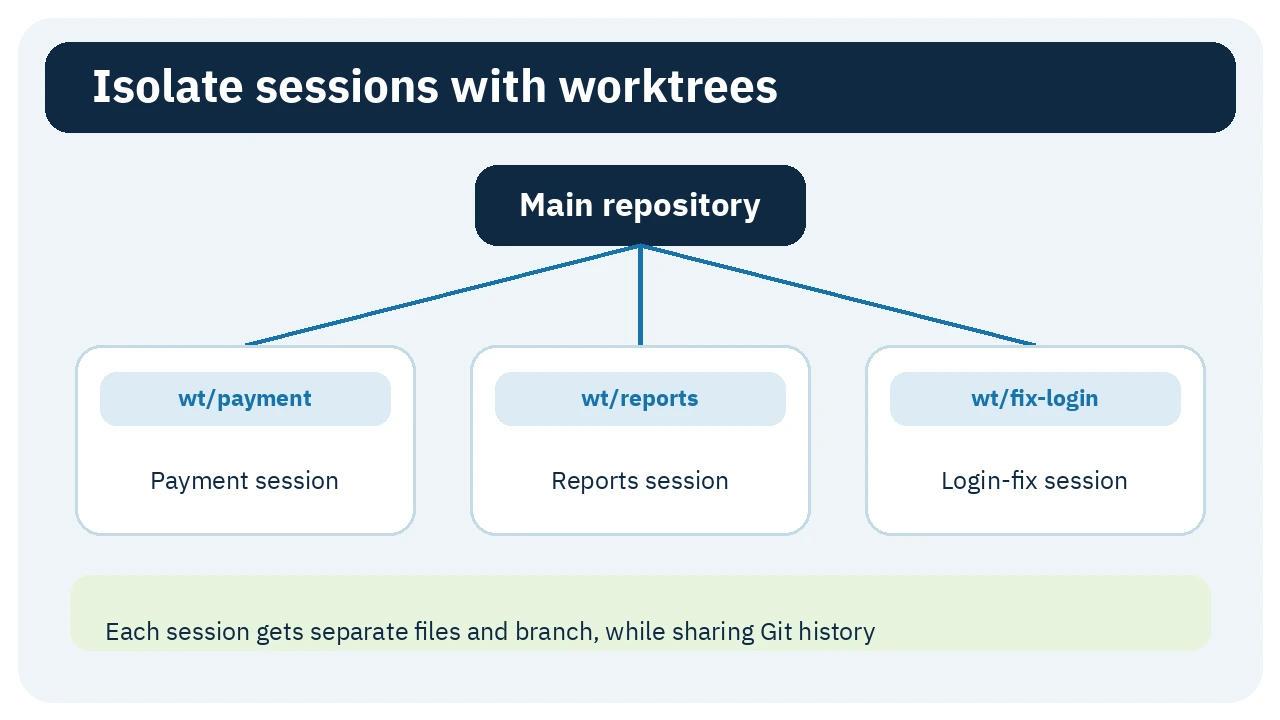
Choose “Start a new session in a worktree,” name it, and select a base. The host creates a directory under $DSH_HOME/worktrees/<repo-key>/<name>/ on a new wt/<name> branch, registers it as a workspace, and opens a session there. The main checkout does not move. The manager lists linked worktrees with branch and commit. It will not remove the primary checkout, and a dirty managed worktree requires a second force confirmation.
- Use: create one worktree for each parallel task, then merge through your normal Git process.
- Value: payment and reporting sessions edit separate files while sharing repository history.
- Important: removing a worktree leaves its branch unless you select the separate delete-branch option. An existing session cannot move into the new worktree because its cwd is immutable.
🪜 Step-by-step example
Illustrative; not executed: you have a stable main and want a login fix plus a new report in parallel. In a blank session, choose the project workspace and create a fix-login worktree based on main. Repeat with reports. DSH opens workspaces on wt/fix-login and wt/reports. Give each session its task and tests. Use Git Graph to inspect where the commits landed, then merge or create pull requests through your normal workflow. Do not enable automatic isolation until you understand where its directories are created and how they are cleaned up.
⚖️ What changes compared with manual work?
| Manual workflow | With dsh-git-graph |
|---|---|
Run git branch and git switch in a terminal | Search and select in a blank-session UI |
Read text from git log --graph | View lanes and refs inside DSH |
| Create a worktree, directory, and DSH workspace manually | Create it and open a linked session in one action |
| Interpret varied Git errors | Receive categorized refusal reasons |
This is a workflow comparison, not a measured time-saving claim. A terminal may be simpler for one small change on one branch.
⚙️ Important settings
The package exposes three live settings:
autoIsolate: off by default. When enabled, New Session for a Git workspace automatically creates a managed worktree.autoBaseline: defaults tocurrentfor the checkout's currentHEAD;defaulttries the remote default throughorigin/HEAD, with a fallback.agentTool: off by default. Enabling it registers the model-facinggit_worktreetool for create, list, and remove operations within the registered repository.
Start with the defaults. Enable agentTool only when you deliberately want the agent to manage worktrees and understand the impact of removal.
🚀 Installation and first run
The verified version is 0.4.2. It requires DSH 0.1.7-rc.2 or newer, and Node.js 22.19 in the Node 22 line or Node 24+. The README recommends:
dsh plugin --profile web add @linxin666/dsh-client-ui-git-graph@latest
Restart dsh web or the relevant profile and refresh the page. Open a registered Git workspace and a blank session; the branch chip should appear near the workspace selector. Replace web if your profile has a different name. I did not run the command. To uninstall:
dsh plugin --profile web remove @linxin666/dsh-client-ui-git-graph
The source-development route clones and builds the monorepo, then links packages/dsh-git-graph. Do not use a direct github: package install because this package is not at the repository root.
🔗 Compatibility, language, and activity
The plugin targets DeepSeek Harness Web. Its sources do not document Claude Code, Codex, or Cursor compatibility. The embedded dictionaries cover English and Simplified Chinese only; the Arabic diagrams in this entry are external explanations, not product localization. package.json declares React 18 as a peer and DSH 0.1.7-rc.2+.
npm published 0.4.2 on 24 September 2026. The latest commit returned for the package path at verification time was dated 25 September 2026 at 02:22 UTC. This is recent activity, not a stability guarantee.
💰 Cost and local operation
The code uses the Apache-2.0 license and the package has no paid API requirement of its own. Git commands run in the local host against registered DSH workspaces. Model usage in DSH is a separate cost, and DSH may send prompts to an external model provider depending on your setup. At verification time, the whole dsh-web monorepo had 7,998 stars and 549 forks. These are monorepo popularity counters, not ratings or plugin-only user counts.
🔐 Privacy, permissions, and security
The host needs to run Git commands, read registered repositories, and create or remove worktree directories when requested. Its /git/* routes accept only registered workspace paths after realpath checks, fence clients to loopback, and use paired-device access when remote web UI is present. This reduces arbitrary path access but does not remove the consequences of Git operations on your work.
The browser half sends one anonymous heartbeat per UTC day to dsh-market.com: a random localStorage UUID plus package name, version, and install channel. The published contract says the server stores a salted hash, not raw IDs or IP addresses, and retains events for 400 days. Repository content is not part of the documented heartbeat payload. If your policy prohibits any outbound telemetry, evaluate this before installation.
⚠️ Limitations and when not to use it
The plugin follows fast-changing DSH Web surfaces and release candidates. The README says an SDK shape change can disable Auto-isolation and fall back to official behavior. A workspace branch switch affects all sessions sharing that checkout, so do not use it for parallel work without worktrees. The graph is read-only and cannot replace diff or pull-request review. Enabling agentTool expands the model from viewing Git context to creating and removing worktrees; keep it off unless needed.
📚 Sources and verification date
Checked 25 September 2026 against the package README, package.json, Git Graph component, data types and guards, permission settings, telemetry contract, package license, and npm registry. I did not install it or run Git operations on a real project.