dsh-session-archive
Active and stableRuns locally ✓No paid APIA local DSH Web plugin for finding, archiving, restoring, and safely deleting sessions, with optional cleanup policies that are off by default.
dsh plugin --profile web add @linxin666/dsh-session-archive@latestIdeal use for this tool
Use it when DSH sessions pile up and you need to identify old work, archive it first, then safely remove what is no longer needed while protecting running sessions. It fits recurring cleanup and finished projects; do not enable automatic deletion before previewing the policy and checking backups.
Details and illustrated features
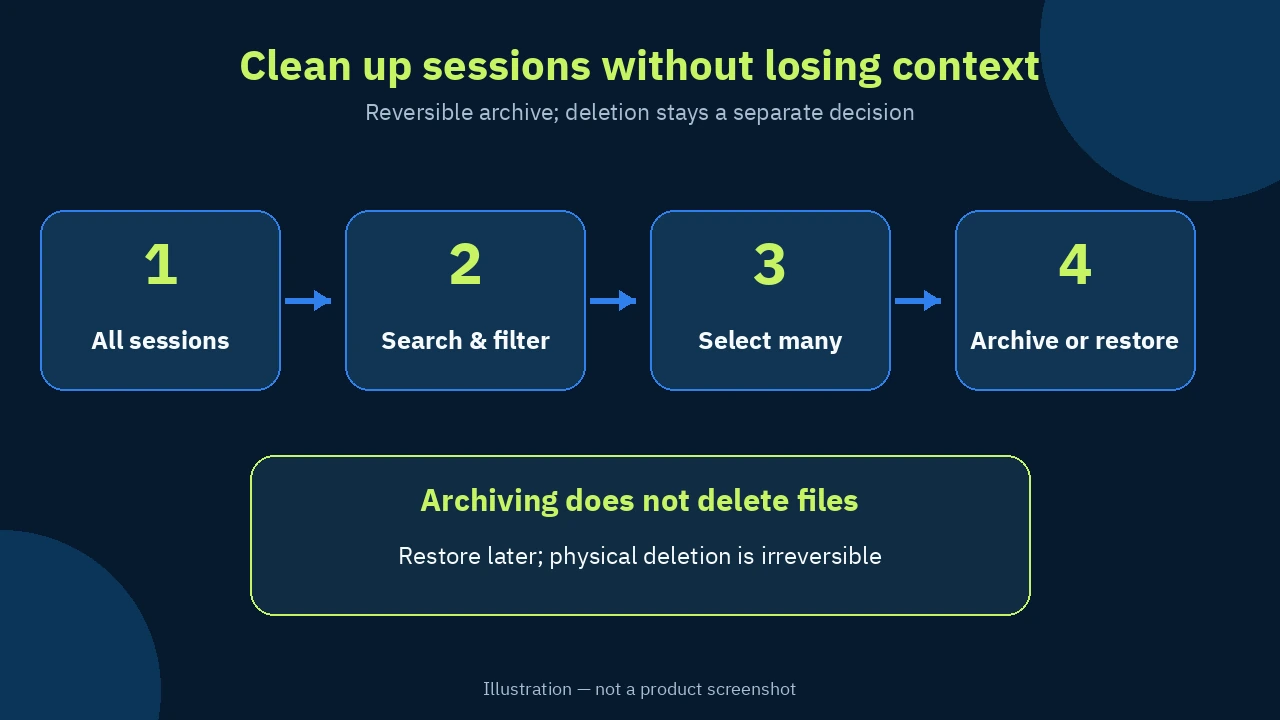
When dozens of DeepSeek Harness sessions pile up, finding an old session or freeing space becomes a risky manual job. Which session is still running? Does “archive” mean delete? What happens to child sessions? dsh-session-archive brings those decisions into one DSH Web screen. You can search, filter, select several sessions, then archive, restore, or physically delete them behind explicit safety checks. Its added value is not merely a faster delete button. It turns cleanup from guesswork across scattered files into a reviewable workflow.
🧭 What is dsh-session-archive?
dsh-session-archive is an open-source web plugin in the original dsh-web repository. It builds a central inventory of active, archived, blank, and child sessions, including sessions without a workspace and historical records with incomplete metadata. Each row shows whatever is available: title or ID, workspace, last activity, status, archive time, size, and child count.
The plugin keeps two often-confused actions separate:
- Archive: changes the session state and removes it from the everyday view without deleting its files. You can restore it later, and its workspace association remains.
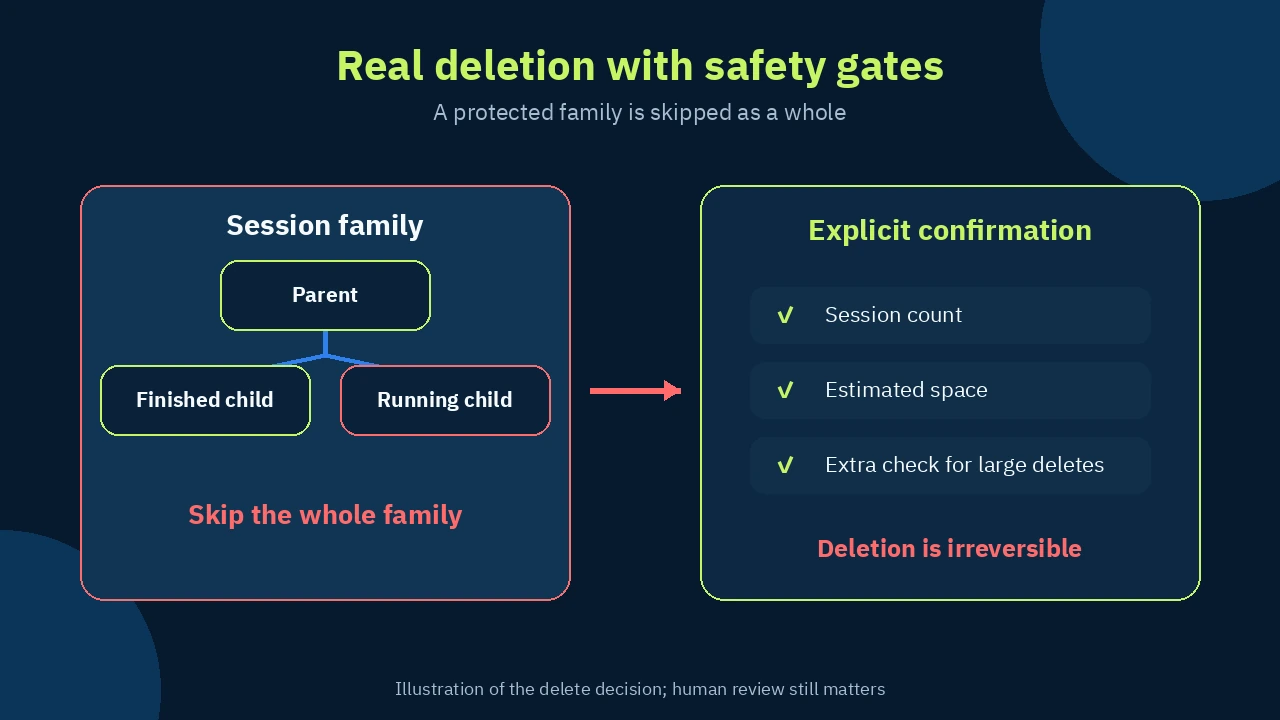
- Physical delete: removes the session from local DSH storage and cannot be undone. Deleting a parent includes its descendants, while a protected member causes the whole family to be skipped.
This lets you start with a reversible step and postpone permanent deletion until you know that the old context is no longer needed.
🎯 How does it help, and what value does it add?
The plugin is useful when you use DSH every day and the session list has become too long to audit comfortably. Instead of opening sessions one by one or inspecting storage folders by hand, narrow the list by project, part of a title, or status, then apply one decision to a clearly defined group.
Its practical value appears in four places:
- Less organizing time: search, sorting, and true multi-select remove repetitive work.
- A clearer decision: archive and delete remain distinct, while the confirmation shows item counts and estimated space before a destructive action.
- Protection for live context: the current session, running sessions, and families containing running descendants are not force-deleted.
- A controlled policy: preview automatic archive and cleanup rules before enabling them; both are off by default.
It fits people with a large session history who want to keep what matters and clean up the rest. If you have only a handful of sessions and no recurring cleanup need, the normal DSH interface may be enough. There is little value in enabling automatic deletion without a real retention problem.
✨ Features and how to use them
1. One inventory with search, filters, and sorting
Open the Session Archive Management section in web settings. Search by title or ID, filter by state or workspace, then sort by last activity, archive time, creation time, title, size, or issues. Sessions with incomplete metadata remain visible and carry an issue marker rather than silently disappearing.
This matters because manual cleanup usually starts with only part of the picture: a folder on disk or the normal session list. The combined inventory brings active, archived, and child sessions into one view. Selection also survives filter changes, so you can assemble a working set across several filters instead of starting over each time.
A safe first use: filter a finished project, sort by oldest activity, select known sessions, and archive them first. Revisit the archive after a few days before considering physical deletion.
2. Batch actions with a separate outcome for each session
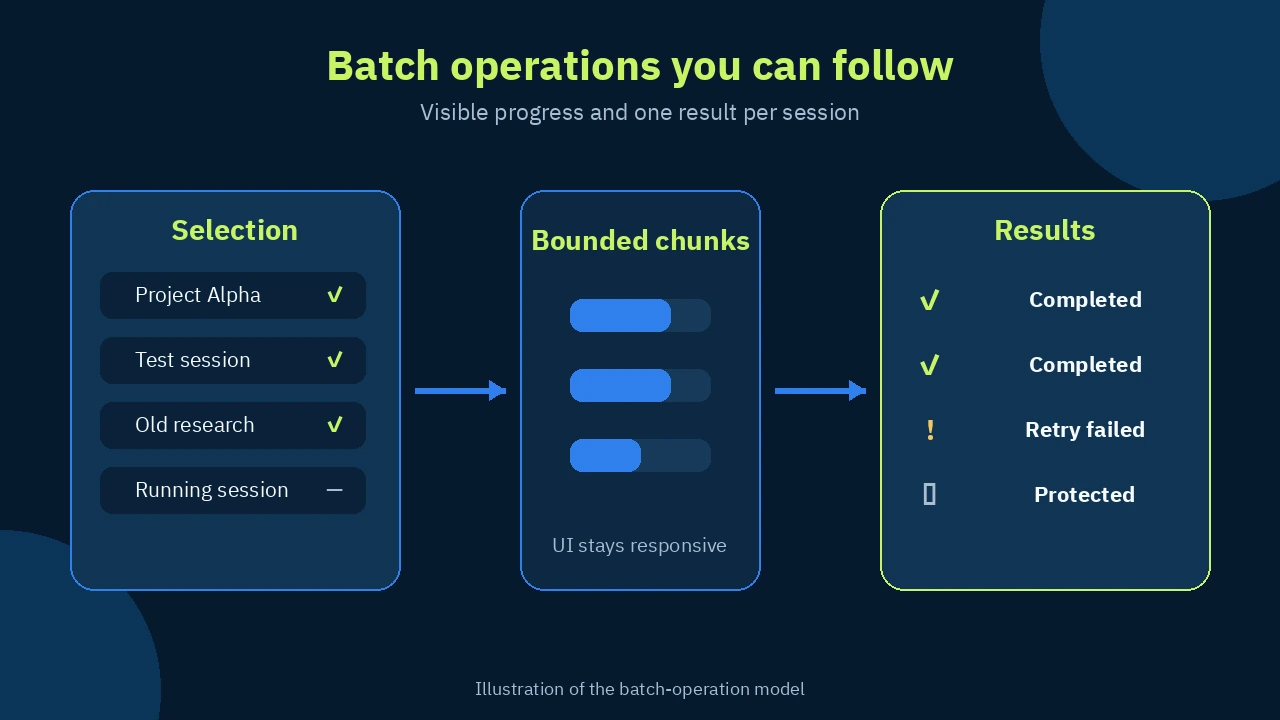
When you archive, restore, or delete a group, the host processes bounded chunks and reports progress. Every session receives its own result, and failed items can be retried without repeating the successful work. A large cleanup is easier to understand than a silent command that may have completed only part of the request.
Protection is enforced, not merely displayed. The current session, running sessions, sessions with running descendants, and sessions already involved in another archive operation are excluded. The plugin never force-stops DSH work just to make cleanup succeed.
3. Family-aware physical deletion with explicit confirmation
Physical deletion removes session storage, whether it is a jsonl.zstd directory or rows in the SQLite-backed session store. It also updates workspace accounting, the archive set, projection cache, and archive ledger. A parent pulls its descendants into the operation. If any family member is protected, the whole family is skipped rather than leaving a partly deleted tree.
Before execution, the confirmation names the number of sessions and estimated space to be freed. Large deletions require an extra acknowledgement. These gates reduce accidental clicks, but they do not make deletion recoverable. Backups and a staged archive-first policy remain your responsibility.
4. Optional automatic archive and cleanup — off by default
Two independent policies are available:
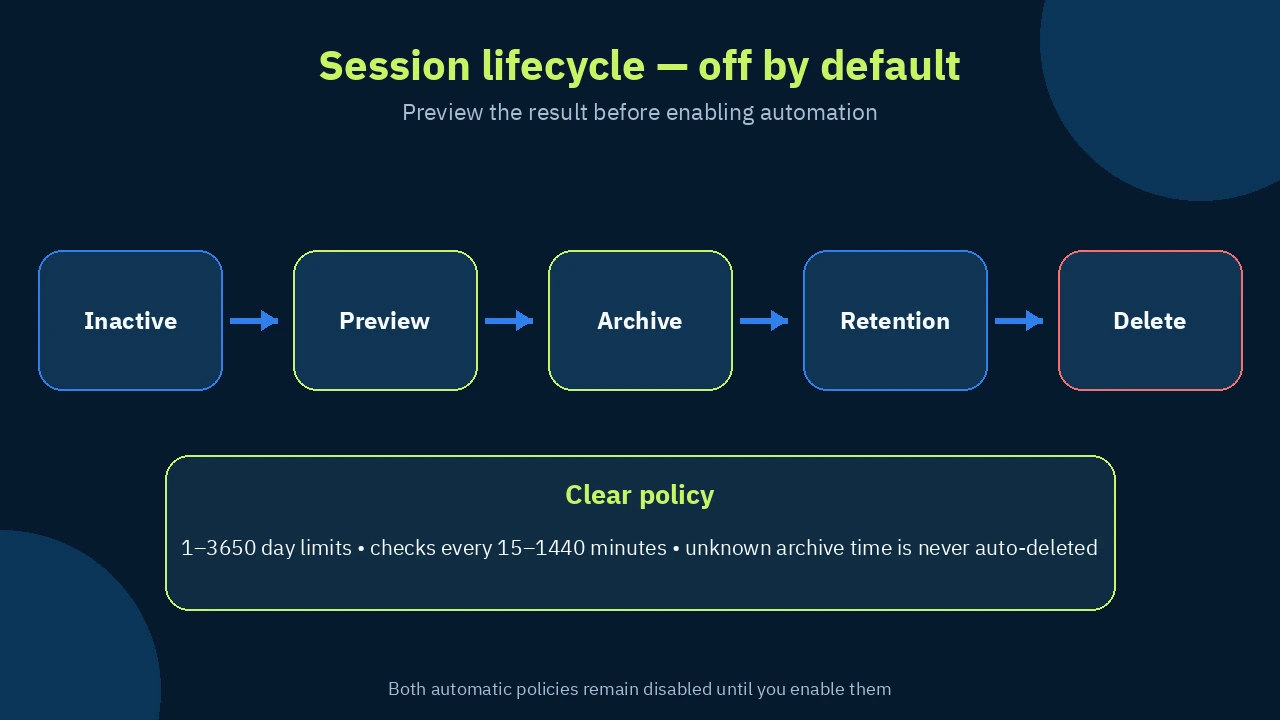
autoArchiveEnabledwithautoArchiveDays: archive sessions after 1–3650 days of inactivity; the default threshold value is 7 days.autoDeleteEnabledwithautoDeleteDays: delete archived sessions after a 1–3650 day retention period; the default threshold value is 7 days.
The scheduler checks every 15–1440 minutes, with 60 minutes as the default. Preview matching sessions before enabling a policy, run the check immediately when needed, and see the last and next run. Both automatic switches are disabled by default, and out-of-range settings are rejected.
Sessions archived before the plugin existed may lack a reliable archive timestamp. They appear with an unknown time and are never included in automatic deletion. Handle them manually, or restore and re-archive them so the plugin records a new timestamp. This conservative rule prevents historical data from being deleted on a guessed date.
🛠️ Step-by-step workflow
- Install the official package into the web profile, then restart
dsh web. - Open DSH Web settings and enter Session Archive Management.
- Start with search and filters, not deletion. Inspect live sessions, descendants, and incomplete records.
- Select a small group and archive it. Watch each result and retry only failed items when appropriate.
- Restore an archived session when needed; there is no need to recreate its context from scratch.
- If physical deletion is justified, read the count and estimated space, and verify that neither context nor backups are missing.
- Enable automatic policies only after previewing their effect on your data. Start with a conservative retention period and review run history.
💡 Practical example
A completed workspace has 46 sessions: short test conversations plus one main session containing important decisions. Filter by workspace, then sort by last activity. Exclude the reference session, select the old test sessions, and archive them. A week later, confirm that nobody needed them, return to the archive, and physically delete a small group after reviewing the count and estimated space.
You can then enable automatic archiving for sessions inactive beyond a period that matches your work, while leaving automatic deletion disabled until usage is well understood. The added value is the two-stage decision: reduce clutter now, permanently remove data later. That is safer than deleting files directly and relying on memory.
⚖️ Compared with manual cleanup
| Job | Manual approach | With dsh-session-archive |
|---|---|---|
| See what exists | Move between lists and folders | One inventory with status, size, activity, and children |
| Find old work | Open sessions and guess age | Search, filters, and last-activity sorting |
| Handle a group | Repeat the action per session | Multi-select and bounded batches with progress |
| Understand failure | Discover it during later inspection | Per-session outcome and retry of failed items |
| Protect running work | Depends on personal attention | Current, running, and protected families are excluded |
| Delete storage | Remove files and risk stale linked state | A pipeline updates storage and related indexes |
| Repeat cleanup | Remember and inspect manually | Optional policy, off by default, with preview |
Manual work may be acceptable for a very small list. It becomes riskier when information is spread across file storage, workspace accounting, and child sessions. The plugin does not take responsibility for the decision; it puts the evidence and safety gates closer to the action.
📦 Installation, compatibility, and cost
Run the official command:
dsh plugin --profile web add @linxin666/dsh-session-archive@latest
Then restart dsh web. The package is also included in @linxin666/dsh-web-all.
On September 28, 2026, the package manifest on the dev branch reported version 0.4.3 and required Node.js 22.19 or newer within Node 22, or Node.js 24 and newer, plus DSH 0.1.7-rc.2 or newer and React 18 as a peer. The folder history shows the 0.4.3 release on September 26, 2026, indicating recent activity. The direct npm page was blocked by Cloudflare in the verification environment, so the version reported here comes from the original manifest and release history rather than an unverified claim about the current npm dist-tag.
The license is Apache-2.0. The plugin does not require a paid subscription or an AI-model API key. Costs for your normal DSH runtime or model usage remain separate.
🔐 Privacy, permissions, and security
The plugin handles sensitive data because it can read session names, states, and sizes; change archive state; and permanently remove local storage. Every endpoint under /api/dsh-session-archive/* is restricted to a loopback socket, a loopback Host, and a same-origin browser marker. It deliberately ignores X-Forwarded-For, so operations through a tunnel or another LAN device receive HTTP 403 by design.
The client sends session IDs, never file paths. During deletion, the plugin resolves storage locations through its sessions-root index, validates real paths again, and rejects paths outside the DSH sessions root. It also checks the fingerprint of the SQLite store before deleting rows. Operations are serialized so two batches cannot interleave.
The project files reviewed for this card do not document telemetry or a third-party data service. What can be verified is that the management routes are loopback-only and the feature acts on local DSH stores. That is not an independent security audit and does not cover DSH itself or other installed plugins.
⚠️ Limits to understand
- The management screen cannot operate from a remote browser, LAN client, or
dsh-remote-web-uitunnel. The restriction is deliberate because the plugin can destroy local data. - Sessions with incomplete metadata are flagged and excluded from automatic flows, so they need a manual decision.
- Physical deletion is irreversible, and the plugin never force-stops a running session.
- Attachments in
$DSH_HOME/attachmentsare shared and content-addressed. The plugin does not garbage-collect orphaned attachments and may not recover every estimated byte. - An unknown historical archive time is never used for automatic deletion.
- This card was verified against documentation, source manifests, and repository history; no production session was destroyed as a test.
📚 Sources and verification date
- Original dsh-web repository — stars, forks, and activity; checked September 28, 2026.
- Official English README — features, setup, security, and limits; checked September 28, 2026.
- Official package manifest — version, engines, dependencies, and license; checked September 28, 2026.
- Package-folder commit history — recent activity and release bumps; checked September 28, 2026.
GitHub displayed approximately 8.1k stars and 555 forks for the parent repository at verification time. Those counts belong to the whole dsh-web repository, not this plugin alone, and are a time-sensitive snapshot.