dsh-task-board
Active and stableRuns locally ✓No paid APIA DeepSeek Harness task board that ties Kanban cards to real DSH sessions, with Host scheduling, run history, and elevated-permission confirmation.
dsh plugin --profile web add @linxin666/dsh-client-ui-task-board@latestIdeal use for this tool
Best for a developer or small team using DSH for recurring or connected work and wanting task state and execution evidence in one record. It pins the project, agent preset, and permission, then runs manually or through Host cron with a human gate for elevated access. It is not a fit for a frequently sleeping machine or unreviewed sensitive automation.
Details and illustrated features
When coding-agent work is scattered across long chats, external notes, and prompts you repeat by hand, it is easy to lose track of what started, failed, or still needs review. dsh-task-board adds an execution-aware board to DeepSeek Harness: create a card, pin its workspace, agent preset, and permission, then run it now or on a cron schedule and return to its session and result history. The added value is one place for planning, execution, and traceability—not unsupervised automation.
🧭 What is dsh-task-board?
It is an open-source DSH Web GUI plugin in zhu1090093659/dsh-web. It adds a five-column Kanban board to the shell's center panel. The Host, rather than the browser, keeps the authoritative task, schedule, and execution ledger in a local file. The browser is an asynchronous view: closing it does not stop Host scheduling or execution settlement while the machine and DSH Host remain running.
Each run applies the card's pinned workspace, agent preset, permission, and model before sending its prompt to a real DSH session. A new session is the default. A card can opt into continuing its previous session when that session is still present and idle; otherwise the Host creates a fresh one.
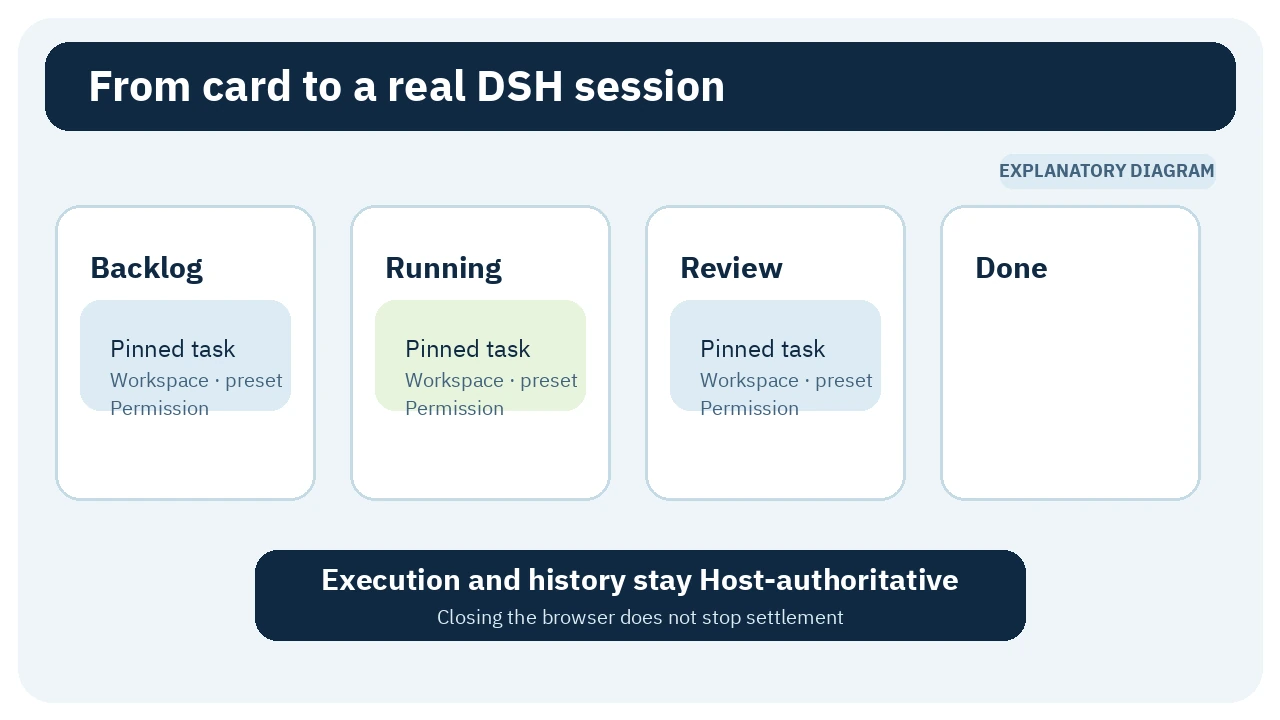
🎯 How does it help you?
Suppose a release has four jobs: inspect a login failure, adjust a screen, write a test, and review the change. Manually, you may open separate sessions, repeat project and permission context, and maintain a different checklist. With the board, you can create pinned cards, attach subtasks to a parent, run them, and open the associated execution sessions from the same task record.
The benefit is not “run everything without supervision.” It is a shared record for the task state, instructions, execution binding, and result. You can see what is waiting, running, settled, or failed. If a card asks for permission above the deployment default, neither the agent nor cron can bypass the human confirmation gate.
It fits a developer or small team already using DSH for recurring or connected jobs. It is a poor fit for a machine that frequently sleeps or powers off, or for sensitive automation whose prompt, permissions, and model costs have not been reviewed.
🌟 Key features and how to use them
1. A Kanban board tied to real execution
The board provides five columns, search, details, archive and restore, run history, and links to execution transcripts. A card is more than a note: on run, the Host resolves its binding, creates or reuses a suitable session, queues the prompt, and observes the session until the run settles.
- Where: the Task Board row in the official DSH Web sidebar.
- How: create a card, add its title, description, and run prompt, then select a workspace, agent preset, permission, and model when needed.
- Value: plan a task and return to execution evidence from one record.
- Caution: archived tasks are read-only and cannot run manually or on schedule until restored.
Cards can also carry searchable labels. A label may include an execution hint injected before the next run prompt, so review hints as prompt content rather than treating every label as decoration.
2. Host scheduling that survives a closed browser
The scheduler accepts five-field cron syntax with *, */n, ranges, lists, Sunday as 0 or 7, and Host-local time. A due card uses the same runner as a manual launch and appends the result to the card's history. Closing the web page does not stop this.
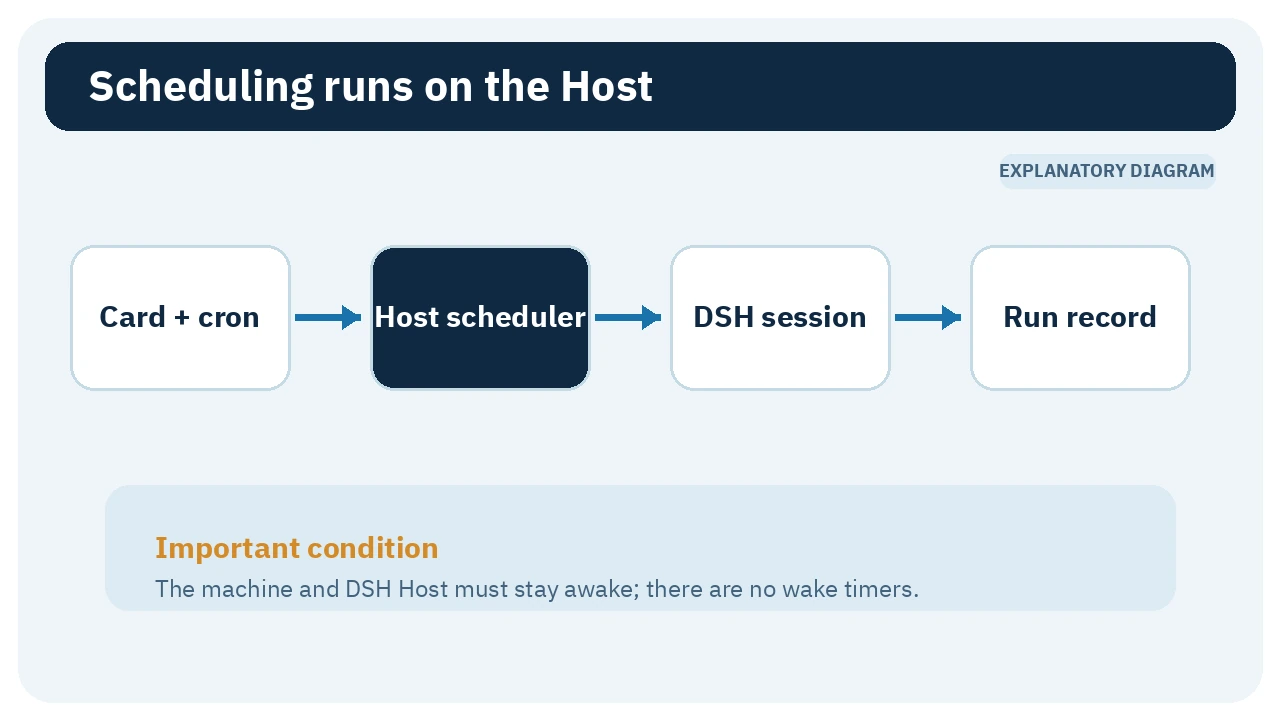
- Illustrative example: schedule a test-project card for weekday mornings with a constrained workspace and permission.
- Value: the board tab does not have to stay open and you do not have to create the session every time.
- Caution: there are no wake timers. If the Host is down or the computer sleeps, the occurrence is skipped rather than queued for catch-up. A task that is already running also skips its next due occurrence.
Optional preventIdleSleep can block idle system sleep while any DSH session runs or a schedule remains enabled. It still allows display sleep and lock, and does not override lid close, manual sleep, hibernation, shutdown, or enterprise policy. Linux needs systemd-logind and permission to acquire an idle block; WSL, containers, non-systemd systems, or machines without a system bus may report unsupported.
3. A human gate for above-default permissions
A task binding includes the workspace, agent preset, and permission. A handover bundle can add the same triplet plus document or script references. When the effective permission exceeds sessionDefaultPermission, the Host marks it unconfirmed: manual runs are refused and cron rolls forward until a human confirms the exact binding from the board.
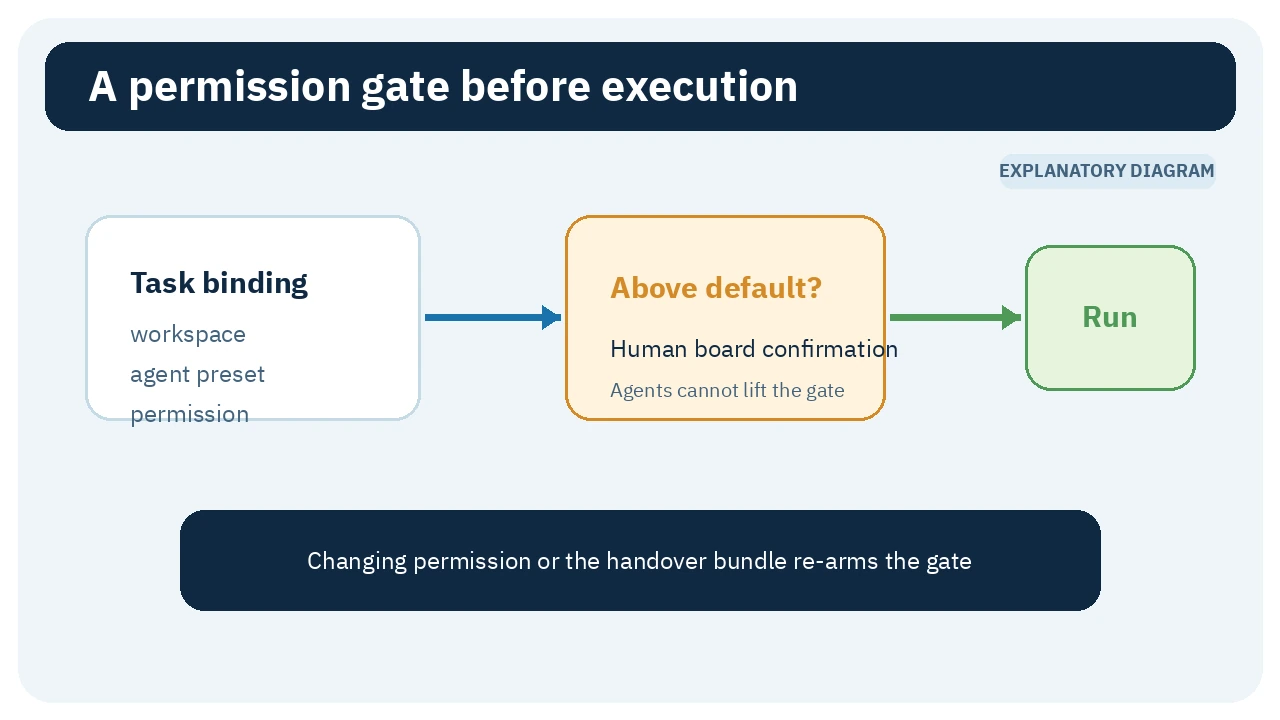
There is deliberately no agent tool that grants this confirmation. Changing the permission or handover bundle clears the previous confirmation and re-arms the gate, which prevents confirm-then-swap escalation.
The gate is useful, not absolute. Prompts, labels, continuation snapshots, and references remain user- or agent-supplied data. Review them before granting write or command access, and prefer a test workspace and lower permission when sufficient.
4. Subtasks with cascade or Agent Team execution
A parent card can own subtasks. Cascade mode runs the tree concurrently, one DSH session per member. The parent stays running until its own turn and every child settle. The overall verdict fails if any member fails, but one failed child does not automatically stop the others.
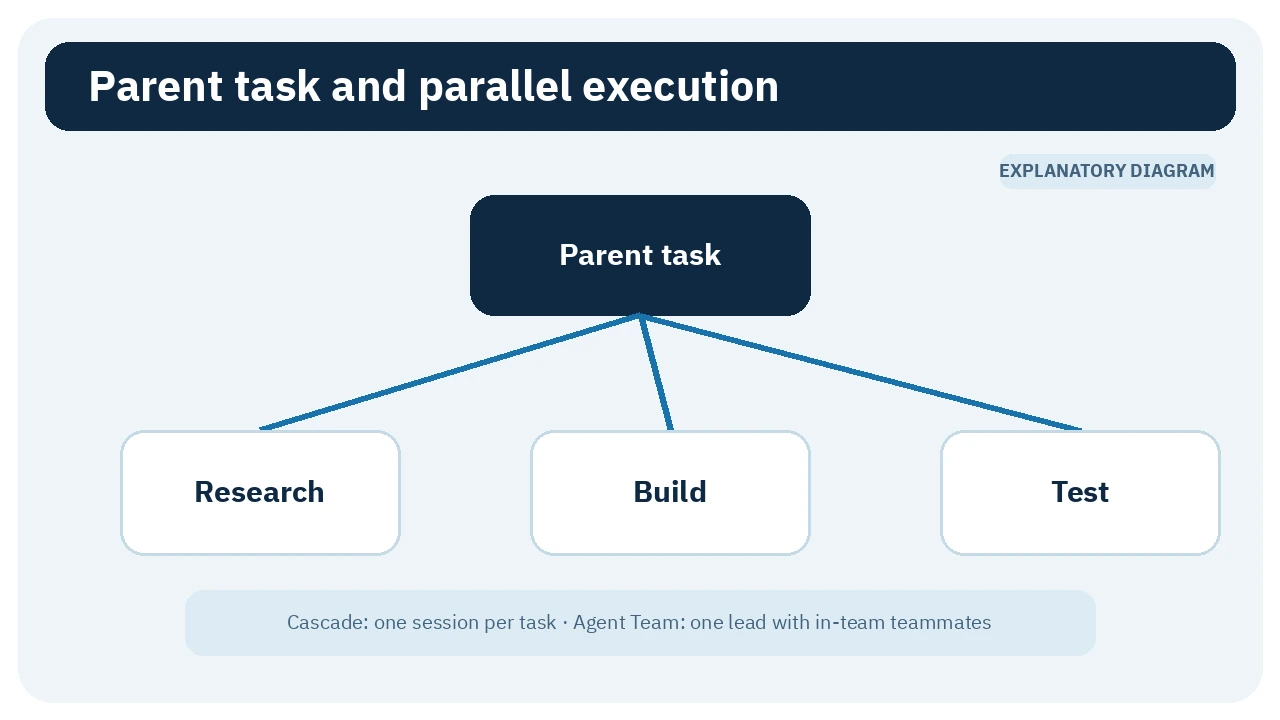
Optional Agent Team mode starts one Lead session, then asks the Agent Teams service to create one teammate per subtask inside that team. The optional agentTeams service must be present; otherwise the run is rejected by name rather than silently falling back. A team subtask cannot pin its own above-default permission because that binding cannot be carried by a teammate.
The default subtask depth is one and the documented maximum is three through maxSubtaskDepth. Every extra level can multiply concurrent sessions and model usage. Use a tree for genuinely separable work, not cosmetic decomposition.
5. Continuation snapshots and provenance
A new card can paste a FREEZE block from a session to store a goal/progress/next snapshot. The protocol replaces sensitive-looking patterns with [REDACTED], rejects slash-prefixed command lines, and caps each field at 8 KiB. Running a continuation card adds the freeze time, source session, and an unreviewed-content warning to the prompt.
This helps preserve context, but does not prove the stored claim is correct. initiatedBy and frozenBy are client-asserted audit metadata, not trust boundaries. Review snapshots and references before resuming sensitive work.
🪜 Step-by-step illustrative example
Not run on a real project: create a parent card named “Weekly release check.” Pin a test repository, agent preset, and read-only permission. Add three children for error-log review, test execution, and a result summary. Add release and qa labels, reviewing any execution hint as prompt content. Run the cascade manually once and inspect the linked sessions. If tests need higher permission, change the binding and confirm it in the board after reviewing the scope. Only then add a cron schedule, remembering that it cannot wake the machine. Archive retired cards so their schedules cannot run.
⚖️ What changes compared with manual work?
| Manual workflow | With dsh-task-board |
|---|---|
| Separate checklist and DSH sessions | Cards, status, and execution records in DSH Web |
| Repeat workspace, preset, and permission context | A pinned binding reapplied before each run |
| Start a session by hand at every due time | Host cron launches it when the machine and Host are awake |
| Track each result yourself | A bounded last-20 execution history with session links |
| Break large work apart manually | Subtasks with cascade or optional Agent Team mode |
This is a workflow comparison, not a measured time saving or a guarantee of success.
⚙️ Important configuration
| Setting | Default | Purpose |
|---|---|---|
enabled | true | Enables or disables the Host, board, and agent tools |
announceToAgent | false | Adds task-board guidance to the system prompt when enabled |
preventIdleSleep | false | Blocks idle system sleep within the documented limits |
sessionDefaultPermission | read-only | Defines the level above which human confirmation is required |
maxSubtaskDepth | 1 | Raises tree depth up to 3 after cost review |
trustedProxyHosts | [] | For an authenticated same-host reverse proxy only |
Advanced proxy composition uses DSH_TASK_BOARD_PROXY_TOKEN. The proxy should replace the client value after authentication, and the secret should remain in the chosen environment variable rather than plugin configuration. Do not expose DSH Web publicly merely to reach the board.
🚀 Installation and first run
The verified npm release was 0.4.2, while package.json on the dev branch had already moved to 0.4.3. The official command installs the latest published package, not unreleased branch code:
dsh plugin --profile web add @linxin666/dsh-client-ui-task-board@latest
Restart dsh web afterward. The package declares DeepSeek Harness >=0.1.7-rc.2 and React 18; its build instructions require Node.js 20 or newer. Installation was not run here. Review the source and package before adding a plugin to your profile.
💰 Cost, local operation, and privacy
The code is Apache-2.0 and the plugin documents no subscription fee. Task execution consumes the same model/API quota as an ordinary DSH session, while a subtask tree may open several sessions concurrently. Free code does not make model execution free.
The authoritative ledger is local at $DSH_HOME/task-board/ledger-v2.json. New POSIX files use mode 0600; Windows inherits the user-directory ACL. That is local task storage, not offline operation: DSH may send prompts to the configured model provider. The browser half also sends one anonymous install heartbeat per UTC day to dsh-market.com, containing a random localStorage ID and the package name. The README says the server stores only a salted hash of the ID, not IP addresses, and exposes aggregate counts.
⚠️ Limits and security notes
- Missed schedules are not replayed and the plugin cannot wake a sleeping computer.
- The same card never overlaps with itself; a due occurrence while running is skipped.
- DST follows Host wall-clock behavior; nonexistent minutes are skipped and repeated minutes are not replayed twice.
- Each task keeps only its most recent 20 execution records.
- Agent tools can create, edit, run, and schedule cards, but cannot confirm elevated permission.
- Agent Team mode needs an additional service; plain cascade can consume several sessions.
- A task prompt is data sent to a real agent session. Review destructive instructions and profile permissions.
📚 Sources and verification date
Checked 27 September 2026 against the original package directory and README, package.json, Apache-2.0 license, package commit history, and published npm package. GitHub showed 8,040 stars and 556 forks for the entire monorepo—not this package alone—at the time of observation. Those changing popularity counts are not quality or security ratings. The latest visible package activity was 26 September 2026. Installation and the example were not run; all images are original diagrams based on the documentation.