DuckDB
Active and stableRuns locally ✓No paid APIAn embedded analytical database that queries CSV, Parquet, and JSON files directly with SQL, without running a separate server.
pip install duckdbIdeal use for this tool
Best for an analyst, developer, or small team that needs to inspect and join large data files and rerun analysis locally. It adds reviewable SQL without database-server setup. It is not a multi-user transactional database for many small concurrent writes from separate processes.
Details and illustrated features
When your data is spread across CSV, Parquet, and JSON files, analysis often starts with copying it into a spreadsheet or importing it into a database server. DuckDB removes that setup layer: it is an analytical database that runs inside your machine or application and can query files directly with SQL. You can start from the file you already have, filter, aggregate, and join the data, then save or export the result without operating a central service.
🧭 What is DuckDB?
DuckDB is an in-process analytical database management system. It runs inside the same process as your program instead of requiring a separate database server. It is available as a command-line application and as a client library for Python, R, Java, Go, Node.js, Rust, WebAssembly, and other environments. It targets analytical workloads that scan many rows and perform joins and aggregations; it is not intended to replace a transactional web database receiving many small concurrent updates.
It can run as a temporary in-memory database or persist an entire database in one file such as analysis.duckdb. It can also query CSV, Parquet, and JSON files directly, and work with Python or R data frames without setting up a server.
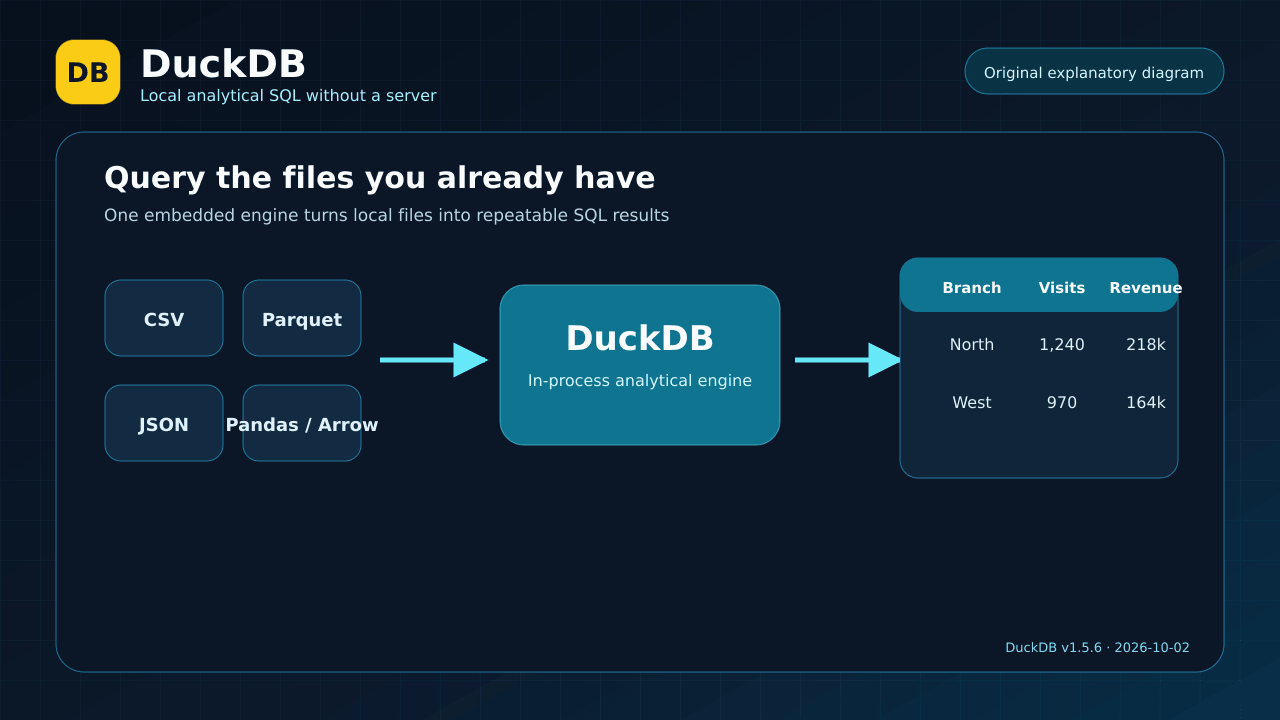
Original explanatory diagram, not a product screenshot.
🎯 How does it help you?
Suppose you need to analyze a large appointments file together with separate branch and practitioner data. A manual workflow may import files into a spreadsheet, clean columns, create formulas or pivot tables, and repeat the process whenever a new file arrives. With DuckDB, you can keep the source files in place and write a clear query that joins them and calculates appointments, revenue, and cancellation rates by branch.
The added value is not only execution speed. The analysis becomes reviewable SQL that can be saved and rerun. This suits an individual or small team that needs repeatable analysis without paying for or operating a server. It is not the right default for a multi-user transactional system with many independent writer processes; use PostgreSQL or another server database for that job and keep DuckDB for analysis.
🌟 Key features and capabilities
1. Query files directly without a separate import step
DuckDB can read CSV, Parquet, and JSON files from the FROM clause. A simple example is:
SELECT branch, count(*) AS appointments
FROM 'appointments.parquet'
GROUP BY branch
ORDER BY appointments DESC;
- Where: the CLI or any DuckDB client such as Python.
- How: place the file path in the query, then apply
WHERE,GROUP BY, orJOINas you would with a table. - Illustrative example: count appointments by branch from a Parquet file.
- Value: analysis can begin without loading the file into a separate database first.
- Important limit: source files must be trusted; DuckDB's security model assumes SQL and file structures come from trusted sources.
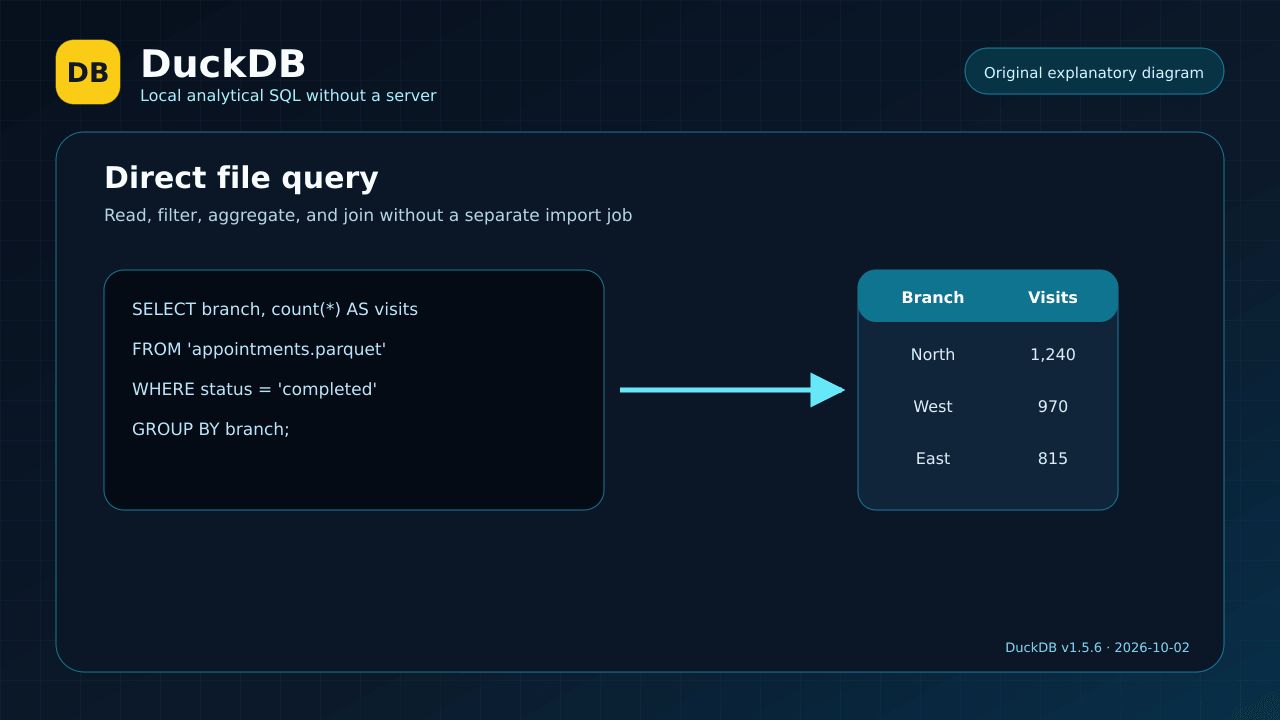
Illustrative query flow; the displayed values are examples, not measured data.
2. Run in memory or persist to one database file
Running duckdb without a filename opens a temporary in-memory database. Running duckdb analysis.duckdb opens or creates a persistent database. This supports a simple progression: start with a quick analysis, then keep a single database file when tables or intermediate results need to persist.
Developers can embed DuckDB in Python, R, Go, Java, Node.js, and other applications. In Python, for example, you install the package and call SQL from code, including direct queries over a DataFrame. There is no separate service, user database, or network port required to get started.
- Value: the same engine works from a terminal or an analysis script.
- Limit: a local database file is not automatically a multi-writer team server.
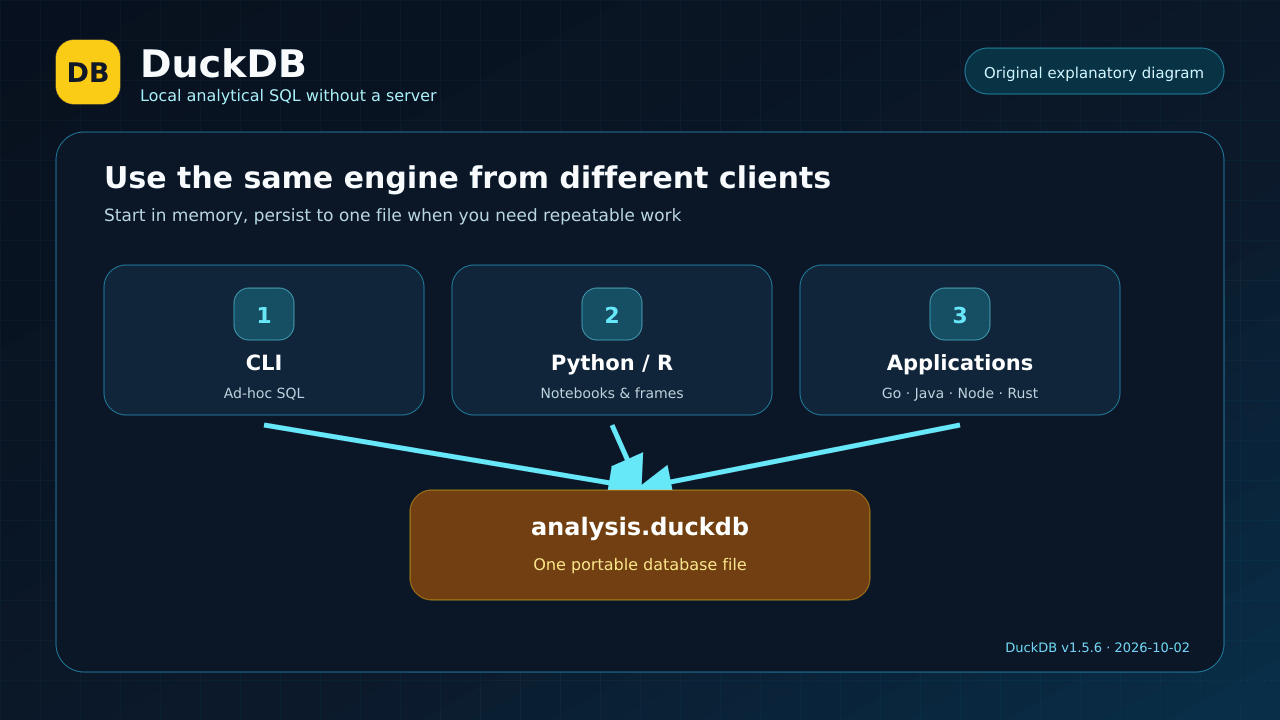
Illustration of documented client paths, not a graphical product interface.
3. Analytical SQL and result export
DuckDB supports analytical SQL features such as window functions, aggregations, complex types, and joins. Query results can become tables inside DuckDB or be exported to CSV and Parquet. This enables a small repeatable workflow: read raw files, normalize values, join datasets, and export a report-ready file.
Illustrative example:
COPY (
  SELECT branch,
         count(*) AS visits,
         sum(amount) AS revenue
  FROM 'appointments.csv'
  WHERE status = 'completed'
  GROUP BY branch
) TO 'branch-summary.parquet' (FORMAT parquet);
This example does not imply that DuckDB automatically fixes data quality. You must define valid values, handle missing and duplicate rows, and validate the output.
4. Integrations and extensions with explicit security boundaries
Extensions add support for formats and connectors such as Parquet, JSON, HTTP, and S3. DuckDB can install or autoload some core extensions when needed, and a community repository is also available. An extension is native code running with the DuckDB process's privileges, so community or unsigned extensions should not be installed without reviewing their source and trust level.
The CLI provides -safe mode, which blocks access to external files other than the database file. External access and automatic extension installation or loading can also be disabled for sensitive environments. These controls matter when SQL is supplied by another user or an AI agent.
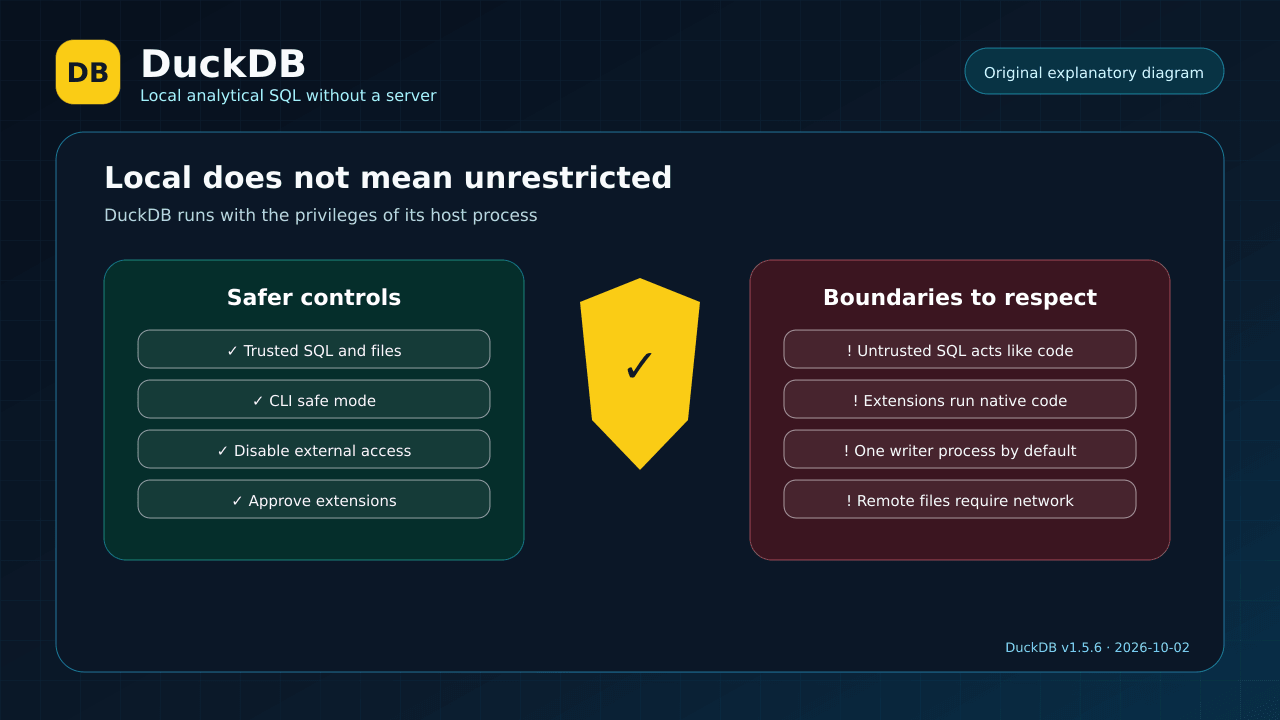
Illustration of the permission model; operating-system isolation is still required for untrusted SQL.
🪜 Step-by-step illustrative workflow
Not run on your data: you have appointments.csv and therapists.csv and want a monthly report.
- Install the Python client in a virtual environment with
pip install duckdb. - Open Python or a notebook and import the package.
- Inspect a small sample before running the full analysis.
- Write a query that reads appointments and joins practitioner data through a stable identifier.
- Define explicit rules for cancelled visits and missing amounts.
- Aggregate by month, branch, and practitioner.
- Check totals against a sample or an independent financial source.
- Export to Parquet or CSV and keep the SQL beside the report so it can be rerun on the next file.
A small Python example:
import duckdb

result = duckdb.sql("""
    SELECT branch, count(*) AS completed_visits
    FROM 'appointments.csv'
    WHERE status = 'completed'
    GROUP BY branch
    ORDER BY completed_visits DESC
""")

result.show()
⚖️ What changes compared with manual work?
| Manual spreadsheet workflow | With DuckDB |
|---|---|
| Import and repeat the import for every update | Query the file directly and rerun saved SQL |
| Cleaning logic is spread across clicks and formulas | Rules are written in reviewable queries |
| Joining large files can become cumbersome | JOIN and aggregation target analytical workloads |
| A database server is needed to try SQL | Run locally in memory or in one file |
| A shared output does not explain its derivation | Share the SQL, database file, or exported result |
This compares workflows; it is not a promise that every file will be faster or that results become correct automatically.
⚙️ Important configuration
- Memory: use
memory_limitto constrain DuckDB on a shared machine or large workload. - Temporary storage: DuckDB may spill to temporary files when data exceeds memory; choose a location with enough capacity and appropriate protection.
- Threads:
threadscontrols execution threads. - External access:
enable_external_accessgoverns access to files, the network, and extension installation; restrict it in untrusted environments. - Extensions: disable
autoload_known_extensionsandautoinstall_known_extensionswhen every extension must be explicitly approved. - Safe mode: use
duckdb -safe database.duckdbwhen the CLI should not read unrelated external files.
🚀 Installation and first run
For Python, the official documentation says the current client requires Python 3.9 or newer:
pip install duckdb
Then verify it:
import duckdb
print(duckdb.sql("SELECT version()"))
The CLI is distributed as a single precompiled executable for Windows, macOS, and Linux. The official installation page provides system-specific downloads. An official install script also exists, but any remote script should be inspected before piping it into a shell. Installation and examples were not executed for this card.
🔗 Integrations and compatibility
- Operating systems: core builds support Windows, macOS, and Linux on x86_64 and ARM64.
- Clients: CLI, C, C++, Go, Java, Node.js, ODBC, Python, R, Rust, and WebAssembly, with documented support tiers.
- Data: CSV, JSON, and Parquet, plus Arrow, Pandas, and dplyr integrations and extensions for additional sources.
- Operation: temporary in-memory mode, a persistent database file, or embedding in an application. An official Docker image is available but is unnecessary for a simple local setup.
Check client, database-file, and extension compatibility when moving files between machines or language runtimes.
💰 Cost and local operation
DuckDB is open source under the MIT license and requires no subscription or paid API for local use. Data remains in memory or in the files you choose. A local query does not send your file to a hosted DuckDB service.
However, SQL can open HTTP or S3 URLs or install extensions over the network if configuration allows it. “Local” therefore does not mean “offline” in every setup. Connected commercial services or cloud storage have separate costs and privacy policies.
⚠️ Limitations and when not to use it
- It is not the default choice for a multi-user transactional application with many small writes from separate processes.
- The traditional file model centers on one writer process; multiple processes can read in read-only mode. Newer options such as Quack and DuckLake exist, but their maturity and requirements should be evaluated instead of assumed.
- Untrusted SQL can read or write files, consume CPU, memory, and disk, and access the network according to process permissions. Treat SQL as code.
- A large or malformed CSV, Parquet, or database file can consume substantial resources. Apply memory and time limits and trust the data source.
- An analytical engine does not automatically fix ambiguous definitions, duplicates, or missing values. Results still depend on your rules and validation.
🔐 Security and permissions
DuckDB runs with the host user or application's privileges. A query may therefore reach files that user can access, and extensions may use the network and operating system. Do not grant an external user or AI agent unrestricted SQL execution on your machine without isolation.
For sensitive use:
- Run DuckDB as a restricted user or inside a container/VM when SQL is untrusted.
- Use CLI
-safemode when appropriate. - Disable external access and automatic extension installation or loading when unnecessary.
- Do not treat unknown DuckDB, Parquet, or CSV files as harmless documents.
- Review temporary and exported files because they may contain personal data.
📚 Sources and verification date
- Original repository and README
- Release v1.5.6
- Why DuckDB
- Command-line client
- Python client
- Security model
- Securing DuckDB and extensions
- Concurrency
- MIT license
Verified on 2 October 2026. The latest stable release verified was v1.5.6, released on 28 September 2026. GitHub displayed approximately 41.9k stars and 3.8k forks at verification time; these changing popularity figures are not quality or security ratings. Installation and the example were not executed against real data.