Gatus
Active and stableRuns locally ✓No paid APIMonitor websites, APIs, DNS, and certificates from your own host, publish a status page, and alert on repeated failures with Gatus.
docker run -p 8080:8080 --name gatus ghcr.io/twin/gatusIdeal use for this tool
Best for an individual developer or small team that wants self-hosted website, API, DNS, and certificate checks with a status page and threshold-based alerts. It combines active checks and simple history in one service. It does not replace resource monitoring, logs, or distributed tracing.
Details and illustrated features
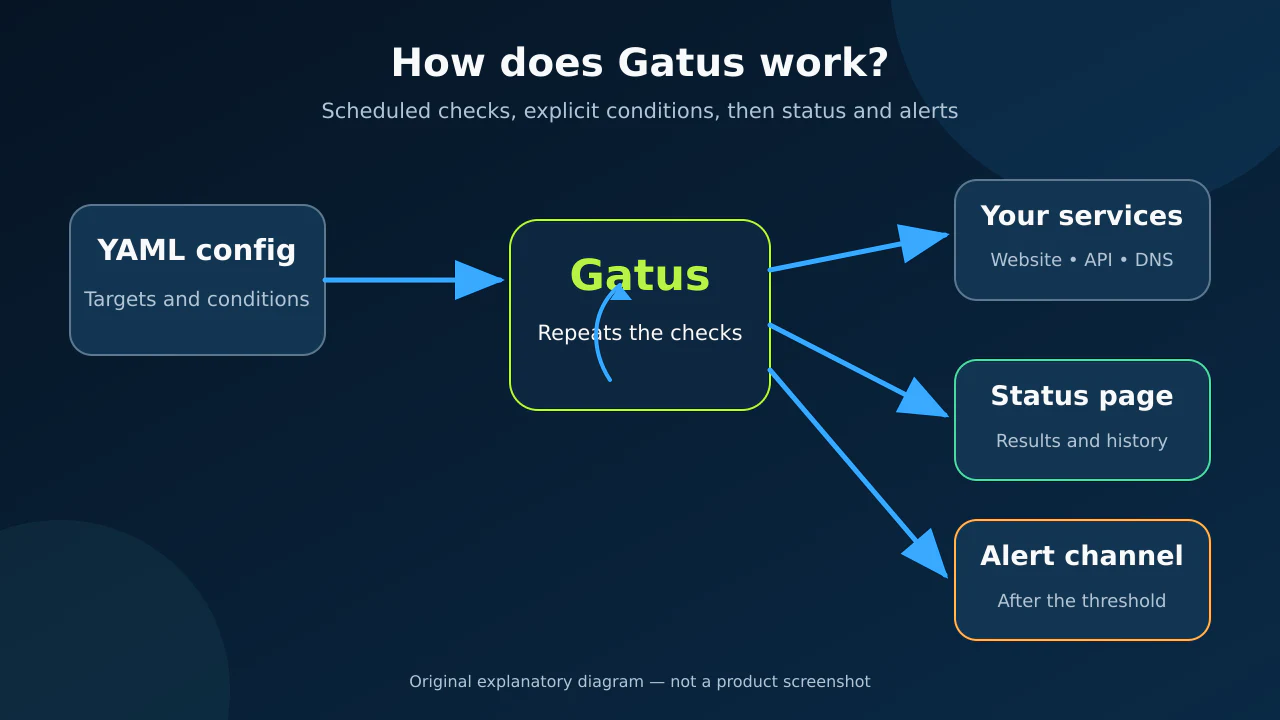
When a website or API goes down, you may learn about it from a customer or by opening the service yourself. Gatus changes that path: it checks services on a schedule from your own host, evaluates explicit response conditions, shows their status, and alerts after repeated failures. Its added value is one lightweight service for active checks, a status page, and alerting instead of scattered scripts and manual checks.
🧭 What is Gatus?
Gatus is an open-source service-health monitor and developer-oriented status page. You describe targets such as a website, REST API, DNS server, or TCP port in YAML and define health conditions. Gatus executes checks at the configured interval, stores results according to the selected storage backend, and displays them in a web interface.
It is not a complete replacement for a logs, traces, and metrics observability stack. Its primary job is active checking: is the service reachable, did it return the expected status and content, is latency within your condition, and is a certificate or domain approaching expiration?
🎯 How does it help you?
Suppose your application exposes /health. Instead of opening it manually, add it once to config.yaml and require HTTP 200 plus a JSON value such as status: UP. Gatus can repeat that check, display the result, and send an alert after the number of consecutive failures you configure.
The practical value is more than knowing whether a server responds. You can detect a URL that opens but returns the wrong data, exceeds a latency boundary, or has a certificate or domain nearing expiration. It suits an individual developer or small team that wants understandable self-hosted monitoring without operating a large platform.
It is not sufficient by itself for CPU and memory analysis, application log aggregation, distributed tracing, or enterprise incident management. Those needs require complementary tools.
🌟 Key features
1. Health conditions beyond “the URL opens”
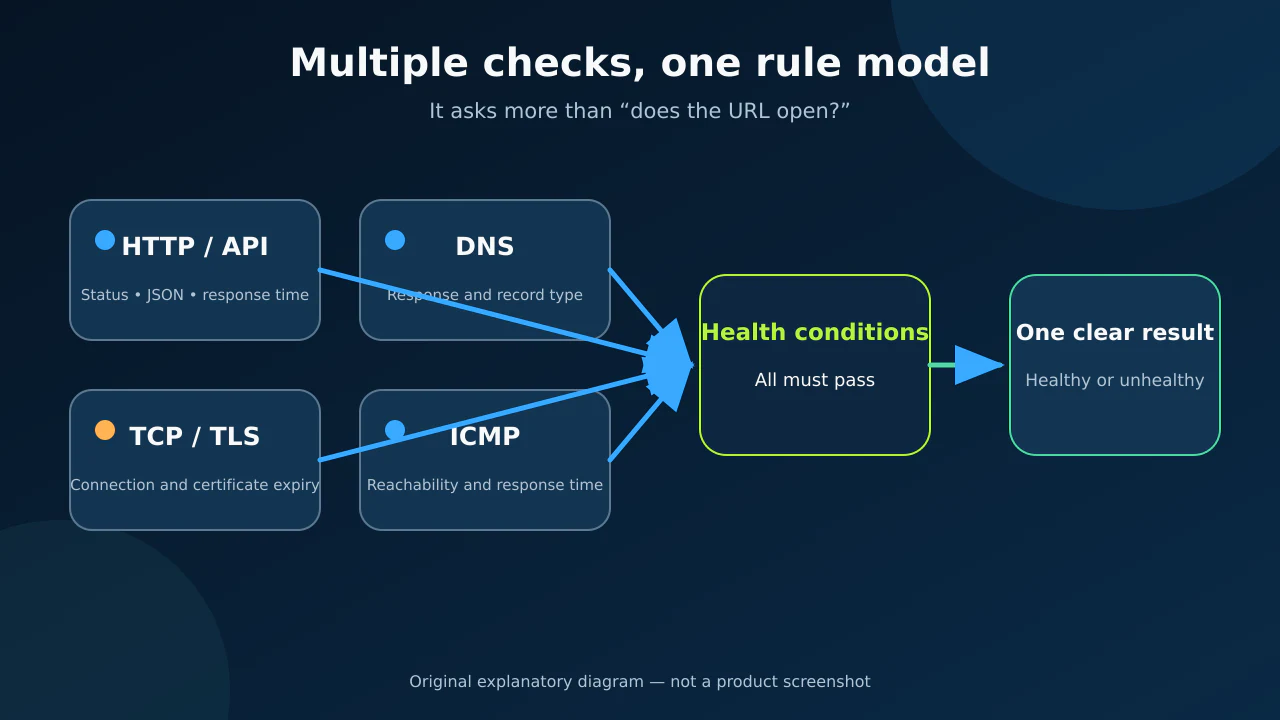
Each endpoint has a target, interval, and conditions. For HTTP, conditions can check the status code, a JSON value, response time, certificate expiration, or domain expiration. This avoids the misleading result “the service is up” when the page responds but data or performance is wrong.
- Where:
endpointsandconditionsin the YAML configuration. - How to use it: start with a status condition, then add content or latency only when you know what is acceptable for your service.
- Illustrative example:
[STATUS] == 200,[BODY].status == UP, and[RESPONSE_TIME] < 500. - Caution: 500 milliseconds is an example, not a universal standard. Derive the boundary from your service.
2. Multiple monitoring protocols
Official documentation covers HTTP, DNS, TCP, UDP, TLS, STARTTLS, SSH, gRPC, WebSocket, ICMP, domain-expiration checks, and push-based external endpoints. Each type exposes appropriate placeholders. A TCP check focuses on connectivity, IP, and response time rather than an HTTP body.
- Value: place a website, API, DNS, certificate, and selected ports on one status surface.
- Use: choose the target type, then use only the conditions supported by that type.
- Limit: a successful TCP connection does not prove the application behind the port behaves correctly; prefer an application-level check where possible.
3. Failure and recovery thresholds for alerts
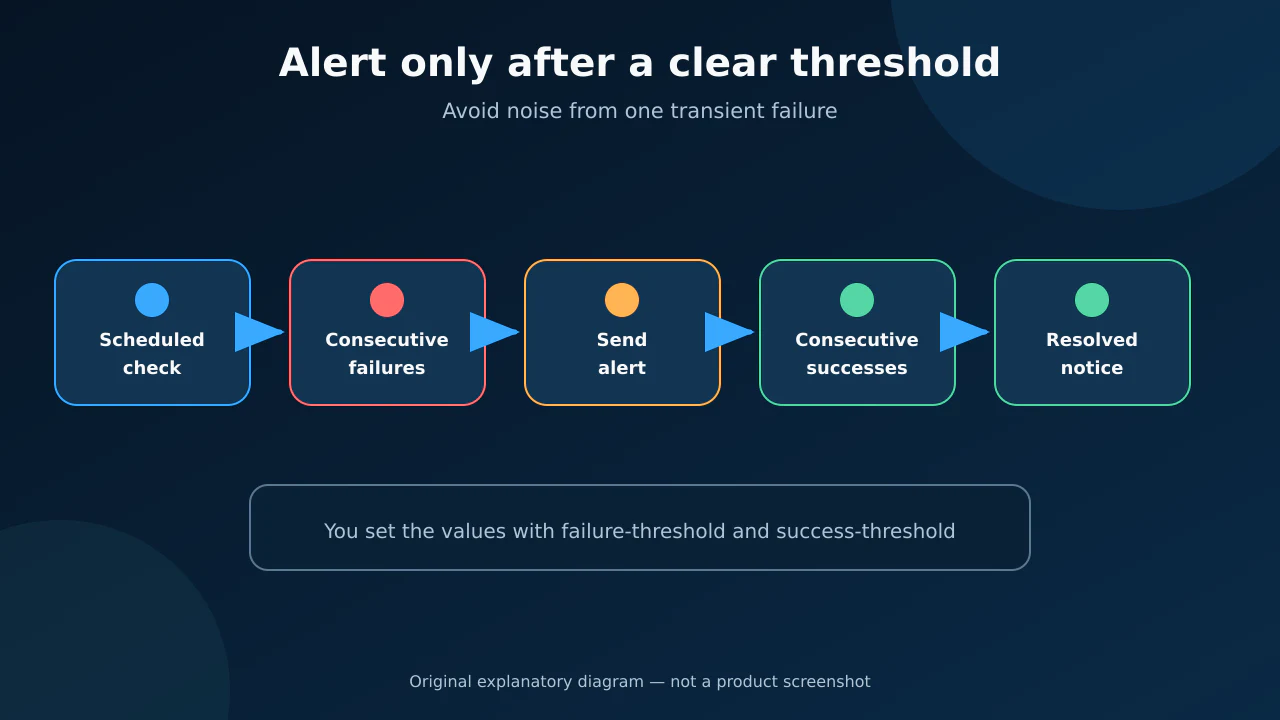
Attach alerts to an endpoint and set failure-threshold before notification and success-threshold before recovery. An optional resolved notification can tell the team that the service returned. This can reduce noise from one transient failure while leaving sensitivity under your control.
The project documents providers including email, Slack, Microsoft Teams, Telegram, Discord, Gotify, ntfy, PagerDuty, and custom integrations, among others. Each provider needs its own credentials and configuration; code-level support does not make a third-party service free.
4. Self-hosted operation and simple storage
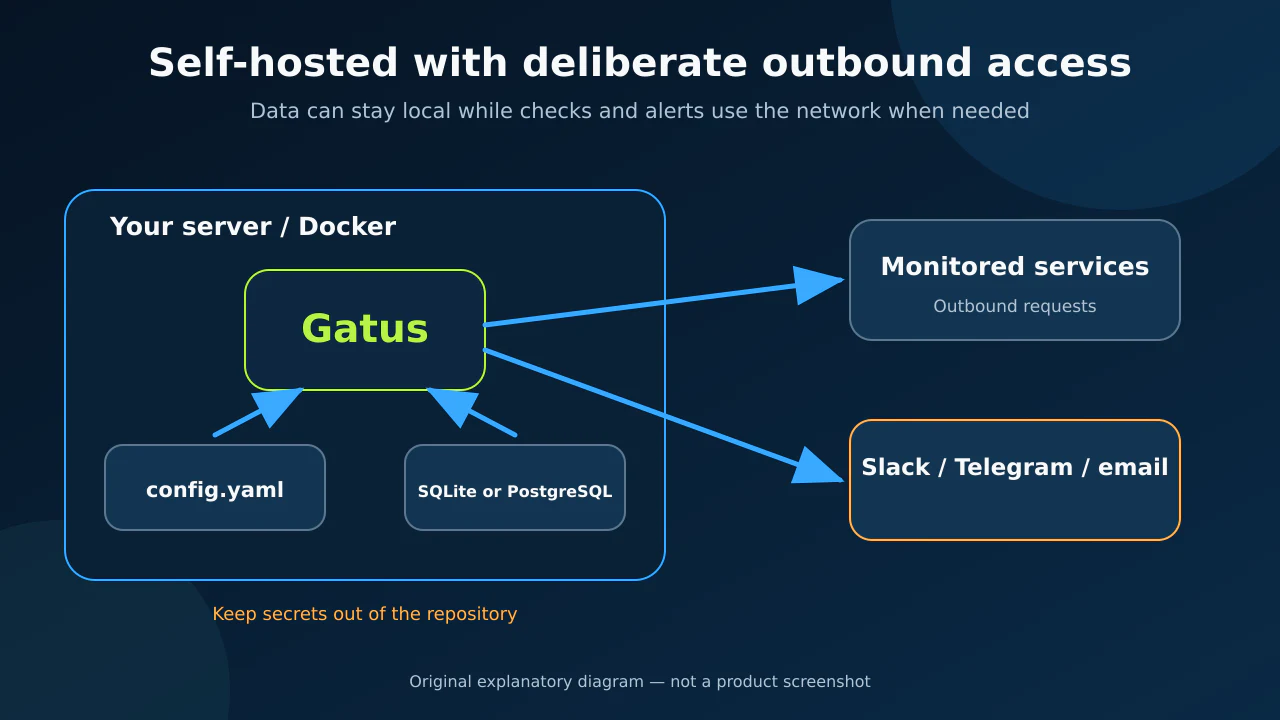
Gatus is a Go application with an embedded web interface and an official container image. Storage options in the code are memory, SQLite, and PostgreSQL. Memory is suitable for a trial but loses history on restart; SQLite is a small starting point when its database file is mounted on persistent storage.
Self-hosted means configuration and history can stay on your server. It does not mean offline: Gatus sends requests to monitored targets, may contact an alert provider, and downloads its image during installation.
🪜 Step-by-step workflow
Illustrative example; I did not run it on your project: monitor one API before adding every service.
- Create
config.yamlin the deployment directory. - Add an endpoint with a clear name and a group such as
production. - Begin with interpretable conditions: status, one JSON health value, and a suitable latency boundary.
- Start the container and open
http://localhost:8080. - Safely exercise a non-production endpoint and review failure and recovery rendering.
- Add persistent storage before relying on history.
- Connect an alert provider only after protecting its secret, then tune thresholds to limit noise.
storage:
  type: sqlite
  path: /data/gatus.db

endpoints:
  - name: nasq-api
    group: production
    url: "https://example.com/health"
    interval: 60s
    conditions:
      - "[STATUS] == 200"
      - "[BODY].status == UP"
      - "[RESPONSE_TIME] < 500"
Replace the URL, value, and threshold with your service's values. Passing this example does not prove every product flow works; add checks for important journeys without turning monitoring into a full test suite.
⚖️ Compared with manual checking
| Manual approach | With Gatus |
|---|---|
| Open a URL after suspecting a problem | Run a documented periodic check |
| Learn only whether the page opens | Check status, content, latency, and certificates as configured |
| Keep scattered results with no common history | Use one status page and the selected storage backend |
| Alert only when somebody notices | Alert after defined failure and recovery thresholds |
| Maintain unrelated scripts | Describe endpoints and conditions in one YAML model |
This compares workflows; it is not a promise that every outage will be detected. If Gatus or its network path fails, it may not alert. For important monitoring, place it reasonably independently from the service being checked.
⚙️ Important configuration
interval: check frequency; the current Gatus endpoint documentation describes 30 seconds to one hour. Do not poll faster without a reason.conditions: health rules using placeholders supported by the endpoint type.client.timeout: client timeout when you need to adjust it.storage: memory, SQLite, or PostgreSQL. Mount persistent storage for SQLite.alerting: provider credentials. Use safe secret handling rather than committing them publicly.security: the code supports basic authentication and OIDC for the interface. Review open OIDC API limitations before relying on automated bearer-token access.GATUS_CONFIG_PATH: changes the configuration path; the documented default isconfig/config.yaml.
🚀 Installation and first run
The simplest documented Docker command is:
docker run -p 8080:8080 --name gatus ghcr.io/twin/gatus
Mount your own configuration for real use. The following is an illustrative command based on the documented configuration path; review local paths and back up data before running it on production:
docker run --rm --name gatus -p 8080:8080 \
  -v "$PWD/config.yaml:/config/config.yaml:ro" \
  -v "$PWD/data:/data" \
  ghcr.io/twin/gatus:v5.37.0
Open http://localhost:8080. A running container only proves that the interface started; inspect endpoint results and container logs. The repository also provides source builds plus Docker Compose and Kubernetes examples.
🔗 Integrations and compatibility
The container runs wherever Docker is available on Linux, macOS, or Windows. The application is written in Go, and the repository includes Kubernetes examples. Prometheus metrics can be enabled, but Gatus is not a metrics database or advanced analysis dashboard.
Alert integrations may require a webhook or API token. Verify the provider's pricing and retention policy separately. Supporting a provider name does not make its account or message delivery free.
💰 Cost and local operation
The repository uses the Apache-2.0 license. The open-source application requires no paid Gatus API or subscription. Real costs are the host, storage, network, and any external alerting service you choose. It can run locally, while public targets and alert providers remain external network connections.
On 30 September 2026, GitHub displayed approximately 12.2k stars and 842 forks. These changing repository popularity counters are not security or quality ratings.
⚠️ Limitations and when not to use it
- It does not collect application logs or traces for deep diagnosis; it can show which condition failed without always explaining the internal cause.
- Monitoring from one location does not represent users in every region.
- In-memory history is temporary. SQLite needs a persistent path and backups when history matters.
- Latency depends on the Gatus host and network, so do not copy another project's threshold.
- OIDC can protect human access, but an open issue documents bearer-token API limitations in some OIDC scenarios; test automation rather than assuming it works.
- Hosting it on the same machine and network path as the monitored service can make both fail together.
- It does not replace resource monitoring, backups, or application tests.
🔐 Security, permissions, and privacy
Gatus reads configuration that may contain authorization headers, alert webhooks, or OIDC secrets. Keep secret values out of public Git, restrict file permissions, and use environment variables or a secret manager where your deployment supports them. The container needs network access to each target and alert provider; avoid granting broader network access than necessary.
For a public status page, hide internal URLs, hostnames, errors, and conditions that reveal architecture. Basic authentication or OIDC can protect the interface, but you remain responsible for TLS termination, upgrades, and reviewing release changes. I did not find a separate repository telemetry contract proving that usage data is sent; missing documentation is not proof of zero network activity, and outbound checks are intrinsic to the tool.
📚 Sources and verification date
Verified on 30 September 2026 against the original repository, v5.37.0 release, sample configuration, Apache-2.0 license, endpoint documentation, HTTP monitoring documentation, and alerting guide. The latest visible release was v5.37.0, published 24 September 2026. I did not install Gatus or run the example on a real project.