restic
Active and stableRuns locally ✓No paid APIAn encrypted backup CLI that creates recoverable snapshots on local, SFTP, or S3 storage with deduplication and repository integrity checks.
brew install resticIdeal use for this tool
Best for an individual developer or small team that needs encrypted, testable backups of project files and exported database dumps. It works with local or remote storage and can be scheduled by the operating system. It does not replace application-consistent database exports or recovery testing.
Details and illustrated features
If your project files live on one computer or one server, a failed disk or a mistaken delete command can turn a technical incident into lost work. restic is an open-source command-line backup tool that creates encrypted point-in-time snapshots and stores them locally or on remote storage. Its practical value is combining encryption, deduplication, integrity checks, and restore operations in one executable. It does not choose a backup policy or test recovery for you.
🧭 What is restic?
restic is a terminal-based backup program for macOS, Linux, Windows, and other systems. It reads files on the client, splits their contents into chunks, compresses and encrypts them, then writes them to a repository. A repository can be a local folder or external disk, SFTP path, rest-server, S3-compatible object store, Azure Blob Storage, Google Cloud Storage, or another destination reached through rclone.
Every successful backup run creates a snapshot describing the files at a point in time. A snapshot behaves like a complete backup during restore, but the repository does not store identical chunks again. This makes frequent backups practical while still requiring enough storage, a retention policy, and regular checks.
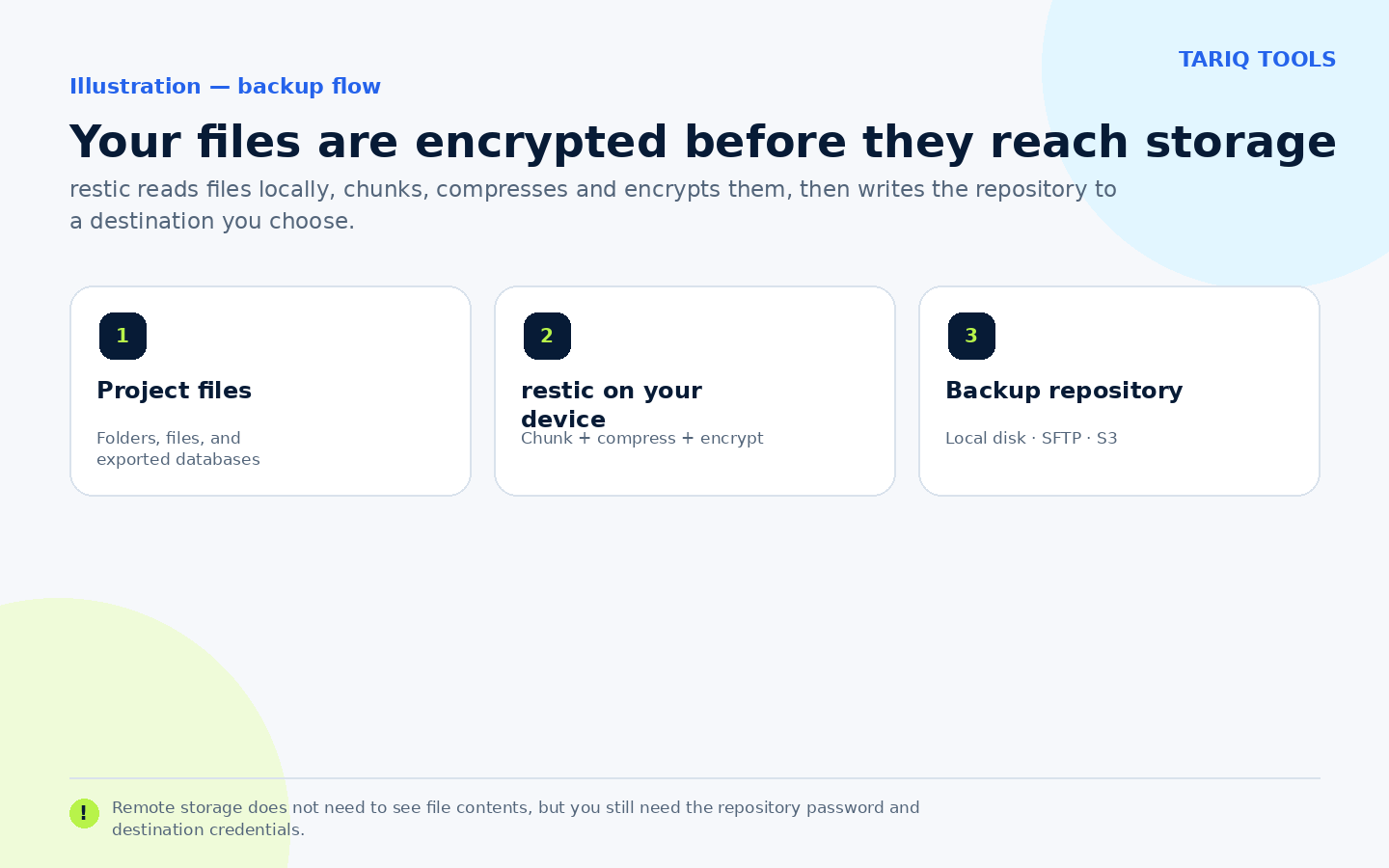
Original explanatory diagram, not a product screenshot.
🎯 How does it help you?
restic suits an individual developer or small team that needs recoverable copies of project files, deployment configuration, uploads, or exported database files without operating a large backup platform. You can begin with manual commands, then schedule the same command with launchd on macOS, a cron job or systemd timer on Linux, or Task Scheduler on Windows.
For example, before changing NASQ's application structure or moving a server, export PostgreSQL using a database-aware tool, then back up the project folder and database dump to a restic repository on an external disk or S3 service. If the change goes wrong, restore a snapshot to a separate folder and compare the files before replacing anything. restic does not produce a PostgreSQL dump and cannot guarantee application consistency by copying a live database directory; create a consistent dump or storage snapshot first.
🌟 Key features
1. Repeated snapshots with deduplication
When a backup runs again, restic compares files with a previous snapshot and reuses chunks already present instead of storing a full duplicate. Each snapshot appears as a complete filesystem state during restore, while shared contents are stored once in the repository.
- Where: use
restic backupto create andrestic snapshotsto list snapshots. - How: back up the same paths regularly and keep host, path, and tag grouping consistent.
- Value: retain several recovery points without duplicating every unchanged byte.
- Caution: moving a file can cause it to be scanned again. Deduplication also does not create independent copies; repository damage may affect several snapshots.
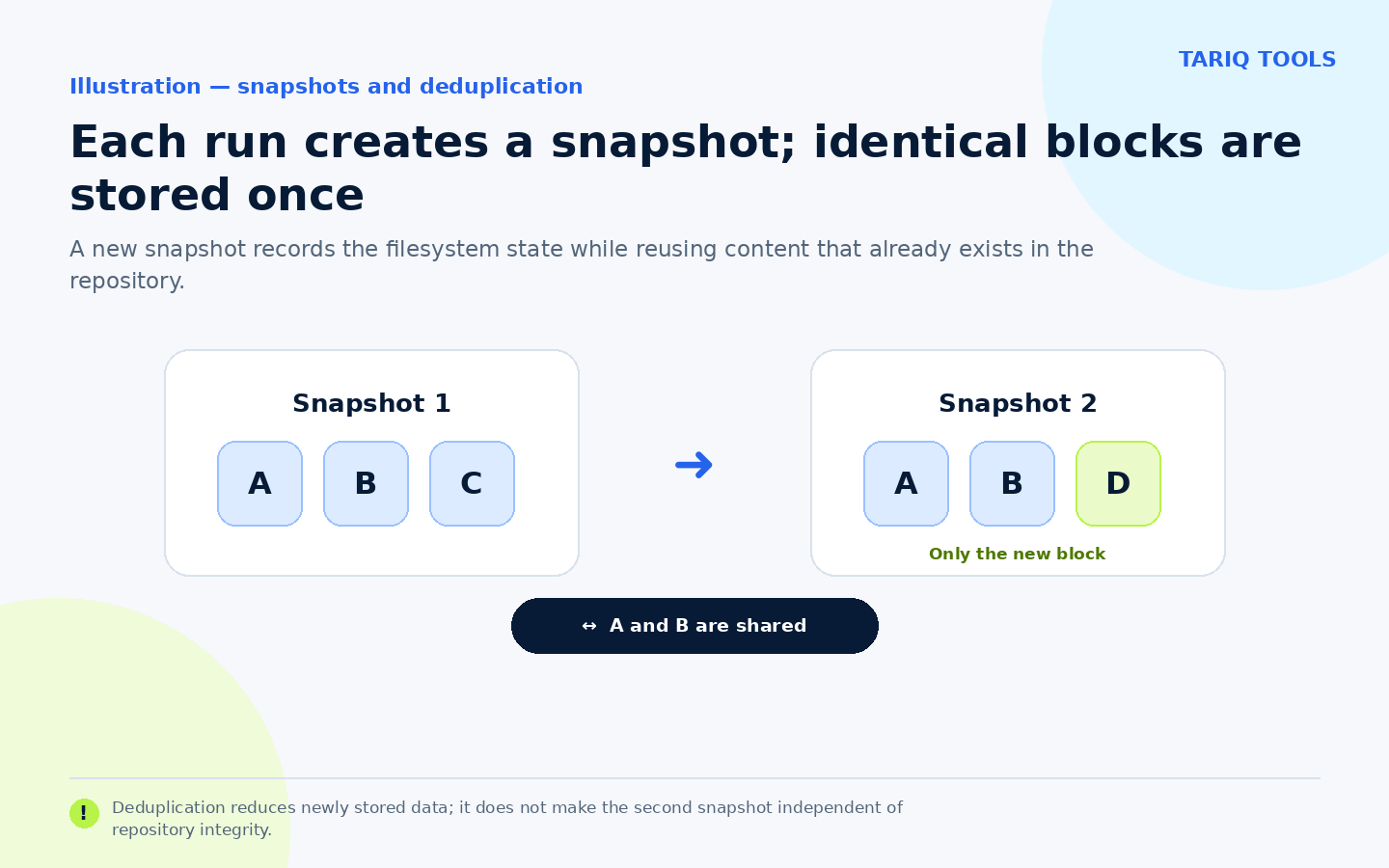
Illustration of snapshots and deduplication, not a measured storage saving.
2. Built-in encryption and several storage backends
restic init creates a password-protected repository. The design documentation states that repository data is encrypted and authenticated, while key list/add/remove/passwd manages multiple access keys. Encryption happens on the client running restic before content is sent to remote storage.
You can start with a local directory or external disk and later use SFTP or S3-compatible storage without changing the core backup and restore workflow. Remote storage can have its own subscription, request, and transfer charges; those are separate from restic.
- Value: the storage service does not need plaintext access to file contents.
- Critical limit: losing every repository password or key makes the data unrecoverable. Store the password in a password manager and test any secondary key you create.
- Permissions: storage credentials need the minimum read, write, and list rights for normal work, plus deletion when pruning. Prefer a key scoped to the repository bucket or path over an account-wide administrator key.
3. Integrity checks and complete or selective restore
restic check verifies repository structure and indexes, with deeper data-reading options available. restore can recover a whole snapshot or selected files with --include or a subfolder path. ls and find help locate a file inside snapshots.
A zero exit code from a backup job is not a recovery test. A safer routine is to run checks, restore to a separate test folder, open real files, and record the last tested date. Restoring into an existing directory can overwrite files, and --delete can remove files that are absent from the snapshot. The documentation recommends reviewing such actions with --dry-run -vv first.
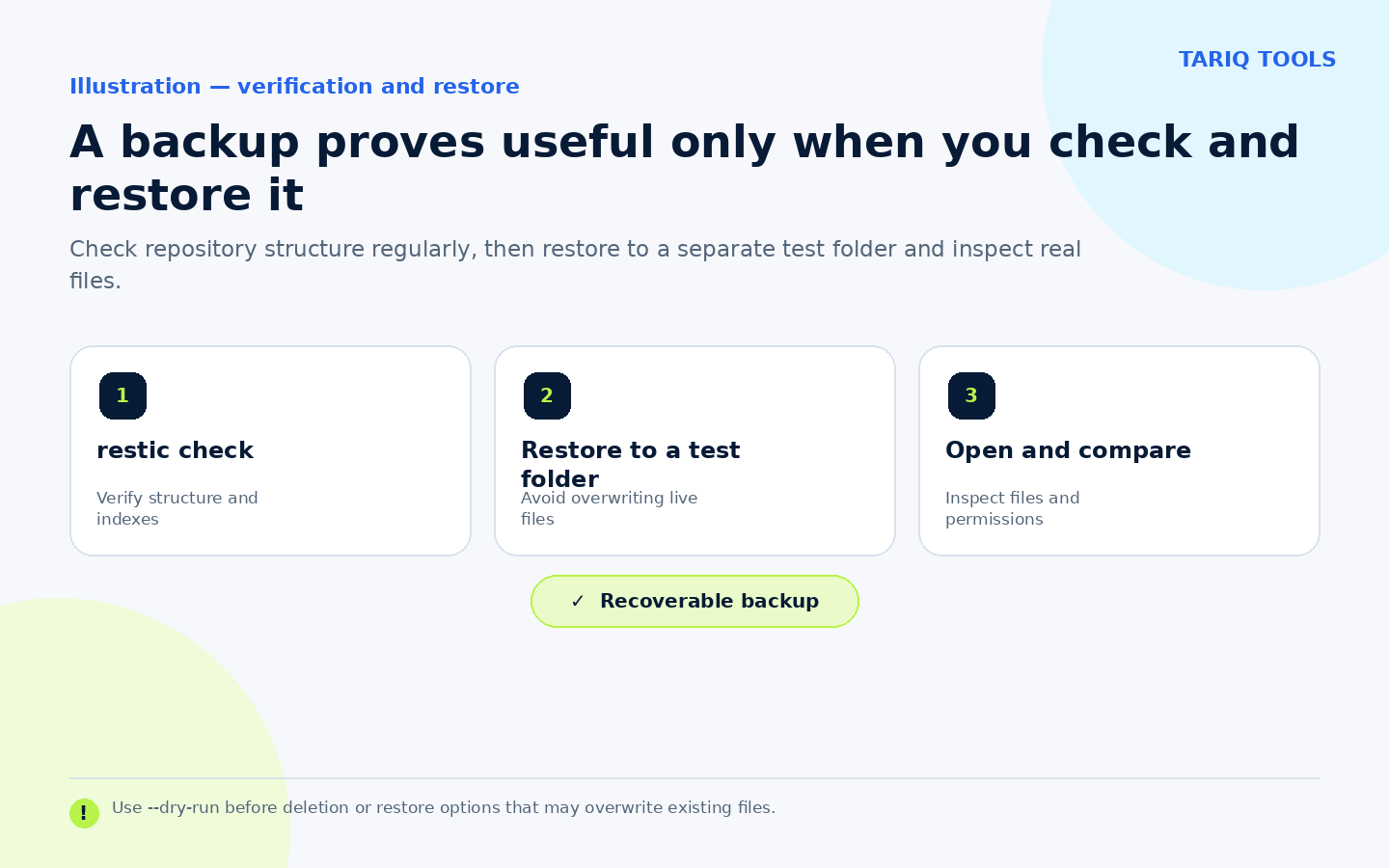
Illustrative recovery check; it was not run against your project.
4. Previewable retention and cleanup policies
forget removes old snapshot references according to a policy such as last, daily, weekly, monthly, or yearly snapshots. prune then reclaims data that no remaining snapshot references. forget --prune combines both steps, but pruning can take time and temporarily locks the repository.
Start with forget ... --dry-run and read exactly which snapshots remain or disappear. Run check after cleanup at a time that does not conflict with backups. Do not copy a generic retention count from the internet; choose it from your data volume, upload speed, and how far back you need to recover.
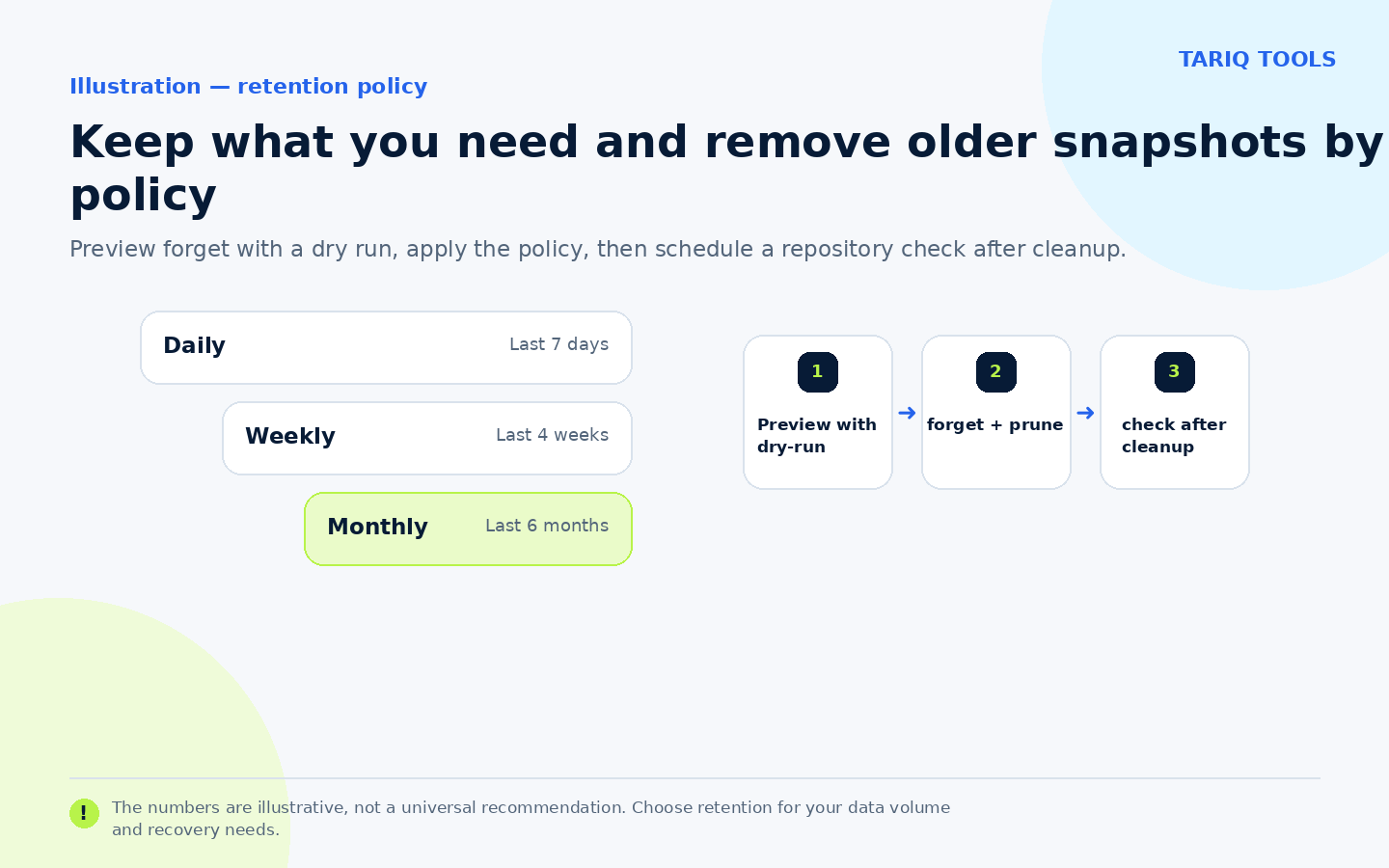
The counts in the illustration are examples, not a universal recommendation.
🪜 Step-by-step illustrative example
Illustrative macOS example not run on your device: use an external disk named Backup for a project repository.
- Install restic and confirm its version:
brew install restic
restic version
- Initialize the repository once and choose a strong password:
restic init --repo /Volumes/Backup/restic-projects
- Create the first backup while excluding rebuildable directories:
restic -r /Volumes/Backup/restic-projects backup "$HOME/Projects/nasq" \
  --exclude node_modules --exclude .nuxt
- List snapshots and check the repository:
restic -r /Volumes/Backup/restic-projects snapshots
restic -r /Volumes/Backup/restic-projects check
- Restore the latest snapshot into a separate folder, then open and compare selected files:
restic -r /Volumes/Backup/restic-projects restore latest \
  --target "$HOME/Restores/nasq-test"
- After the recovery test succeeds, add a separate schedule and capture exit status. Do not treat a “completed” message as a substitute for recovery testing, and never commit the repository password to Git.
⚖️ Compared with manual copying
| Manual copying | With restic |
|---|---|
| Copy another full folder each time | Create a snapshot and reuse identical chunks |
| Files may remain readable on storage | Encrypt the repository before upload |
| Hard to identify which copy belongs to a date | snapshots lists time, host, paths, and tags |
| Delete old folders manually | Preview and apply a retention policy |
| Assume the copy is healthy | Run check and a test restore to another path |
This is a workflow comparison, not a guarantee against data loss. A backup on the same disk does not protect against disk failure, and encryption does not stop a storage principal with delete permission from destroying repository objects.
⚙️ Important configuration
RESTIC_REPOSITORYor--repository-filedefines the repository without repeating-r.RESTIC_PASSWORD_FILEor--password-commandsupplies the password for automation. Protect the file or command with restricted permissions and keep it out of Git.--excludeand--exclude-fileomit rebuildable or unwanted paths. Review exclusions carefully because a mistake can remove the most important file from the backup scope.--dry-runpreviews backup, restore, forget, and some rewrite operations without modifying the repository.--tagdistinguishes production, development, or job types and affects snapshot grouping and retention filters.
🔗 Integrations and compatibility
restic is available as a standalone binary and packages for macOS, Linux, Windows, and other systems, plus an official Docker image. Built-in storage options include local paths, SFTP, REST, S3-compatible storage, Azure, and Google Cloud Storage; rclone extends the destination list. On Windows it can use VSS for locked files, while restoring some links and full security descriptors requires specific Windows privileges or administrator access.
restic is a CLI, not a monitoring dashboard or scheduler. Use the operating system for scheduling, ntfy or another channel for notification, and a separate log for every run. That is a workflow integration, not a built-in restic service.
💰 Cost and local operation
restic is free and open source under the BSD-2-Clause license. It needs no paid API for a local disk or a server you own. S3, B2, Azure, and other providers may charge for storage, API requests, and data transfer. Encryption and indexing run on the client; network access is needed when using remote repositories or self-update.
On 5 October 2026, GitHub displayed about 36.4K stars and 1.9K forks. These changing popularity counters are not security ratings or recovery guarantees.
⚠️ Limitations and when not to use it alone
- restic does not create an application-consistent live database backup; run
pg_dumpor an appropriate snapshot mechanism first. - It has no built-in graphical interface, scheduling service, or alerting system.
- A lost repository password cannot be bypassed to recover data.
forget,prune, andrestore --deleteare consequential operations; preview and test before automation.- One repository does not satisfy a multi-copy or off-site strategy. Add a second destination or use
copyaccording to your risk level. - A storage provider or attacker with delete permission can destroy repository data. Consider append-only access, object lock, or an independently controlled second copy, then test the design.
- Memory and runtime grow with repository size, and some
checkandpruneoperations need a suitable maintenance window.
🔐 Security, permissions, and privacy
restic needs read access to every source file, repository write access, and read/delete rights when restoring or pruning. Do not run it as root unless the backup scope requires that privilege; a broad account increases the impact of a path or script mistake. Use a dedicated storage account and repository key rather than general-purpose administrator credentials.
Keep repository passwords and S3 or SSH credentials in a secret manager or protected file, not in a command that appears in process history. Terminal and debug output may expose paths and filenames, so review logs before sharing them. Repository encryption protects stored content; it does not protect a compromised client while restic reads files and does not prevent deletion by a principal that controls storage.
📚 Sources and verification date
Verified on 5 October 2026 against the original repository, v0.19.1 release, official documentation, installation guide, repository and backend guide, backup and snapshot guide, restore guide, retention and pruning guide, and license. The latest documented stable release is v0.19.1, dated 5 July 2026, and the latest visible commit at verification time was dated 25 September 2026. I did not install restic or run the backup and restore example on a real device.