uv
Active and stableRuns locally ✓No paid APIA free Python project and package manager with lockfiles, project environments, and separate workflows for command-line tools and scripts.
brew install uvIdeal use for this tool
For a Python developer or small team that wants a shared setup rather than relying on manually installed packages. Commit the dependency definition and lockfile, then sync the environment and run commands with uv. It does not isolate the operating system or untrusted code, or replace application compatibility tests.
Details and illustrated features
You reopen a Python project and discover that your installed packages differ from a teammate's, or you keep switching between commands to create environments, install dependencies and run checks. uv brings these steps into one workflow: describe what a project needs, record resolved versions in a lockfile, and run code in its environment. The benefit is not merely shorter commands. It is a clearer way for an individual or small team to set up, review and hand over a project.
🧭 What is uv and how does it work?
uv is an open-source Python package, project and environment manager from Astral, written in Rust. It runs in the terminal and also manages Python versions, command-line tools and standalone scripts. It is not a code editor, an AI agent or a cloud service that writes your application.
In a uv-managed project, pyproject.toml declares dependencies and Python requirements. uv.lock records resolved dependency versions, including information needed for differences between platforms and Python versions. .venv is the local environment containing installed packages. Commit the first two files to Git, not the environment directory. uv lock creates or updates the lockfile without creating an environment; uv sync prepares an environment for the selected dependencies.
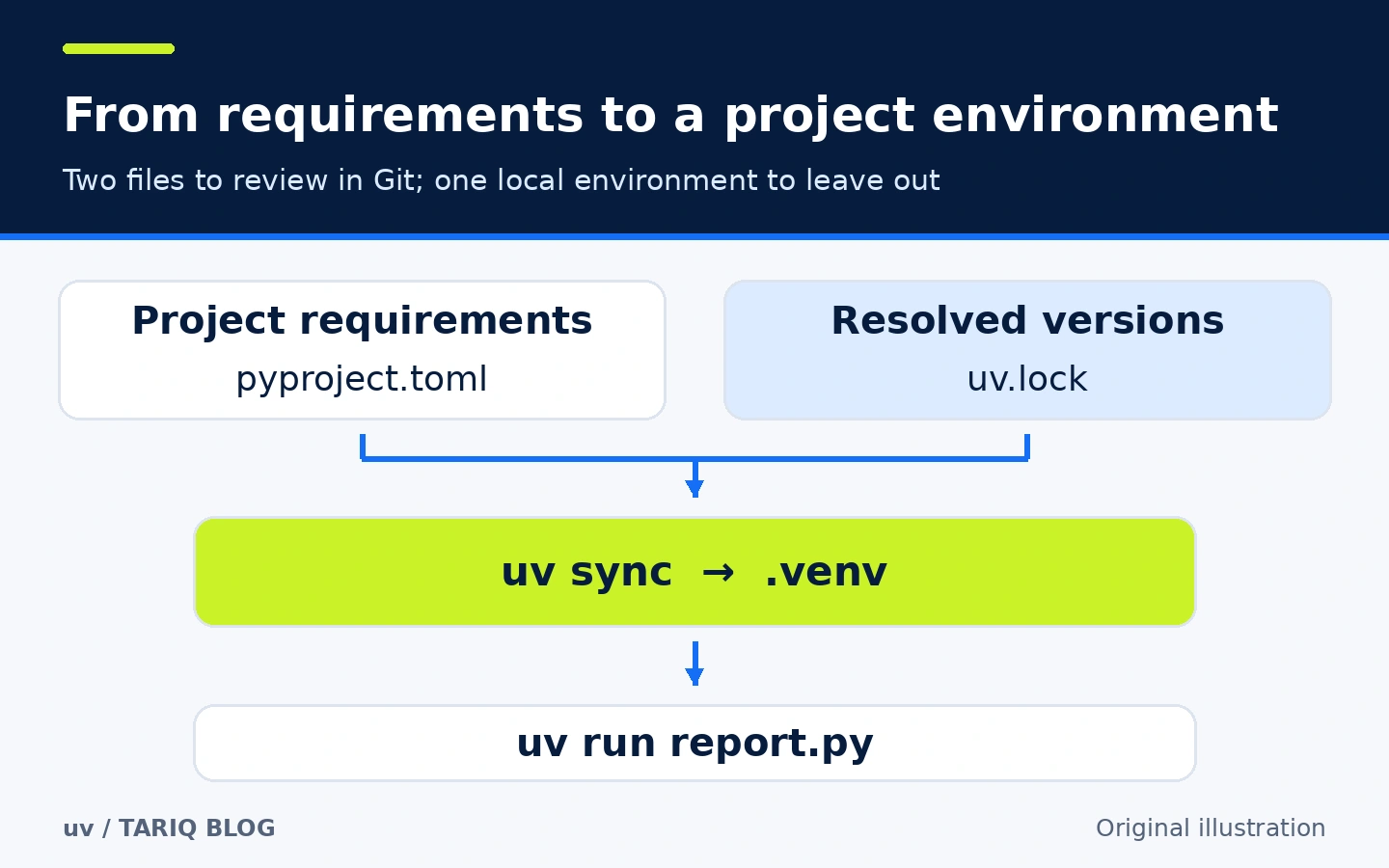
Original diagram showing project files and the local environment, not a uv screenshot. A lockfile does not replace installing packages on each machine.
🎯 How does it help your everyday work?
Imagine writing a weekly report script that a colleague or CI job must also run. Instead of sending a handwritten package list and environment activation instructions, you commit the project definition and lockfile and provide a clear run command. When a library is added, the change appears in Git for review alongside the code.
The added value is fewer scattered decisions: which Python version, which package versions, and whether a tool belongs to the application or should stay separate. uv provides distinct workflows for these cases. It does not guarantee correct code or native-package availability on every platform. Reproducible Python dependencies also do not automatically reproduce an operating system and its external libraries.
🌟 Key features
1. A lockfile with project-aware execution
uv.lock avoids relying on packages that happen to be installed on one developer's machine. It records resolution results, while pyproject.toml retains allowed requirements. A normal run checks the project, updates the lockfile if necessary, and synchronizes required dependencies before executing your command.
- Where to find it:
uv lock,uv syncanduv runinside the project directory. - How to use it: add a library with
uv add rich, then runuv run report.py. Review the project definition and lockfile changes together. - Illustrative example: use
uv run --locked report.pyin CI to fail if the lockfile needs updating, rather than modifying a committed file during the check. - Important limitation:
--frozenuses the existing lockfile without checking whether it is still consistent with the project definition. It does not mean “more secure” or “offline.” A new upstream package release alone does not make an existing lockfile outdated; upgrading is a separate decision.
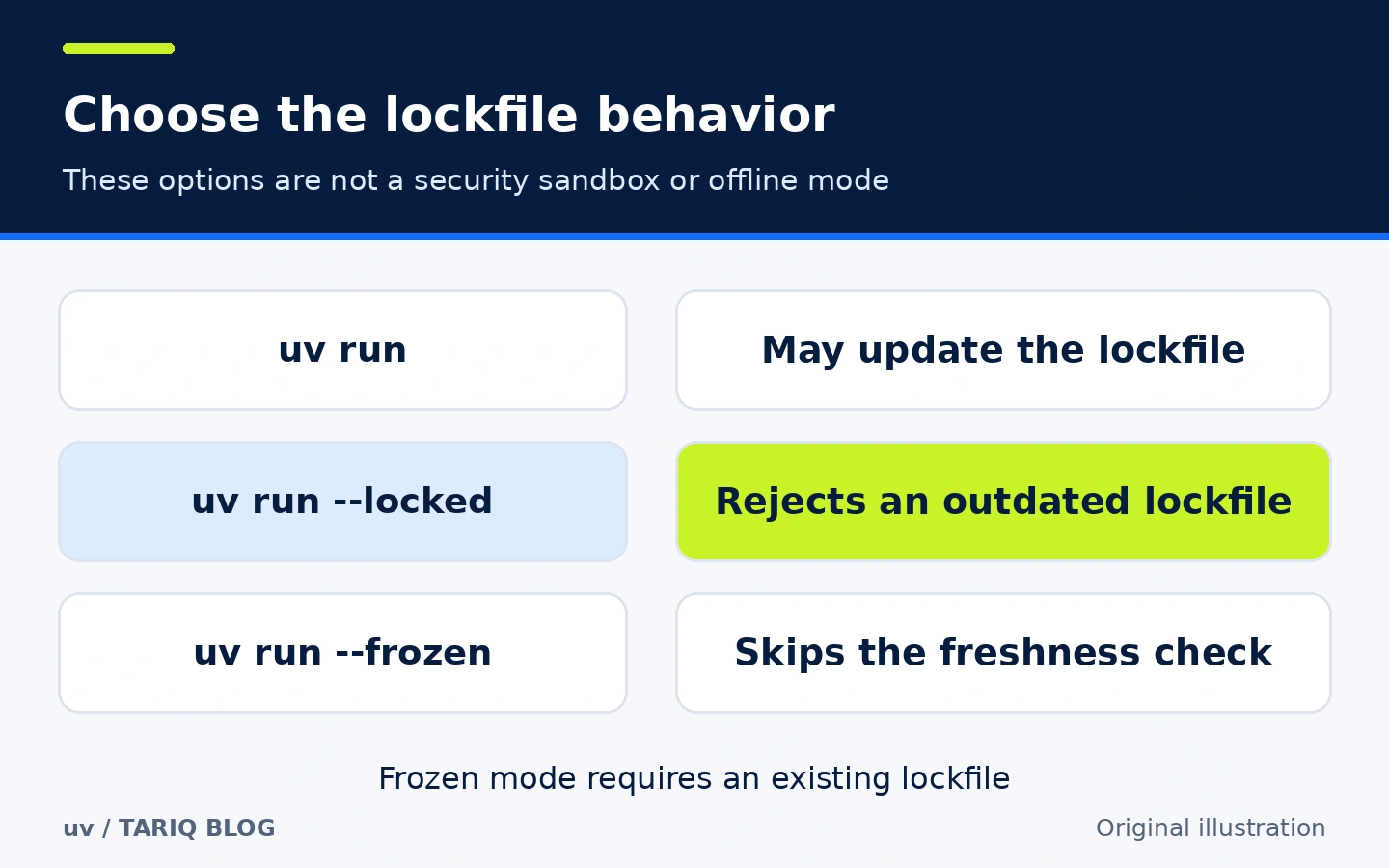
Original comparison of updating a lockfile, refusing an outdated lockfile and skipping the freshness check. Lock modes do not restrict code execution or network access.
There is another practical distinction: uv sync performs exact synchronization by default, removing packages not required by the current selection from the project environment. uv run uses inexact synchronization by default and does not remove extra packages in the same way. Do not manually install packages into .venv and depend on them surviving uv sync; declare the dependencies the project actually needs.
2. Command-line tools outside application dependencies
You may want a checker such as Ruff without adding it to every application or installing it into global Python. uvx, an alias for uv tool run, provides an isolated tool environment in uv's cache. That environment is cached for reuse, not necessarily deleted after each invocation.
- Where to find it:
uvxfor on-demand execution anduv tool installfor tools you use regularly. - How to use it:
uvx ruff checkchecks the current path.uv tool install ruffcreates a persistent tool-specific environment and exposes its executable through the user's command path according to installation configuration. - Illustrative example: check a project without adding Ruff to application dependencies. If a checker version is part of your team's contract, declare it in the project or explicitly pin the tool according to team policy rather than depending on a moving selection.
- Important limitation: tools that need to import project dependencies, typically pytest, should use the project workflow and
uv run. Do not assumeuvxsees the same environment. An isolated tool can still read or modify your files.
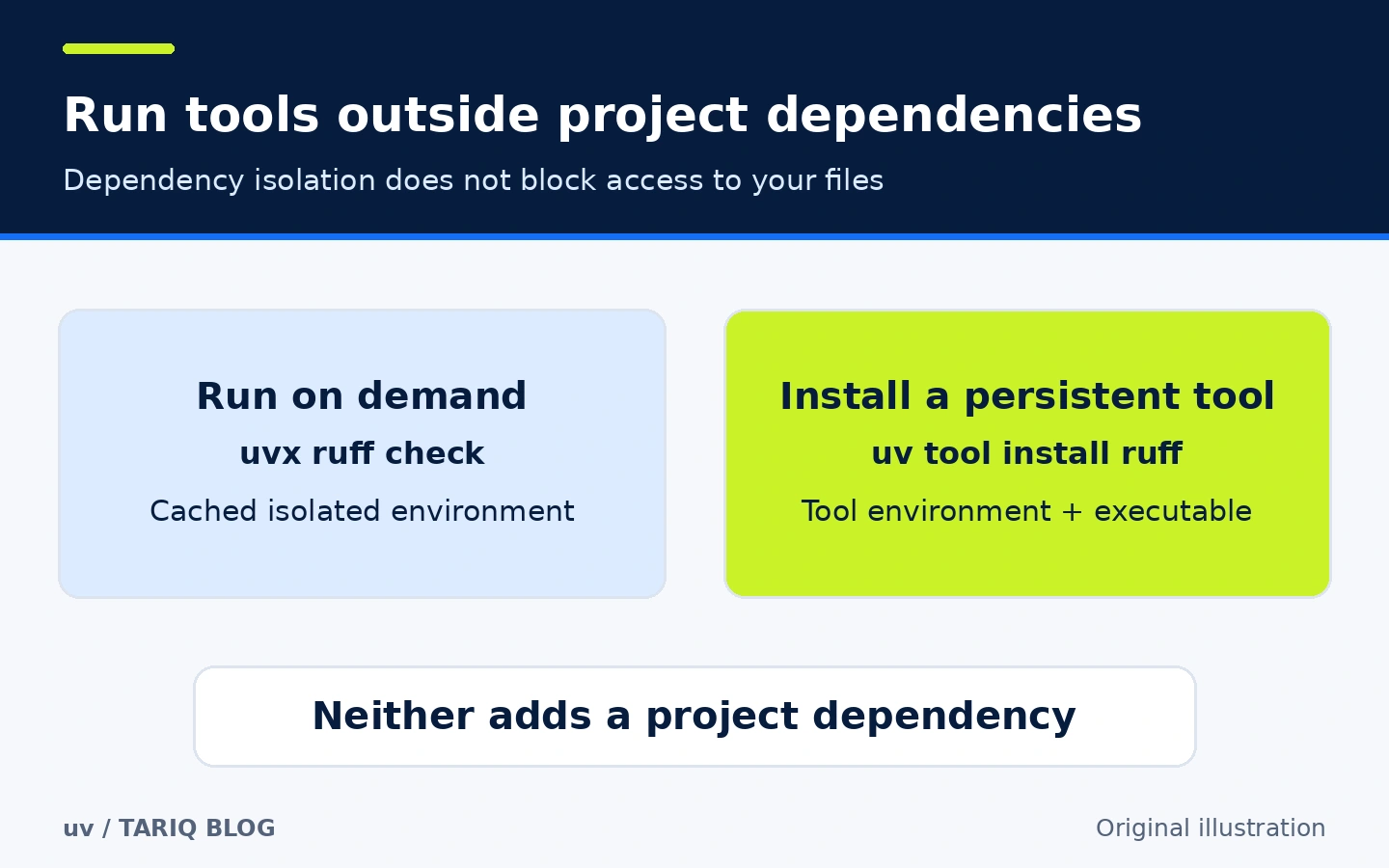
Original diagram comparing on-demand execution with persistent installation. Both separate tool dependencies from the project; neither creates a security sandbox.
uvx may reuse a previously resolved and cached version, and may use a matching installed tool environment. Do not expect every invocation to upgrade the tool. Pin a version when consistency matters, and make upgrades deliberate rather than an unnoticed consequence of running a check.
3. Scripts that carry their own dependency declarations
Not every task needs a full project. uv supports PEP 723 inline script metadata: Python requirements and packages live in a comment block inside the .py file, allowing uv to prepare an appropriate execution environment. This suits a small personal script you want to share without asking the reader to guess its dependencies.
- Where to find it: the script guide,
uv add --script report.py rich, anduv run report.py. - How to use it: add inline metadata instead of depending on global Python packages. uv reads that metadata when running the script.
- Illustrative example: a report script using Rich declares the package inside a
# /// scriptblock, telling uv what it needs before execution. - Important limitation: a script with inline metadata uses an isolated environment and ignores dependencies from the surrounding project. Do not add metadata to a script that requires the project environment and expect it to keep inheriting those packages.
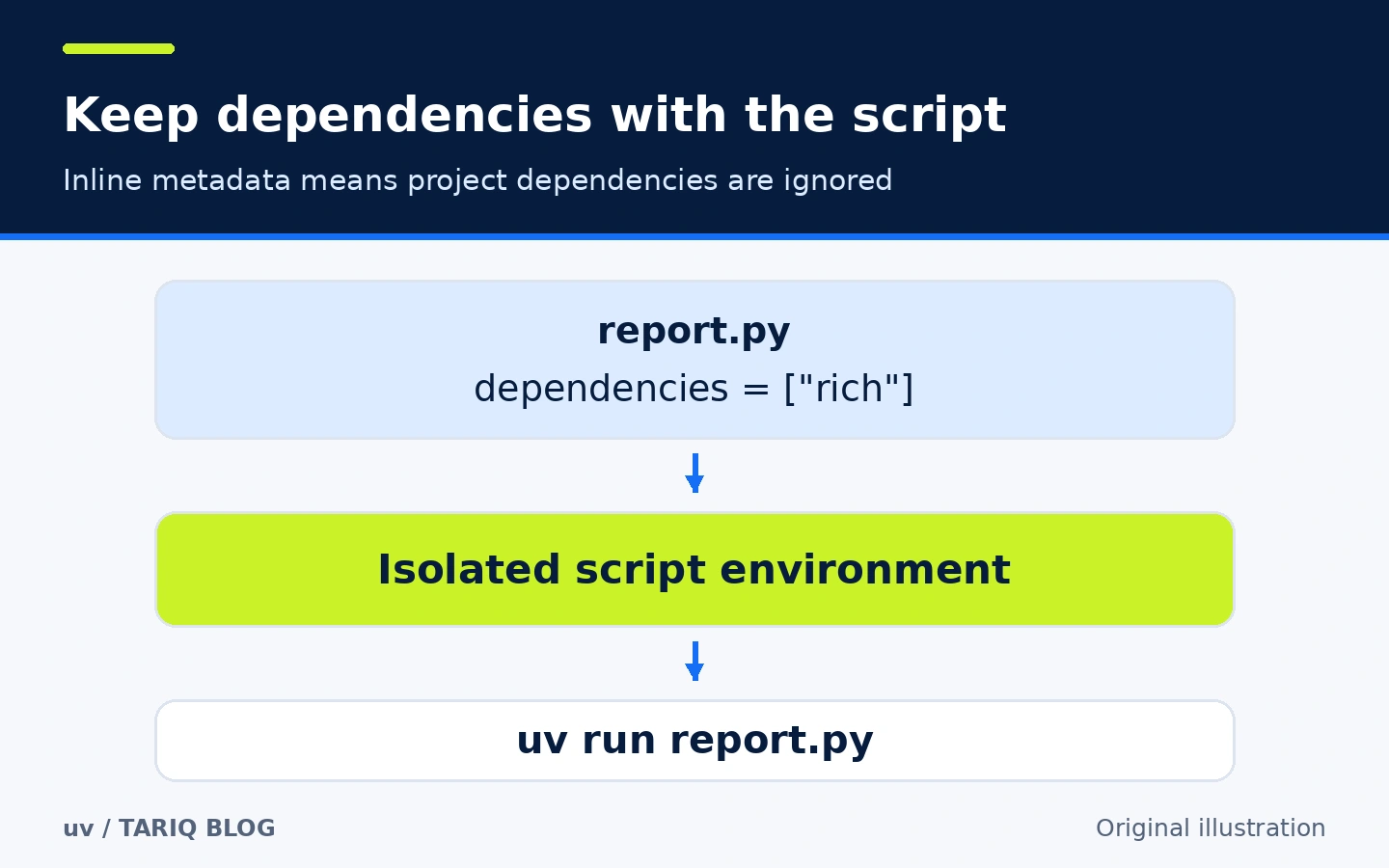
Original diagram of inline-metadata script execution. The package name illustrates the relationship, not an observed run result.
For example, the file could contain:
# /// script
# requires-python = ">=3.12"
# dependencies = ["rich"]
# ///
from rich import print
print("[green]Weekly report ready[/green]")
The metadata requires a dependencies field even if its list is empty. If you need a script lockfile, explicitly run uv lock --script report.py to create report.py.lock; do not assume every script automatically has one. This is an educational example we did not execute.
🪜 End-to-end example: a small report project
This workflow differs from the standalone-script example above. Here you use project dependencies, so do not add the inline metadata block to report.py.
- After installing uv, create and enter a project:
uv init report-demo
cd report-demo
uv add rich
- Create a file named
report.pyyourself in the project root:
from rich import print

items = ["Collect data", "Review totals", "Send summary"]
for number, item in enumerate(items, start=1):
    print(f"[cyan]{number}.[/cyan] {item}")
- Run it from the same directory:
uv run report.py
The expected result is a three-item numbered task list, with color in a terminal that supports it. This is a documentation-based example, not an executed test or performance measurement. In the checked release, uv init creates a package layout by default; report.py is an extra file you create, not a file we claim the command generates.
-
Review and commit the project definition, lockfile and relevant source files. Do not commit
.venv. From a clone, a colleague can useuv sync --lockedfollowed byuv run --locked report.py. A suitable Python version and network access for resources not already available locally are still required. -
For an intentional upgrade, use
uv lock --upgrade-package rich, review the lockfile diff and test the code. Updating the lockfile alone does not synchronize the environment; running or syncing is a subsequent step. Dependency resolution does not guarantee application-level compatibility.
⚖️ What changes compared with manual work?
| Task | Separate manual steps | With uv |
|---|---|---|
| Set up a project | Create and activate an environment, then install packages | Declare and lock the project, then sync or run in its environment |
| Share dependencies | Explain versions or rely on one developer's installed state | Commit and review pyproject.toml and uv.lock with code |
| Run an occasional CLI tool | Global installation can mix unrelated packages | Separate tool environment through uvx |
| Share a standalone script | Separate installation instructions can drift | Dependency metadata travels inside the script |
These are workflow differences, not measured time-saving percentages. pip, venv and a disciplined process can accomplish much of this. uv's practical contribution is bringing the paths together and making their state clearer.
⚙️ Configuration worth understanding
Start small. Use requires-python in pyproject.toml to declare the Python range the project supports. A local selection can also be recorded with uv python pin 3.12 in .python-version, subject to team policy. This does not replace testing the application on versions you claim to support.
uv configuration lives in [tool.uv] in pyproject.toml or in uv.toml. For a private package index, configure its URL and authentication according to company documentation. Do not paste passwords into a file that will be committed to Git. The package cache, project environment and tool environments serve different purposes; you do not need to copy them to a colleague to share a project definition.
🚀 Installation and first run
The observed stable release is 0.13.3, published 20 October 2026. Official prebuilt binaries do not require compiling Rust, and the standalone installation can work without a pre-existing Python installation. uv may download a required Python version if it cannot find one, so consider your network and download policies.
On a machine with Homebrew already installed, Astral documents:
brew install uv
uv --version
On Windows with WinGet:
winget install --id=astral-sh.uv -e
uv --version
Official release files and a standalone installer are also available. The documentation includes an online shell installer; downloading and executing a script grants it your account's permissions. Review its source, contents and your organization's policy before execution. The example does not require adding sudo or elevating system permissions.
Package-manager commands may install a newer version or lag behind the observed release. Check the output of uv --version. uv version serves a different project-version function and is not the verification command intended here. Start in a disposable example project rather than an unsaved production repository.
🔗 Integrations and compatibility
The official policy supports macOS, Linux and Windows at different testing tiers. Tier 1 includes macOS on Intel and Apple Silicon, and Linux and Windows on x86_64. This does not imply equivalent support for every architecture. Consult the platform matrix, especially for ARM or older systems; the documentation lists macOS 13+ and Windows 10/Server 2016 as baseline requirements, with platform-specific details and exceptions in the reference.
The checked Python policy lists CPython as Tier 1 and Python 3.10–3.15 within that tier. Support for older versions does not make them a sensible security choice. A particular package's compatibility still depends on that package, Python version and platform, not uv alone.
You can invoke uv from an editor terminal or CI. It is not a Cursor or Claude Code plugin, and this guide does not establish an official integration with a particular agent. The direct connections here are Git through reviewable text files and Python package indexes. uv support does not mean every pip command or legacy project configuration can be migrated without review.
💰 Cost and local operation
The core tool is free and open source under MIT OR Apache-2.0, at your option as described by the repository. It requires no subscription or paid API. uv's license does not determine the licenses of packages you install, and private indexes or services used by your project may have separate costs.
Project management is local, but installation, dependency resolution, Python downloads and tool downloads may contact index and distribution servers. This example does not involve sending code to an AI model. We do not promise zero network traffic or claim to have performed a comprehensive network audit. Offline operation depends on cached resources, commands and configuration; --frozen is not an offline switch.
⚠️ Limitations and when not to use it
uv does not replace Docker for operating-system isolation, a system package manager for native libraries, or application tests. Packages built from source may require compilers and other tooling. Lockfiles cannot guarantee that every native build will succeed on a different machine.
If your team already has a stable Poetry, pip-tools or other workflow, try a small project and assess migration costs. Do not introduce competing lockfiles without a policy. If your actual need is packing repository files into AI-assistant context, a tool such as Repomix addresses a different problem; that is not a reason to install uv.
We compared uv with Repomix from the code-context preparation domain. Both are outside DSH. uv was selected for a repeated dependency and execution problem that can be clearly explained and checked against primary sources, not for having more stars. We did not perform an installation, migration or speed benchmark.
🔐 Security and permissions
uv writes project files, environments and caches, and can download Python and packages and execute commands. An untrusted library or tool may run code with your account's privileges. Virtual environments separate dependencies; they do not block access to files, network connections or secrets.
Review package sources and names, review lockfile changes in pull requests, and use limited permissions in CI. Do not execute an unknown repository's script merely because uv can install its dependencies. Keep private data and index credentials in an appropriate authentication mechanism, not documentation or committed files. A lockfile controls dependency versions; it is not a certificate that they contain no vulnerabilities.
📚 Sources and verification date
Verified on 20 October 2026 against the upstream repository and documentation for 0.13.3. astral-sh/uv had 90,917 stars and 3,674 forks at inspection; the recorded last push was 20 October 2026, 03:00:50 UTC. These are time-specific observations, not a quality rating or a promise of real-time page updates.
- Upstream repository and license statement.
- Release 0.13.3 and publication date.
- Official installation guide.
- Project guide and locking and syncing behavior.
- Running tools and tool environments.
- Scripts and inline metadata.
- Platform policy and Python policy.
- Release-pinned documentation for checking behavior if the live docs change.
- Discovery and comparison: GitHub Topics: package-manager, Claude skills directory, DSH Market, and Repomix upstream. Repomix had 28,915 stars and 1,707 forks, release v1.18.1 dated 21 September 2026, an MIT license and a Node.js 22+ requirement.
Verification scope: reading primary sources and files, reviewing examples and diagrams. We did not install uv, Ruff or example dependencies, execute the commands, measure performance or conduct an independent security audit. The original illustrations explain concepts; they are not runtime evidence or fabricated product interfaces.